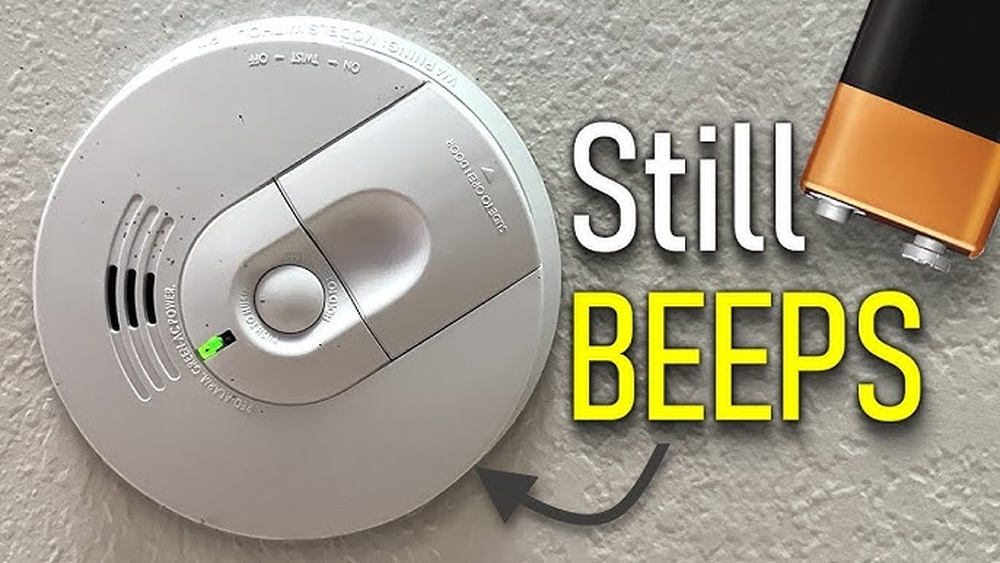

Changing the battery in your smoke detector is a simple task, but do you know how to reset it afterward? If your smoke alarm keeps beeping or won’t stop chirping, it can be frustrating and even stressful.
You want your home to stay safe without the constant noise distracting you. In this guide, you’ll learn exactly how to reset your smoke detector quickly and easily after a battery change. By following these clear steps, you’ll ensure your alarm works perfectly and gives you peace of mind.
Keep reading—you’re just moments away from solving that annoying beep for good.

Credit: www.youtube.com
Why Reset Smoke Detectors
Resetting smoke detectors after changing the battery is a crucial step. It ensures the device works correctly and keeps your home safe. Many people forget this step and think the job is done after replacing batteries. Resetting clears any error signals and restores the detector to normal operation.
Without resetting, smoke detectors might not respond properly during emergencies. This small action helps maintain your safety system’s reliability. Understanding why resetting is necessary helps you keep your smoke alarms in top condition.
Purpose Of Resetting
Resetting removes any warning sounds after battery change. It clears the smoke detector’s memory of false alarms or low battery alerts. This step confirms the device is ready to detect smoke or fire. Resetting also tests the battery connection and sensor function. It helps avoid false alarms and ensures the alarm works during a real emergency.
Signs Reset Is Needed
Smoke detector beeps or chirps after battery replacement. The alarm light may blink or stay on continuously. The device might fail to sound during a test. These signs mean the detector needs a reset. Ignoring these signals can reduce your home safety. Resetting solves these problems and restores normal function.
Tools Required
Before resetting your smoke detector after changing the battery, gather the right tools. The correct tools make the process quick and safe. You need to know what type of battery fits your smoke detector. Some extra tools may help with the reset or battery replacement.
Battery Types
Smoke detectors use different battery types. The most common are 9-volt batteries and AA or AAA batteries. Check the battery compartment to see which type your detector needs. Use fresh batteries to ensure the detector works properly. Old or wrong batteries can cause false alarms or failure.
Additional Tools
A small screwdriver helps open the detector cover. Some models may have a locking mechanism to unlock first. A step stool or ladder lets you reach ceiling-mounted detectors safely. A clean cloth can wipe dust from the detector before resetting. Having these tools ready saves time and effort.
Step-by-step Reset Process
Resetting a smoke detector after changing its battery is simple. Follow these clear steps to ensure your device works properly. Each step helps your smoke alarm return to normal function. This process keeps your home safe and your alarm ready to alert you.
Removing The Old Battery
First, locate the smoke detector on your ceiling or wall. Twist or slide the cover to open it. Take out the old battery carefully. Dispose of it according to local rules. Check for any dirt or dust inside the battery compartment. Clean gently if needed to ensure good contact.
Installing The New Battery
Insert the new battery into the compartment. Match the positive and negative ends correctly. Press the battery firmly in place. Close the smoke detector cover by twisting or sliding it back. Make sure it snaps shut securely. The detector may beep once to signal power.
Reset Button Use
Find the reset button on the detector’s face or side. Press and hold the button for 15 to 20 seconds. Listen for a beep or a light flash. This signal means the detector has reset. Release the button after the signal. Your smoke detector is now ready to use.
Power Cycle Method
Turn off the power to the smoke detector at the circuit breaker. Wait about 30 seconds to a minute. Turn the power back on. This action resets the internal system. Check the smoke detector for normal operation. The alarm should no longer beep or flash unexpectedly.
Troubleshooting Reset Issues
Resetting a smoke detector after changing its battery should be simple. Sometimes, the alarm does not reset as expected. This can cause frustration and confusion. Troubleshooting reset issues helps find the root of the problem quickly. It ensures your smoke detector works properly to keep you safe.
Common Problems
The smoke detector may still beep after battery replacement. This often means the battery is not inserted correctly. Check if the battery terminals touch the contacts firmly. Dust or debris inside the detector can block the reset process. Clean the device gently with a soft brush or cloth.
Some models require pressing and holding the reset button for 15-30 seconds. Skipping this step can stop the reset. Make sure the battery is fresh and of the correct type. Old or weak batteries cause repeated alerts. Test the detector after reset to confirm it works.
When To Replace The Detector
Smoke detectors wear out after about 8-10 years. If the alarm keeps malfunctioning, it may be time to replace it. Frequent false alarms or failure to reset are signs of aging. Some detectors have an expiration date printed on the back. Use this as a guide to know when to buy a new one.
Replacing an old detector ensures reliable smoke detection. It also improves your home safety. Newer models have better sensors and longer battery life. Keep your smoke detector up to date for peace of mind.
Maintenance Tips
Keeping your smoke detector in good shape helps protect your home. Regular care ensures it works when needed. Small steps make a big difference in safety.
Regular Testing
Test your smoke detector every month. Press the test button until the alarm sounds. This check confirms the device is working properly. If no sound comes, replace the battery or the detector.
Battery Replacement Schedule
Change batteries at least once a year. Use fresh, high-quality batteries for best results. Mark your calendar to remind yourself of the next change. Some detectors beep when batteries are low. Do not ignore these signals.

Credit: www.wirechiefelectric.com

Credit: plcfire.com
Frequently Asked Questions
How Do I Reset My Smoke Detector After Battery Change?
To reset your smoke detector, first reinstall the battery. Press and hold the test button for 15-20 seconds until the alarm beeps. This clears any error signals and resets the device. Always follow the manufacturer’s instructions for specific reset procedures.
Why Won’t My Smoke Detector Reset After Battery Replacement?
If your smoke detector won’t reset, ensure the battery is installed correctly. Check for dirt or dust inside the unit. Press and hold the test button firmly. If it still fails, the detector may need replacement or professional inspection.
How Long Does Resetting A Smoke Detector Take?
Resetting a smoke detector usually takes less than a minute. After changing the battery, press and hold the test button for about 15-20 seconds. The alarm will beep to confirm it’s reset and fully operational.
Can I Reset A Smoke Detector Without Replacing The Battery?
You generally cannot reset a smoke detector without replacing a dead battery. Resetting clears errors, but a fresh battery is essential for proper function. Always change batteries annually or when the low-battery warning sounds.
Conclusion
Resetting your smoke detector after a battery change keeps it working well. Test the alarm to make sure it sounds loud. Press the reset button if needed to clear any errors. Regular checks help protect your home and family. Don’t ignore any warning signs or unusual sounds.
Simple steps like these keep your smoke detector ready. Stay safe by maintaining your device often. It only takes a few minutes but gives peace of mind. Keep your home secure and your loved ones safe.