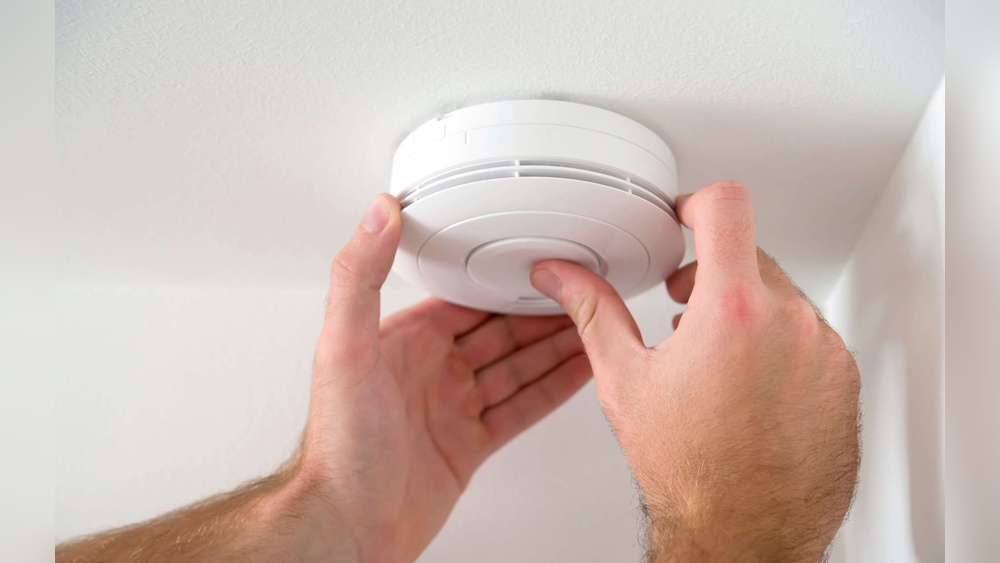

Is your smoke detector constantly beeping and driving you crazy? You’re not alone.
That annoying sound can interrupt your day, keep you awake at night, and even make you anxious about your home’s safety. But don’t worry—there are simple steps you can take right now to stop your smoke detector from beeping. You’ll discover easy, practical tips to silence those alerts for good, so you can get back to peace and quiet without compromising your safety.
Keep reading to find out how to fix this common problem quickly and effectively.

Credit: www.angi.com
Common Causes Of Beeping
Smoke detectors are important for home safety. They alert you to smoke or fire dangers. Sometimes, they beep even without smoke. This beeping can be annoying and confusing. Knowing why smoke detectors beep helps fix the problem fast.
Low Battery Alerts
One common cause of beeping is a low battery. Smoke detectors need power to work. When the battery runs low, the alarm beeps to warn you. This beeping usually happens every minute or so. Changing the battery stops the noise and keeps the alarm ready.
Dust And Debris
Dust can gather inside the smoke detector. It blocks the sensor and causes false alarms. Debris can make the alarm beep often. Cleaning the detector with a soft brush or vacuum helps. Regular cleaning keeps the sensor clear and working well.
Humidity And Steam
High humidity or steam can trigger false alarms. Bathrooms and kitchens are common spots for this. Steam looks like smoke to the detector. Avoid placing alarms near showers or cooking areas. Use fans or vents to reduce steam and stop beeping.
End Of Life Warning
Smoke detectors do not last forever. After 8 to 10 years, they may beep to signal the end of life. This warning means the detector needs replacement. Old alarms may not work correctly. Replacing them ensures your home stays safe and sound.
Simple Battery Replacement
Smoke detectors often beep to warn about low batteries. Replacing the battery is a simple fix. It stops the annoying sound and keeps your home safe.
This section explains how to replace the battery easily. Follow these steps to get your smoke detector working well again.
Choosing The Right Battery
Check the battery type in the smoke detector manual. Most use 9-volt or AA batteries. Use fresh batteries from a reliable brand. Avoid mixing old and new batteries.
Step-by-step Replacement Guide
First, turn off the smoke detector or remove it from the ceiling. Open the battery compartment carefully. Take out the old battery and dispose of it properly. Insert the new battery with correct polarity. Close the compartment securely. Mount the smoke detector back in place.
Testing After Replacement
Press the test button on the smoke detector. Listen for a loud beep or chirp. This means the battery works well. If no sound, check the battery again or try a new one. Ensure the detector is fully functional before leaving it.
Cleaning Smoke Detectors
Smoke detectors often beep due to dust and dirt inside them. Cleaning your smoke detector can stop the annoying beeping sound. It also helps the device work correctly and keeps your home safe.
Tools Needed
Gather a soft brush, a vacuum cleaner with a hose, and a clean cloth. Avoid using water or harsh chemicals. These tools help remove dust without damaging the smoke detector.
Proper Cleaning Techniques
Turn off the power to the smoke detector first. Remove the detector from the ceiling or wall. Use the vacuum hose to suck out dust from the vents. Gently brush any remaining dirt away. Wipe the outside with a dry cloth. Let the detector dry completely before reinstalling it.
Frequency Of Cleaning
Clean your smoke detector at least twice a year. Increase cleaning if you live in a dusty area. Regular cleaning stops false alarms and keeps the detector reliable. Mark your calendar to remember the cleaning dates.
Managing Environmental Factors
Smoke detectors can beep due to changes in their environment. Managing these factors helps reduce false alarms. Controlling moisture and placing detectors correctly keeps them working well. Small changes make a big difference in stopping constant beeping.
Reducing Humidity
High humidity can cause smoke detectors to beep. Moist air may trigger the sensor by mistake. Use a dehumidifier in damp rooms to lower moisture levels. Keep windows open for fresh air when possible. Dry air keeps detectors calm and reduces false alarms.
Avoiding Steam Exposure
Steam from showers or cooking can set off smoke detectors. Avoid installing detectors near bathrooms or kitchens. Close doors to stop steam from reaching them. Use exhaust fans to remove steam quickly. Preventing steam contact helps stop unwanted beeping.
Proper Detector Placement
Place smoke detectors away from vents, fans, and windows. Avoid areas with drafts or strong airflow. Install detectors on ceilings or high on walls. Keep them at least 10 feet from cooking appliances. Correct placement lowers the chance of false alerts.
Resetting The Smoke Detector
Resetting a smoke detector can stop annoying beeping sounds quickly. It helps clear errors and refreshes the device. Sometimes, the detector beeps due to minor faults or after battery changes. Resetting brings the detector back to normal working order.
When To Reset
Reset the smoke detector after changing the battery. Also, reset it if it keeps beeping without reason. Dust or insects inside the detector may cause false alarms. Resetting is useful after testing the alarm too.
Reset Procedures
First, press and hold the reset button on the detector. Hold it for 15 to 20 seconds. Some models need you to remove the battery before resetting. Wait a few seconds, then put the battery back and press reset again. The beeping should stop after the reset.
Troubleshooting Reset Issues
If the smoke detector still beeps after reset, check the battery again. Weak batteries cause continuous beeping. Clean the detector’s vents gently with a soft brush. Dust can block sensors and cause false alarms. Replace the smoke detector if problems persist despite resetting.

Credit: www.youtube.com
Replacing Old Smoke Detectors
Smoke detectors do not last forever. Over time, they wear out and start to beep frequently. Replacing old smoke detectors can stop annoying beeping sounds. It also keeps your home safe from fire risks. New detectors work better and have improved features.
Signs It’s Time To Replace
Smoke detectors usually last about 10 years. If yours beep even after changing batteries, it may be old. Yellow or discolored detectors show age. Frequent false alarms also mean replacement is needed. A detector that does not respond to smoke tests should be swapped out.
Choosing New Models
Pick models with a long battery life. Some use 10-year sealed batteries. Look for detectors with clear sound and bright lights. Smart smoke detectors connect to your phone. These send alerts if smoke is detected. Choose models that meet safety standards and have good reviews.
Installation Tips
Install smoke detectors on every floor and near bedrooms. Mount them on ceilings or high on walls. Avoid placing near windows or vents to prevent false alarms. Test new detectors after installation to ensure they work. Replace batteries regularly, even in sealed units. Keep detectors clean and dust-free for best performance.
When To Call A Professional
Smoke detectors save lives by alerting you to danger early. Sometimes, they beep without stopping. This can be annoying and confusing. Knowing when to call a professional can help you fix the issue safely. Some problems need expert help to protect your home and family.
Persistent Beeping Issues
Smoke detectors may beep for many reasons. If you change the battery and it still beeps, the problem may be deeper. Persistent beeping can mean a faulty sensor or internal damage. Professionals can check the device and fix or replace it. Avoid ignoring continuous beeping. It could mean your detector is not working properly.
Electrical Problems
Hardwired smoke detectors connect to your home’s power. Faulty wiring or power surges cause beeping or failure. Electrical issues can be dangerous to fix alone. A professional electrician can safely inspect and repair wiring. They ensure your smoke detector gets steady power. This keeps your detector ready to alert you.
Regular Maintenance Services
Smoke detectors need regular checks to work well. A professional can clean sensors and test device functions. They find hidden problems before they cause failures. Scheduling yearly maintenance keeps your system reliable. It gives peace of mind that your detectors will beep only in true emergencies.

Credit: waynealarm.com
Frequently Asked Questions
Why Do Smoke Detectors Keep Beeping Randomly?
Smoke detectors beep due to low batteries, dust buildup, or electrical issues. Regular cleaning and battery checks prevent false alarms. Replace batteries every six months to ensure proper function. If beeping persists, consider replacing the unit or consulting a professional electrician.
How To Stop Smoke Detector Beeping Without Removing Battery?
You can stop beeping by pressing the reset button or replacing the battery. Clean the detector’s sensor to remove dust. Avoid disconnecting batteries as it disables safety features. Regular maintenance ensures the alarm functions correctly without unnecessary noise.
Can Humidity Cause Smoke Detectors To Beep?
Yes, high humidity or steam can trigger false alarms. Place detectors away from bathrooms or kitchens to reduce false beeping. Use exhaust fans to control moisture levels. Regular cleaning also helps maintain sensor accuracy and prevents unnecessary alerts.
When Should I Replace My Smoke Detector?
Replace smoke detectors every 10 years for optimal safety. Over time, sensors degrade, reducing reliability. Check the manufacture date on your device. If alarms beep frequently despite maintenance, replacement is necessary to ensure home safety.
Conclusion
Stopping smoke detectors from beeping is simple with the right steps. Check the battery first. Clean the detector to remove dust or dirt. Replace old batteries regularly to avoid false alarms. Test your smoke detector often to keep it working well.
Remember, a quiet detector means safety in your home. Take action now to prevent annoying beeping sounds. Stay safe and enjoy peace of mind every day.