
Is your smoke detector beeping nonstop, driving you crazy? That constant beep can be more than just annoying—it can disrupt your focus, sleep, and peace of mind.
You might wonder why it won’t stop and how to fix it quickly and safely. You’ll learn simple, step-by-step ways to turn off the beeping on your smoke detector for good. Keep reading, and you’ll have your quiet home back in no time.

Credit: www.youtube.com
Common Causes Of Smoke Detector Beeping
Smoke detectors beep for several reasons. These sounds alert you to problems that need quick attention. Understanding why your smoke detector beeps helps you fix it fast. Some causes are easy to solve, while others need more care.
Low Battery Alerts
Most smoke detectors beep when the battery runs low. This beep is a warning to change the battery soon. The sound repeats every minute or so. It stops only after replacing the battery. Using fresh batteries keeps your home safe and quiet.
Dust And Debris Issues
Dust or dirt inside the smoke detector can cause it to beep. Dust blocks the sensor, making it think there is smoke. Cleaning the device gently with a vacuum or cloth can help. Keep detectors free from dust to avoid false alarms.
End Of Life Warnings
Smoke detectors do not last forever. After about 8 to 10 years, they send a beep to warn of their age. This alert means it is time to replace the entire unit. An old detector may not work well during an emergency.

Credit: waynealarm.com
Basic Steps To Stop The Beeping
Beeping from a smoke detector can be annoying and disturbing. It often signals that the device needs attention. Knowing the basic steps to stop the beeping helps keep your home safe and quiet. These easy actions can fix most common issues quickly.
Resetting The Smoke Detector
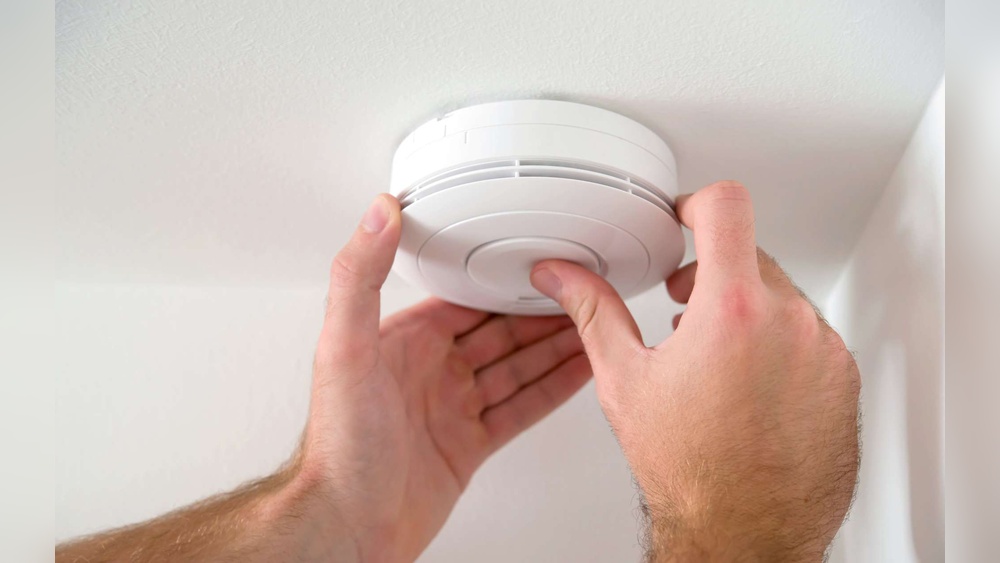
Start by pressing the reset button on the smoke detector. Hold it down for about 15 seconds. This action stops false alarms and clears minor errors. If the beeping continues, try other steps below. Resetting is a simple way to refresh the device’s system.
Replacing The Battery
Smoke detectors beep when the battery runs low. Open the detector’s cover carefully. Remove the old battery and replace it with a new one. Use the correct battery type for your model. After replacing, press the reset button to stop the beep. Regular battery checks prevent unexpected alarms.
Cleaning The Device
Dust and dirt can cause false beeping. Use a soft brush or vacuum to clean vents and sensors. Gently wipe the outside with a dry cloth. Avoid using water or cleaners inside the detector. Clean devices work better and beep less often.
Advanced Troubleshooting Tips
Advanced troubleshooting helps solve smoke detector beeping beyond basic fixes. It involves checking wiring, spotting malfunctions, and knowing when to replace the unit. These tips save time and reduce frustration.
Checking Wiring And Connections
Start by turning off power to the smoke detector. Loose or damaged wires often cause beeping. Open the detector and carefully inspect all wiring connections. Tighten any loose wires. Look for signs of corrosion or wear. Clean contacts with a dry cloth. Restore power and test if beeping stops.
Inspecting For Malfunctions
Malfunctions inside the smoke detector can cause constant beeping. Remove the detector from its mounting plate. Check the circuit board for visible damage or burnt spots. Use a soft brush to clear dust and debris. Test the sensor with a smoke test spray if available. Malfunctioning sensors need professional repair or replacement.
When To Replace The Detector
Smoke detectors have a lifespan of 8-10 years. Beeping that persists after troubleshooting may mean the device is worn out. Check the manufacture date on the back. Replace the detector if it is over 10 years old. New models improve safety and reduce false alarms.

Credit: www.angi.com
Preventing Future Beeping
Beeping smoke detectors can disturb your peace and cause unnecessary stress. Preventing future beeping is the best way to keep your home quiet and safe. By following simple steps, you can reduce or stop the annoying sounds. Focus on regular care, using the right batteries, and correct installation.
Regular Maintenance Schedule
Check your smoke detector once a month. Dust and dirt can cause false alarms. Clean the device with a soft brush or vacuum. Replace the detector every 10 years. Old units can beep without reason. Regular checks keep it working well and quiet.
Choosing Quality Batteries
Use high-quality batteries for your smoke detector. Cheap batteries can lose power quickly. Always replace batteries at least once a year. Use the battery type recommended by the manufacturer. Good batteries help the detector work correctly and stop random beeps.
Proper Installation Tips
Place smoke detectors in the right spots. Avoid installing them near kitchens or bathrooms. Steam and cooking smoke can cause false alarms. Install detectors on ceilings or high on walls. Follow the manufacturer’s instructions carefully. Correct placement reduces false beeping and keeps you safe.
Frequently Asked Questions
Why Is My Smoke Detector Beeping Continuously?
Your smoke detector beeps when its battery is low or there is a malfunction. It alerts you to check and replace batteries or clean the unit to ensure safety.
How Do I Temporarily Stop Smoke Detector Beeping?
Press the hush or silence button on your smoke detector to temporarily stop beeping. This pauses alerts while you address the cause, like battery replacement or dust removal.
Can I Disable Smoke Detector Beeping Permanently?
It’s unsafe to disable smoke detector beeping permanently. The alarm warns of fire or hazards. Always maintain the detector properly instead of turning off alerts.
What Causes False Beeping In Smoke Detectors?
False beeping often results from low battery, dust, humidity, or sensor faults. Regular cleaning and battery changes help prevent false alarms and keep your detector reliable.
Conclusion
A beeping smoke detector can be very annoying. You can stop the noise by changing the battery or cleaning the device. Sometimes, a reset helps too. Always check your smoke detector’s manual for clear steps. Remember, a working smoke detector keeps you safe.
Don’t ignore the beeping for long. Taking simple actions can fix the problem fast. Stay safe and keep your home quiet.