
Are you ready to make your home smarter and safer? Installing a Ring Video Doorbell and Chime is easier than you think.
Imagine seeing who’s at your door from anywhere and hearing the alert inside your home. In this guide, you’ll get simple, step-by-step instructions that anyone can follow. No confusing jargon, just clear directions to get your devices up and running quickly.
Keep reading, and you’ll be enjoying the peace of mind that comes with your new Ring setup in no time.
Choosing The Right Ring Doorbell
Choosing the right Ring Video Doorbell is the first step to a secure home. Each model offers different features and fits various needs. Picking the right one ensures easy installation and smooth use. Consider your home’s layout and what features matter most to you.
Comparing Different Models
Ring offers several doorbell models. Some have better video quality, others have longer battery life. The Ring Video Doorbell Pro is wired and offers high definition video. The Ring Video Doorbell 4 has a rechargeable battery and motion detection. The Ring Video Doorbell Wired is budget-friendly but needs wiring. Consider how you want to power your doorbell and the video quality you prefer.
Selecting Compatible Accessories
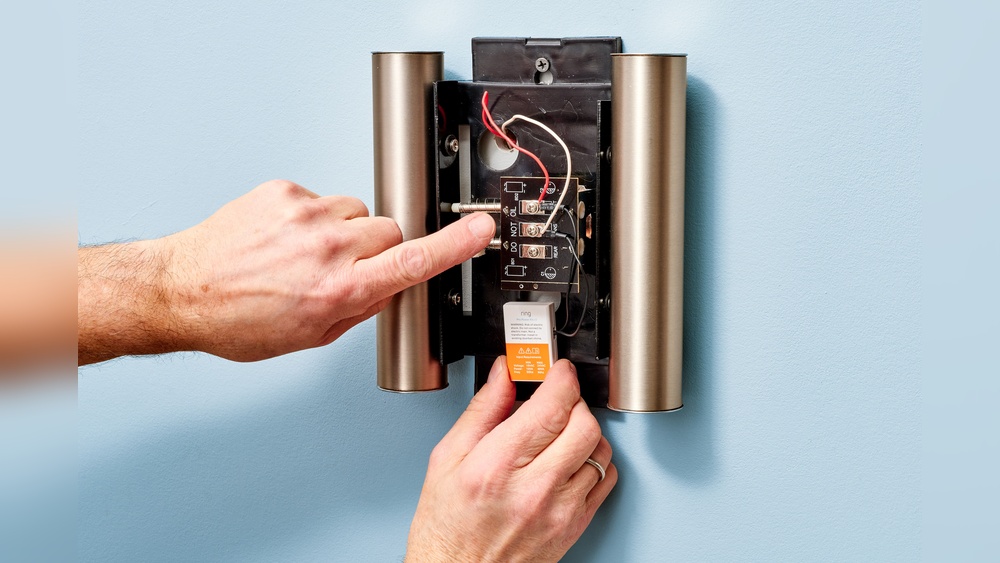
Accessories improve your doorbell’s performance. Ring Chime connects to your doorbell and rings inside your home. Choose a Chime that matches your doorbell model for easy syncing. Some doorbells work with smart lights and security cameras. Check compatibility before buying to avoid issues. Accessories can make your system more convenient and effective.
Gathering Necessary Tools
Before starting the installation of your Ring Video Doorbell and Chime, gather all necessary tools. This step saves time and prevents interruptions during the process. Having everything ready ensures a smooth setup and avoids last-minute trips to the store.
Required Hardware And Tools
Prepare the Ring Video Doorbell and Chime devices first. Check the package for included items like screws and mounting brackets. You will also need a drill with bits, a screwdriver, and a level to ensure straight installation. A measuring tape helps place the doorbell at the right height. For wiring, have a voltage tester and wire stripper ready. A ladder may be necessary for higher door frames or walls.
Safety Precautions
Turn off power at the circuit breaker before handling any wiring. Use a voltage tester to confirm no current flows. Wear safety goggles to protect your eyes from dust or debris. Keep tools organized to avoid accidents. Follow the manufacturer’s safety instructions closely. Do not rush the installation to prevent mistakes or injuries.
Preparing For Installation
Preparing for the installation of your Ring Video Doorbell and Chime sets the stage for a smooth setup. Taking the right steps before you start saves time and prevents problems. This section covers two key preparation tasks: checking your Wi-Fi signal strength and turning off the power supply.
Checking Wi-fi Signal Strength
A strong Wi-Fi signal is crucial for the Ring Doorbell to work well. Check the signal near your doorbell’s mounting spot. Use your phone or a Wi-Fi analyzer app to test the strength. The signal should be stable and strong enough for video streaming.
If the signal is weak, try moving your router closer or use a Wi-Fi extender. A good connection avoids delays and missed alerts. Confirming Wi-Fi strength before installation helps your Ring devices perform at their best.
Turning Off Power Supply
Safety comes first during installation. Turn off the power supply to your existing doorbell at the circuit breaker. This prevents electrical shocks and damage to your devices. Use a voltage tester to make sure the power is off.
Working without electricity reduces risks and keeps the installation process safe. Only proceed once you are sure the power is completely turned off. This simple step protects you and your Ring products.
Credit: www.vicentetorns.com
Installing The Ring Video Doorbell
Installing the Ring Video Doorbell is a simple process anyone can follow. This section guides you step-by-step to get your doorbell ready. Follow each step carefully for the best results.
Mounting The Doorbell
Choose a spot near your front door, about 48 inches from the ground. This height captures clear video of visitors. Use the included mounting bracket and screws. Hold the bracket against the wall and mark the holes with a pencil. Drill holes and insert anchors if needed. Attach the bracket firmly to the wall.
Connecting The Wiring
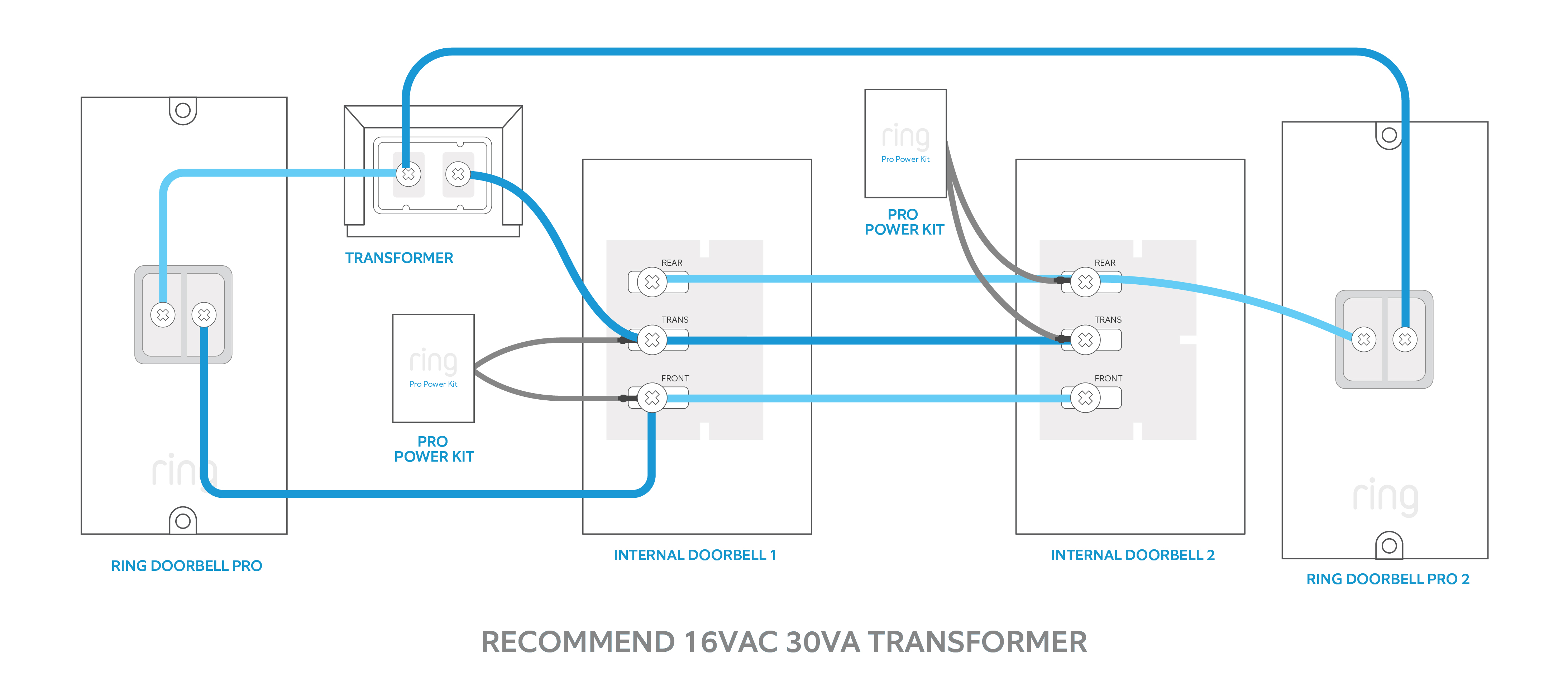
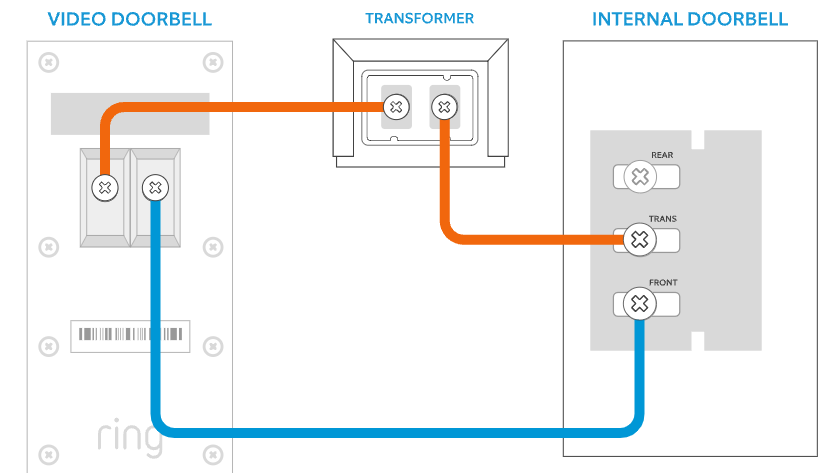
Turn off power to your existing doorbell at the breaker box. Remove the old doorbell and disconnect its wires. Connect these wires to the back of the Ring Video Doorbell. Usually, the wires connect to two screws labeled “Front” and “Trans.” Tighten the screws to secure the wires. Make sure the wires do not touch each other.
Securing The Device
Snap the Ring Video Doorbell onto the mounting bracket. Push it until it clicks into place. Use the small security screws included to lock the doorbell. This prevents theft and keeps the device stable. Restore power at the breaker box. Test the doorbell to confirm it works perfectly.
Setting Up The Ring Chime
Setting up the Ring Chime is a simple process that adds convenience to your Ring Video Doorbell system. The Chime lets you hear alerts inside your home, so you never miss a visitor. This section guides you through plugging in the Chime and pairing it with your doorbell.
Plugging In The Chime
Find a power outlet inside your home near a central location. Plug the Ring Chime directly into the outlet. Avoid using extension cords or power strips for best performance. The Chime will light up, showing it has power. Wait a few moments for the device to start.
Pairing With The Doorbell
Open the Ring app on your smartphone or tablet. Select your Ring Video Doorbell from the device list. Tap on the option to add a Chime. Follow the in-app instructions to connect the Chime to your doorbell. The app will confirm when pairing is successful. Test by pressing the doorbell to hear the Chime sound.
Credit: ring.com
Configuring The Ring App
Setting up the Ring app is the next step after installing your Ring Video Doorbell and Chime. This app connects your devices and lets you control them easily. It sends alerts and shows live video right on your phone. Follow simple steps to get your app ready for use.
Creating An Account
Download the Ring app from the App Store or Google Play. Open the app and tap “Create Account.” Enter your email address and choose a strong password. Confirm your password and accept the terms of service. Tap “Create Account” to finish. You now have a Ring account to manage your devices.
Connecting To Wi-fi
Log in to your Ring app with your new account. Select “Set Up a Device” and choose your Ring Video Doorbell or Chime. Follow the on-screen instructions to connect to your home Wi-Fi network. Make sure your phone is close to the device. Enter your Wi-Fi password carefully. Wait for the device to connect and confirm the connection in the app.
Adjusting Notification Settings
Open the Ring app and go to “Device Settings.” Tap “Notification Settings” to customize alerts. Choose how and when you want to receive notifications. You can turn alerts on or off for motion and doorbell rings. Adjust the settings to avoid too many or too few alerts. Save your preferences to stay updated at your convenience.
Testing The System
Testing the Ring Video Doorbell and Chime is important after installation. It helps confirm that the devices work correctly. This step ensures your home stays secure and you don’t miss any visitors.
Check the video and audio quality first. Then, verify that the chime alerts sound properly. These tests save time by fixing issues early.
Checking Video And Audio
Open the Ring app on your smartphone. Look at the live video feed from the doorbell. The video should be clear and smooth. Speak near the doorbell to test the microphone. Listen through the app to hear your voice. Next, use the app to speak to visitors. Make sure the speaker on the doorbell works well. Adjust the camera angle if the video is not clear. Good video and audio are key for security.
Verifying Chime Alerts
Press the doorbell button to test the chime. Listen for the sound inside your home. The chime should ring clearly and loud enough. Check if the chime responds quickly to the doorbell press. Adjust the volume in the app if needed. Test alerts on all devices linked to the system. Confirm notifications appear on your phone. The chime alerts keep you informed about visitors.

Credit: www.youtube.com
Troubleshooting Common Issues
Troubleshooting common issues helps keep your Ring Video Doorbell and Chime working well. Problems can happen during or after installation. Knowing how to fix these issues saves time and stress.
Many issues relate to connectivity, power, or the app. Each requires a different approach to solve. This guide covers simple steps to fix the most frequent problems.
Connectivity Problems
Weak Wi-Fi signals cause most connectivity problems. Place your router closer to the doorbell. Avoid thick walls or metal objects between devices. Restart your router and doorbell to refresh the connection.
Check your internet speed. The doorbell needs at least 1 Mbps upload speed. Use the Ring app to test your Wi-Fi strength. If the signal is weak, try a Wi-Fi extender.
Power And Wiring Issues
Power problems can stop your doorbell from working. Make sure the doorbell is properly connected to the wiring. Turn off the power at the breaker before touching wires.
Use the voltage tester to check if the power is on. If your doorbell uses batteries, replace them with new ones. Low battery levels often cause malfunctions.
App Malfunctions
The Ring app may freeze or not load correctly. Close the app and reopen it. Restart your phone to clear any temporary glitches.
Keep the app updated. Updates fix bugs and improve performance. Clear the app cache from your phone settings if problems continue.
If login fails, reset your password. Check your internet connection. Sometimes, reinstalling the app solves persistent issues.
Maintaining Your Ring Devices
Keeping your Ring devices in good shape helps them work well and last longer. Regular care is simple and keeps your video doorbell and chime ready to protect your home. Small steps make a big difference in performance and reliability.
Regular Cleaning Tips
Dust and dirt can block the camera and sensors. Wipe the lens gently with a soft cloth. Avoid using harsh chemicals or water directly on the device. Clean the chime vents to keep sound clear. Check for spider webs or debris around the device. A clean device sends clear video and sound.
Software Updates
Ring often releases updates to improve features and security. Open the Ring app to check for new updates. Install updates as soon as possible to keep devices safe. Updates can fix bugs and add useful functions. Your device works better with the latest software.
Battery Replacement
Battery life depends on usage and settings. Watch the battery level in the Ring app. Charge or replace the battery before it runs out. Use the original Ring battery for best results. Replace the battery carefully to avoid damage. A full battery keeps your device active all day.
Frequently Asked Questions
How Do I Install A Ring Video Doorbell?
First, charge your Ring doorbell fully. Next, use the mounting bracket to mark screw holes. Drill, secure the bracket, and attach the doorbell. Finally, connect it to Wi-Fi and complete setup via the Ring app.
Can I Install Ring Chime Without Professional Help?
Yes, Ring Chime is easy to install yourself. Plug it into any power outlet within Wi-Fi range. Then, connect it to your Ring app for instant notifications and sound alerts.
What Tools Are Needed For Ring Doorbell Installation?
You need a drill, screwdriver, level, and the included mounting screws. Optionally, use a pencil for marking holes. Ensure you have your smartphone ready for app setup.
How Do I Connect Ring Doorbell To Wi-fi?
Open the Ring app and follow device setup. Select your Wi-Fi network and enter the password. Ensure your phone is close to the doorbell during setup for smooth connection.
Conclusion
Installing your Ring Video Doorbell and Chime is simple and quick. Follow each step carefully for the best results. Test the devices to make sure they work properly. This setup helps keep your home safe and connected. Enjoy the convenience of seeing visitors anytime, anywhere.
Stay secure with clear video and instant alerts. Maintenance is easy, so check your devices often. Now, you can feel confident about your home’s security.