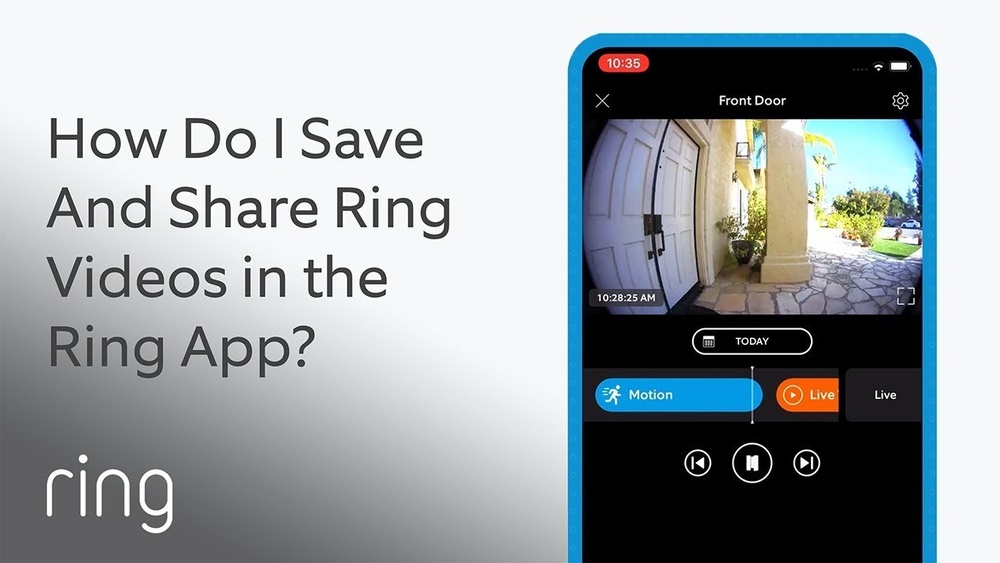

Have you ever wanted to save an important moment captured by your Ring Doorbell? Maybe it’s a delivery, a visitor, or something unusual happening outside your door.
Knowing how to save these videos quickly and easily can give you peace of mind and help you keep track of everything happening around your home. You’ll discover simple steps to save your Ring Doorbell videos so you never miss a thing.
Keep reading to unlock the full potential of your device and make sure those important clips are always at your fingertips.

Credit: www.eufy.com
Accessing Your Ring App
Accessing your Ring app is the first step to saving videos from your Ring Doorbell. The app lets you see live video and review past recordings. It also helps you manage settings and notifications. To use these features, you need the app on your phone or tablet. Follow simple steps to download and log into your Ring app quickly.
Downloading And Installing The App
Go to the app store on your device. Search for “Ring” in the search bar. Find the official Ring app and tap “Download” or “Install.” Wait for the app to finish downloading. Open the app after installation completes. The app works on both Android and iOS devices.
Logging Into Your Account
Open the Ring app on your device. Enter your registered email address or phone number. Type your password carefully. Tap the “Log In” button. If you do not have an account, choose “Create Account” and follow the prompts. Once logged in, you can access your Ring Doorbell videos easily.

Credit: www.wikihow.com
Locating Recorded Videos
Finding your recorded videos on the Ring Doorbell app is simple. Knowing where to look saves time and frustration. This section explains how to locate saved videos quickly and easily.
Navigating To Event History
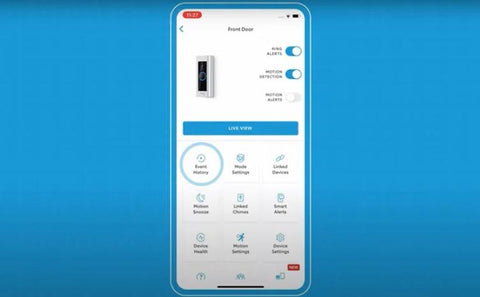
Open the Ring app on your phone or tablet. Tap the menu icon in the top left corner. Select “History” or “Event History” from the list. This shows a timeline of all recorded activities. Each event has a timestamp and a thumbnail image. Scroll through to see recent recordings.
Filtering And Selecting Videos
Use filters to narrow down your search. Choose specific dates or event types like motion, ring, or live view. This helps find the exact video you want. Tap on a video thumbnail to watch it. You can also download or share the recording from this screen.
Saving Videos To Your Device
Saving videos from your Ring Doorbell lets you keep important moments safe. You can watch them anytime without internet access. This is useful for sharing footage or keeping records. The process is simple and quick.
Using The Download Feature
Open the Ring app on your phone or tablet. Go to the event history and select the video you want. Tap the download icon to save the video to your device. The video file is stored in your device’s default download folder. You can watch it offline or share it easily.
Choosing Storage Locations
Decide where you want to keep your saved videos. You can save them on internal phone storage for quick access. Another option is using an SD card if your device supports it. Cloud storage services also offer extra space and backup. Choose a location that is easy to access and secure.
Sharing And Exporting Footage
Saving videos on your Ring Doorbell is not just about keeping memories. Sharing and exporting footage helps you show others important moments. It also supports safety and legal needs. You can easily share clips or save them for future use. Knowing how to do this makes your Ring Doorbell more useful and practical.
Sharing Via Email Or Messaging
Sharing videos from your Ring Doorbell is simple. Select the clip you want to share from the app. Tap the share icon to open options. You can send the video through email or messaging apps.
Choose the contact or type the email address. The recipient gets a link to view the video securely. This method keeps your footage private and easy to access. Sharing helps friends, family, or neighbors stay informed.
Exporting For Legal Or Security Use
Exporting footage is important for legal or security reasons. You may need to save videos outside the Ring app. Start by selecting the video and tapping the export option.
Save the video file to your phone or computer. The exported file can be shared with police or security teams. It acts as evidence if needed. Keeping a backup helps protect your home and proves incidents clearly.
Using Cloud Storage Options
Saving videos from your Ring Doorbell is simple with cloud storage options. These options let you store video clips safely online. You do not need extra devices or space on your phone. Cloud storage keeps your videos secure and easy to find.
Benefits Of Ring Protect Plan
The Ring Protect Plan offers video recording and storage. It saves all your Ring Doorbell videos to the cloud. You can watch, download, or share videos anytime. Videos stay safe even if your device is lost or stolen. The plan also gives you extra features like video history and snapshots.
Accessing Cloud Recordings Anytime
Access your saved videos from any device. Use the Ring app or website to view recordings. Videos are organized by date and time for easy searching. Watch live or recorded videos whenever you want. This convenience helps you check your home from anywhere.
Troubleshooting Video Saving Issues
Saving videos on your Ring Doorbell should be simple. Sometimes, videos fail to save correctly. This can cause frustration and confusion. Troubleshooting these issues helps you keep important recordings safe. Let’s explore common problems and how to fix them. Also, learn when to contact Ring support for help.
Common Problems And Fixes
One common problem is poor internet connection. Videos may not upload or save properly without stable Wi-Fi. Check your Wi-Fi signal strength near your Ring device. Move your router closer if needed. Restarting your router can improve connection speed.
Another issue is insufficient storage. Ring stores videos in the cloud, but your subscription must be active. Verify your Ring Protect plan is current. Without it, video saving might stop.
App glitches also affect video saving. Force close and reopen the Ring app. Update the app to the latest version. This can fix bugs that block video downloads.
Power problems can disrupt recordings. Ensure your Ring Doorbell has enough battery or is correctly wired. Low power may prevent videos from saving.
Contacting Ring Support
Sometimes issues need expert help. Ring support can guide you step-by-step. Prepare your device details and error messages. This speeds up the process.
Use the Ring app or website to reach support. They offer chat, phone, or email options. Explain your problem clearly. Follow their instructions carefully to resolve video saving issues.
Tips For Secure Video Management
Managing your Ring Doorbell videos securely is important. It protects your privacy and keeps your footage safe from loss or theft. Simple steps can help you control your video files better. Follow these tips to ensure your videos stay protected and easy to access when needed.
Regular Backups
Always make copies of your videos. Save them on a cloud service or an external drive. Backups stop you from losing important footage. Set a schedule to back up videos often. This habit keeps your files safe even if your device fails.
Setting Strong Passwords
Use strong and unique passwords for your Ring account. Avoid simple or common passwords. Combine letters, numbers, and symbols. Change passwords regularly to improve security. Strong passwords block unauthorized access to your videos.
Credit: www.eufy.com
Frequently Asked Questions
How Do I Save A Video From Ring Doorbell App?
Open the Ring app, select the video, then tap the download icon. The video saves to your phone’s gallery or default downloads folder automatically.
Can I Save Ring Doorbell Videos Without A Subscription?
No, saving videos requires a Ring Protect subscription. Without it, you can only view live footage but cannot save or share recordings.
Where Are Saved Ring Doorbell Videos Stored?
Videos saved from the Ring app are stored locally on your device, usually in the Photos or Downloads folder, depending on your phone’s settings.
How Long Are Ring Doorbell Videos Stored Online?
Ring stores videos for 60 days with an active Protect plan. After this period, videos are automatically deleted from the cloud storage.
Conclusion
Saving videos on your Ring Doorbell keeps your home security strong. You can watch or share clips anytime you want. The process is simple and quick to follow. Always check your app settings to ensure videos save correctly. Regularly saving videos helps you keep important moments safe.
Stay aware and protect your home with saved footage. Easy steps make video saving stress-free and reliable. Your Ring Doorbell becomes even more useful this way.