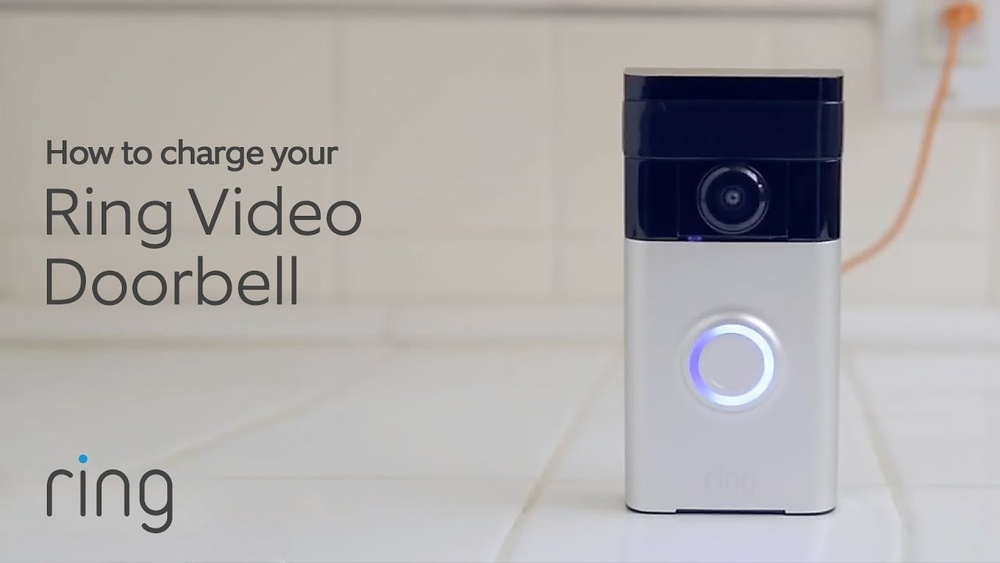

Are you wondering how to keep your Ring Video Doorbell powered up and ready to protect your home? Knowing how to charge your device correctly is key to making sure you never miss a visitor or an important alert.
Whether you’re new to Ring or just need a quick refresher, this guide will walk you through simple steps to charge your doorbell efficiently. Keep reading to discover easy tips that will keep your Ring Video Doorbell working smoothly every day.
Charging Options
Charging your Ring Video Doorbell is simple and flexible. You can choose between two main charging options. Both keep your doorbell ready to protect your home. Understanding these options helps you keep your device powered without stress.
Wired Charging
Wired charging connects your Ring doorbell to your home’s existing doorbell wiring. This option provides constant power. It means you don’t need to remove the battery for charging. The doorbell charges as you use it. Installation requires basic electrical work, but it saves time later. This method is ideal for users wanting a set-and-forget solution.
Battery Charging
Battery charging uses a removable battery inside your Ring doorbell. You take the battery out and charge it using a USB cable. It usually takes a few hours to fully charge. This option works well if your home lacks doorbell wiring. You can charge the battery anywhere, making it portable. Keep a spare battery to swap during busy days.
Tools And Accessories Needed
Charging your Ring Video Doorbell requires a few simple tools and accessories. Having the right equipment helps keep your device powered without any hassle. This section covers the basic items needed for charging.
Charging Cable Types
The most common cable for Ring doorbells is a micro-USB cable. This cable connects the doorbell to a power source. Some newer models may use a USB-C cable instead. Make sure to check your model’s requirements before charging. Using the correct cable ensures safe and efficient charging.
Compatible Chargers
Wall adapters with a USB port work well for charging. A charger with 5V and 1A power output is ideal. Avoid using high-power chargers meant for laptops or tablets. These can damage your doorbell’s battery. Portable power banks also serve as a good option for charging on the go.
Step-by-step Charging Process
Charging your Ring Video Doorbell is simple and quick. Follow these clear steps to keep your doorbell powered and ready. Regular charging ensures your device works without interruptions.
Removing The Doorbell
Start by unlocking the doorbell from its mount. Use the provided screwdriver to remove the security screws. Gently pull the doorbell away from the wall. Place it on a flat surface for charging.
Connecting The Charger
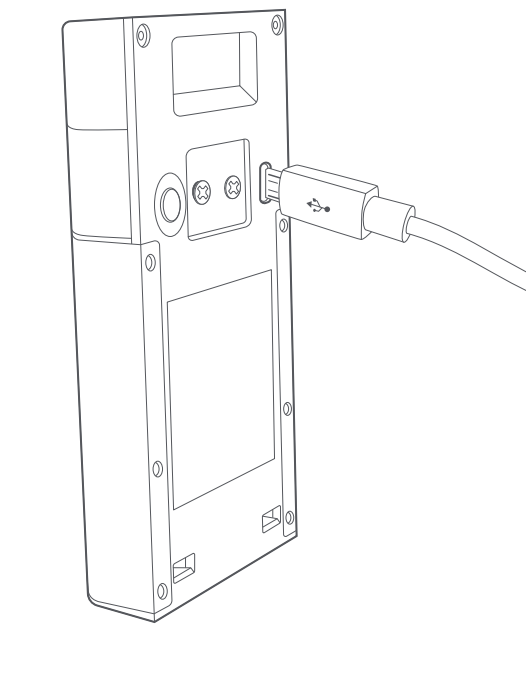
Find the charging port on the back of the doorbell. Connect the USB charging cable firmly into the port. Plug the other end into a power source. Use the original charger for best results.
Charging Duration
Charge the doorbell for about 5 to 10 hours. A full charge allows several weeks of use. Check the LED light for charging status. Green means fully charged; orange indicates charging.

Credit: ring.com
Checking Battery Status
Checking the battery status of your Ring Video Doorbell is important to keep it working properly. It helps you know when to charge the device. There are simple ways to check the battery level using the Ring app or the device’s indicator lights.
Using The Ring App
The Ring app shows the battery percentage clearly. Open the app and select your Ring Video Doorbell from the devices list. The battery status appears on the device dashboard. It updates in real-time. This makes it easy to track battery life without touching the doorbell.
The app also sends notifications when the battery is low. This way, you can charge it before it dies. You can also check the battery history to see how fast it drains. The Ring app is a handy tool for managing your doorbell’s battery.
Battery Indicator Lights
Your Ring Video Doorbell has small battery indicator lights. These lights show the current battery level. Press the button on the doorbell to see the lights. Different colors mean different charge levels.
A green light means the battery is good. A yellow or orange light signals medium charge. A red light warns that the battery is low. Watching these lights helps you decide when to recharge the doorbell. It is a quick way to check battery status without using the app.
Tips For Battery Maintenance
Proper battery maintenance helps your Ring Video Doorbell last longer. It keeps the device working well. Small habits can protect the battery’s health. Follow easy steps to keep your battery strong.
Good battery care reduces the need for frequent charging. It also ensures your doorbell stays ready to use. Understanding how to maintain the battery saves time and effort.
Optimizing Battery Life
Lower the video quality to save power. Turn off motion alerts when not needed. Limit live view sessions to reduce battery use. Place the doorbell in a shaded area to avoid heat. Heat can drain the battery faster. Clean the doorbell regularly to keep sensors clear. These small changes help the battery last longer.
Avoiding Overcharging
Unplug the charger once the battery is full. Overcharging may reduce battery capacity over time. Use the original charger or a compatible one. Avoid charging overnight or for too long. Charging during the day is best. Monitor the charging process to protect the battery. Careful charging keeps the battery healthy.

Credit: www.atenabcn.com
Troubleshooting Charging Issues
Charging your Ring Video Doorbell should be easy and quick. Sometimes, charging problems can happen. These issues may stop your doorbell from working well. Knowing how to fix these problems saves time and keeps your device ready.
Common Problems
The doorbell might not charge due to a bad cable or adapter. Check if the charging cable is damaged or loose. Dirt or dust can block the charging port. Clean it gently with a soft cloth. The battery may also be old and need replacement. Make sure the power source works by testing it with another device. Sometimes, the doorbell’s software needs an update to fix charging bugs.
When To Contact Support
Contact Ring support if your doorbell still won’t charge. Especially after trying the basic fixes. If the battery drains very fast, ask for help. Support can guide you step-by-step or arrange a repair. Use support when your device has visible damage or won’t turn on. Getting professional help avoids making the problem worse.
Credit: www.arloren.com
Frequently Asked Questions
How Do You Charge A Ring Video Doorbell Battery?
To charge a Ring Video Doorbell battery, remove it from the device. Use the included USB charging cable. Connect the cable to a power source. Charge until the battery is full, which usually takes 5 to 10 hours.
Can I Charge Ring Doorbell Without Removing The Battery?
No, the battery must be removed to charge. Ring Doorbells don’t support charging the battery while installed. Always detach the battery for safe and effective charging.
How Long Does A Ring Doorbell Battery Last Per Charge?
A full charge typically lasts 6 to 12 months. Battery life depends on usage, settings, and weather conditions. Frequent motion alerts or live views may reduce battery life.
What Type Of Charger Is Needed For Ring Doorbell?
Use the USB charging cable provided by Ring. It’s compatible with standard USB power adapters. Avoid third-party chargers to prevent damage or slow charging.
Conclusion
Charging your Ring Video Doorbell is simple and quick. Just remove the battery and use the charging cable. A full charge usually takes a few hours. Keep your doorbell ready to stay secure and connected. Regular charging helps the device work without interruption.
Enjoy peace of mind with a fully charged Ring doorbell. Easy steps make sure your home stays safe every day.


