
Looking for a video doorbell that keeps your home safe without costing you extra every month? You’re not alone.
Many people want the convenience of seeing who’s at their door without paying ongoing subscription fees. But with so many options out there, how do you find the best video doorbell without a subscription? You’ll discover top choices that give you clear video, easy installation, and smart features — all without locking you into monthly payments.
Keep reading to find the perfect fit for your home and your budget.
Why Choose A Subscription-free Doorbell
Choosing a video doorbell without a subscription is a smart move for many homeowners. It offers freedom from monthly fees and simplifies managing your home security. You own the device and control your data without extra costs.
Subscription-free doorbells focus on easy use and privacy. They provide essential features without forcing you to pay for cloud storage or advanced services. This makes them ideal for those who want security without complexity or hidden fees.
Cost Savings Over Time
Subscription fees add up quickly. Paying monthly or yearly fees can become expensive over a few years. A subscription-free doorbell saves you money by avoiding these ongoing charges. You pay once and use the device fully. This makes your investment more affordable in the long run.
Privacy Benefits
Your video data stays with you. No need to trust third-party servers with your personal videos. This reduces the risk of data breaches or unauthorized access. Subscription-free doorbells often store videos locally, giving you full control. Protecting your family’s privacy is easier this way.
Simple Setup And Use
Subscription-free doorbells usually have straightforward setups. No need to create accounts or manage subscriptions. You can install and start using the device quickly. The user interface is often simpler, making it easier for all family members to use. Less hassle means more convenience.
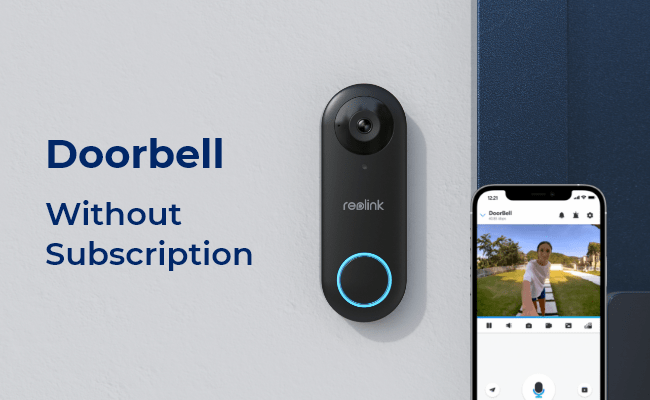
Credit: reolink.com
Key Features To Look For
Choosing the best video doorbell without subscription means focusing on key features. These features ensure security, ease of use, and value. Understanding them helps pick a doorbell that fits your needs and budget.
Video Quality And Field Of View
Clear video is vital for seeing visitors well. Look for doorbells with at least 1080p resolution. This gives sharp and detailed images. A wide field of view covers more area at your door. It reduces blind spots and improves security.
Two-way Audio
Two-way audio lets you talk with visitors through the doorbell. This feature adds convenience and safety. You can greet guests or warn off strangers without opening the door. Clear sound is essential for smooth conversations.
Motion Detection And Alerts
Motion detection alerts notify you when someone approaches your door. Good doorbells allow you to set motion zones. This limits false alerts from passing cars or animals. Instant alerts keep you aware and ready.
Storage Options
Storage lets you save video clips for later review. Look for local storage options like SD cards or internal memory. This avoids monthly fees. Some doorbells support cloud storage without subscription, offering easy access to footage.
Top Video Doorbells Without Subscription In 2025
Choosing a video doorbell without a subscription saves money and protects privacy. Many models offer great features without monthly fees. These doorbells store videos locally or allow free cloud storage. The best options in 2025 combine quality, ease of use, and affordability. Here are top video doorbells without subscription to consider.
Model A: Best Overall
Model A offers clear video and reliable motion detection. It supports local storage via a microSD card. The app is easy to use with no hidden fees. This model suits most homes and provides great value. Video quality stays sharp day and night. It works with voice assistants for added convenience.
Model B: Budget-friendly Choice
Model B fits tight budgets without cutting key features. It provides decent video quality and two-way audio. Installation is simple and quick. This doorbell uses local storage only, avoiding monthly charges. It offers basic alerts and easy setup. Perfect for those who want savings and simplicity.
Model C: Best For Advanced Features
Model C includes smart alerts and customizable motion zones. It offers free cloud storage for videos and snapshots. The night vision is excellent for low-light areas. This doorbell supports app integration with smart home devices. It suits users wanting more control and features without fees.
Model D: Best For Easy Installation
Model D installs quickly with no professional help needed. It works with existing doorbell wiring or battery power. The setup app guides step-by-step with clear instructions. Video quality is good for everyday use. It stores video locally and sends instant alerts. Ideal for those who want fast, hassle-free installation.
How To Install Your Video Doorbell
Installing your video doorbell is easier than you think. Most models come with clear instructions. You can set it up in about 30 minutes. This guide helps you install your video doorbell without stress. Follow each step carefully for best results.
Tools Needed
- Electric drill
- Screwdriver (Phillips and flathead)
- Level tool
- Measuring tape
- Wire stripper (if using wired doorbells)
- Safety goggles
- Mounting screws (usually included)
Step-by-step Installation
- Turn off power at the circuit breaker if using a wired doorbell.
- Mark the mounting location near your door.
- Drill holes for screws using the electric drill.
- Attach the mounting bracket to the wall with screws.
- Connect the wires to the video doorbell if wired; follow the guide.
- Snap the video doorbell onto the bracket securely.
- Turn the power back on and test the device.
- Download the app and connect the doorbell to Wi-Fi.
- Adjust camera angle and settings in the app.
Troubleshooting Tips
- Check power supply if the doorbell does not turn on.
- Reset the device if the app does not detect it.
- Ensure Wi-Fi signal is strong near the doorbell.
- Clean the camera lens for a clear video feed.
- Consult the manual for error codes or blinking lights.
- Contact customer support if problems persist.
Maintaining Your Doorbell For Longevity
Maintaining your video doorbell ensures it works well for years. Taking care of the device keeps it reliable and responsive. Simple steps help avoid common problems and extend its life.
Regular Firmware Updates
Firmware updates improve your doorbell’s performance and security. Install updates as soon as the manufacturer releases them. These updates fix bugs and add new features. Check the app or device settings for update alerts. Staying current prevents glitches and keeps your doorbell running smoothly.
Cleaning And Care
Clean your doorbell regularly to keep the camera clear. Use a soft, damp cloth to wipe the lens and body. Avoid harsh chemicals that can damage the surface. Remove dust, dirt, and spider webs from sensors and buttons. Clean devices capture better video and respond more accurately.
Battery Maintenance
Charge the battery before it runs completely out. Frequent deep discharges reduce battery life over time. Use the original charger or one recommended by the manufacturer. Check battery levels often, especially in cold weather. Replace the battery if it no longer holds a charge well.
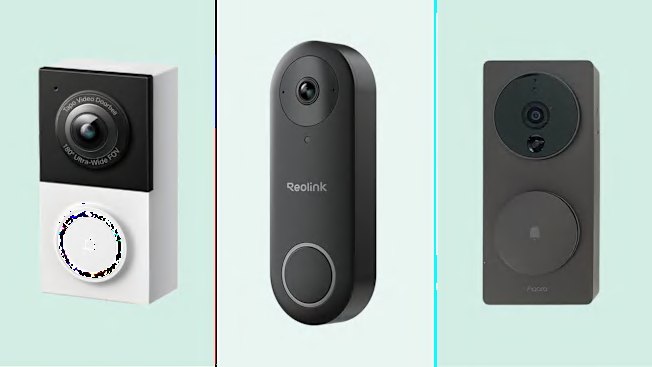
Credit: www.consumerreports.org
Comparing Subscription Vs. Non-subscription Models
Choosing the right video doorbell depends on understanding subscription and non-subscription models. Both have benefits and drawbacks that affect cost, features, and user experience. This section compares these models to help you decide which fits your needs.
Cost Analysis
Subscription models charge a monthly or yearly fee. This fee covers cloud storage and advanced features. Non-subscription models require a higher upfront cost. They do not have ongoing fees for using basic functions. Over time, non-subscription models can save money. Subscription plans add up and may become expensive.
Feature Differences
Subscription models offer advanced features like cloud video storage. They may include smart alerts and facial recognition. Non-subscription models store videos locally on an SD card. This limits video access to your home network. Some non-subscription doorbells may lack advanced smart features. Basic motion detection and live video are usually included.
User Experience
Subscription models provide easy access to videos anywhere via the app. Users can review and share videos remotely. Non-subscription models may limit video review to the device or local network. Setup for subscription models can be simpler due to cloud support. Non-subscription models require manual management of video files. User control is higher with non-subscription models, with less dependency on internet services.

Credit: www.amazon.com
Frequently Asked Questions
What Is The Best Video Doorbell Without Subscription?
The best video doorbell without subscription offers free local storage and reliable alerts. Popular models include Eufy Security and Ring Video Doorbell Wired, which provide quality video and motion detection without monthly fees.
How Do Video Doorbells Work Without Subscriptions?
Video doorbells without subscriptions store footage locally on microSD cards or internal memory. They send real-time alerts to your phone without cloud storage, ensuring privacy and no recurring costs.
Are Free Video Doorbells Reliable For Home Security?
Yes, free video doorbells are reliable for basic security. They provide motion detection, two-way audio, and HD video. However, features like cloud storage and advanced AI may be limited.
Can I Access Video Footage Without Monthly Fees?
Yes, many video doorbells allow access to footage without monthly fees. They save recordings on local storage devices, enabling easy retrieval and review anytime through the app.
Conclusion
Choosing the best video doorbell without subscription saves money and hassle. These devices offer clear video and easy installation. You keep control over your data and recordings. Many models provide useful features without monthly fees. Pick one that fits your budget and needs.
Protect your home smartly and simply. Peace of mind is within reach. No extra costs, just reliable security. Your front door deserves smart protection today.