
Have you ever wondered how the Ring Video Doorbell 2 keeps your home safe while letting you see who’s at your door from anywhere? This clever device does more than just ring a bell—it’s like having a watchful guard right at your doorstep.
You’ll discover exactly how the Ring Video Doorbell 2 works, why it’s so popular, and how it can give you peace of mind every time someone comes knocking. Keep reading, and you’ll learn how this smart gadget can make your home smarter and safer in ways you might not expect.

Credit: www.esseg.eu
Ring Video Doorbell 2 Features
The Ring Video Doorbell 2 offers several features that make home monitoring easy and effective. It blends smart technology with simple design. This device helps you see and talk to visitors from anywhere. It also improves home security with clear video and sound. Below are its key features.
Design And Build
The Ring Video Doorbell 2 has a sleek and sturdy design. It fits well on most door frames. The device is weather-resistant, built to handle rain and sun. Its button is easy to press for visitors. The design balances style with durability.
Video And Audio Specs
This doorbell records in 1080p HD video. It shows clear images day and night. Infrared night vision helps in low light conditions. The two-way audio allows you to hear and speak. The microphone and speaker deliver clear sound both ways.
Power Options
The Ring Video Doorbell 2 works with a rechargeable battery. This battery lasts for months on a single charge. You can also connect it to existing doorbell wiring. This option keeps the device powered without charging. The flexible power choices suit different home setups.
Installation Process
The installation process of the Ring Video Doorbell 2 is simple and user-friendly. It takes only a few steps to get your doorbell working. This section covers what tools you need, how to set it up, and tips for connecting to Wi-Fi.
Tools Needed
You only need a few basic tools for installation. A screwdriver is essential to mount the doorbell. A drill might be necessary if you need to make holes in the wall. The Ring kit usually comes with screws and anchors. Keep a smartphone nearby to complete the setup in the app.
Step-by-step Setup
Start by charging the doorbell’s battery fully. Next, remove your old doorbell, if you have one. Use the mounting bracket from the Ring box to mark holes on the wall. Drill holes and insert anchors if the surface is solid. Screw the bracket firmly in place. Attach the Ring Video Doorbell 2 to the bracket. Finally, follow the Ring app instructions to complete setup.
Wi-fi Connection Tips
Place your doorbell within range of your Wi-Fi router. A strong Wi-Fi signal ensures smooth video streaming. Use the Ring app to select your home Wi-Fi network. Enter your Wi-Fi password carefully. If the connection fails, try moving the router closer or use a Wi-Fi extender. Avoid walls or metal objects that block signals.
Motion Detection
The Ring Video Doorbell 2 uses motion detection to keep your home safe. It senses movement near your door and starts recording. This helps you see who is outside, even before they ring the bell.
The motion detection feature works with smart sensors. These sensors notice changes in heat and movement. This means you get alerts only when something important happens.
Customizing Motion Zones
You can choose specific areas for the doorbell to watch. These are called motion zones. Set zones where you want to detect movement. This stops alerts from less important places like the street.
Custom zones help focus on your porch or walkway. This makes motion detection smarter and more useful. It also reduces false alarms from cars or passersby.
Adjusting Sensitivity
The doorbell lets you change how sensitive the sensors are. Higher sensitivity catches even small movements. Lower sensitivity ignores minor motion, like animals or leaves.
Adjust sensitivity to fit your home’s needs. This improves alert accuracy. It keeps your notifications helpful, not annoying.
Alerts And Notifications
The Ring Doorbell sends instant alerts to your phone. You get notified when motion is detected. This lets you check live video right away.
Alerts help you respond fast to visitors or deliveries. You can also see if someone suspicious is near your door. Notifications keep you connected to your home at all times.
Live View And Two-way Talk
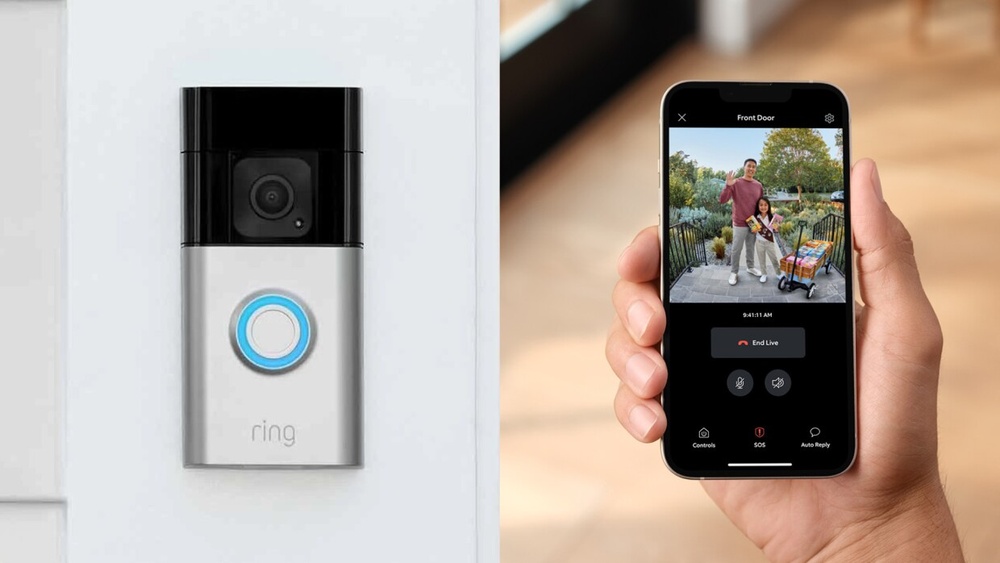
The Ring Video Doorbell 2 offers a powerful feature set with Live View and Two-Way Talk. These functions let you see and speak to visitors in real time. You can check your front door anytime from your phone or tablet. This adds an extra layer of security and convenience.
Using Live View, you get a clear video feed of your doorstep. The Two-Way Talk feature lets you speak with anyone at your door. This happens through the built-in microphone and speaker on the device. These features make your home more connected and safer.
Accessing Live Video
To access Live View, open the Ring app on your phone. Tap on your Ring Video Doorbell 2 device. The app will show a live video stream. You see your front door in real time. No need to wait for motion alerts. You can check anytime you want.
Using The Microphone And Speaker
The doorbell has a built-in microphone and speaker. They let you hear and talk to visitors. Press the talk button in the app. Speak clearly into your phone’s microphone. Your visitor hears you through the doorbell speaker. You can listen to their reply too.
Communication Scenarios
Use Two-Way Talk to greet guests when away. Tell delivery drivers where to leave packages. Warn strangers to keep their distance. Speak to family members without opening the door. This feature helps in many daily situations.
Video Recording And Storage
The Ring Video Doorbell 2 records video whenever it detects motion or when someone presses the doorbell. The device captures clear videos, day or night, thanks to its infrared night vision. These videos help you see who is at your door, even if you are not home.
All recorded videos are saved securely online. This way, you can watch them later on your phone, tablet, or computer. The storage and management of these videos are part of Ring’s system, which offers different plans to fit your needs.
Cloud Storage Plans
Ring stores videos in the cloud, not on the doorbell itself. This means you need a subscription plan to save and review videos. The plans vary by price and how long videos stay stored. Basic plans keep videos for 60 days. You can upgrade for more features and longer storage times.
Saving And Sharing Clips
You can save important video clips to your phone or computer. This helps keep special moments or proof of deliveries. Sharing clips is simple too. You can send videos by email or through social media. This feature helps you show others what happened at your doorstep quickly.
Privacy And Security
Ring uses strong encryption to protect your videos. Only you and people you allow can watch your clips. Ring also follows privacy laws to keep your data safe. You control who sees your videos and can delete them anytime. This gives you peace of mind about your video privacy.

Credit: www.esseg.eu
Integration With Smart Home
The Ring Video Doorbell 2 fits well into many smart home setups. It works with various devices and systems. This helps users control and monitor their home easily. It makes home security smarter and more connected.
Compatible Devices
The Ring Video Doorbell 2 connects with many smart devices. It works with smartphones and tablets. You can use it with both iOS and Android devices. It also pairs with smart speakers like Amazon Echo. This lets you see and talk to visitors hands-free.
Using Alexa With Ring
Alexa voice control adds convenience to the Ring Doorbell 2. You can ask Alexa to show the front door on your Echo Show. It lets you answer visitors without touching your phone. Alexa also alerts you when someone presses the doorbell or triggers motion.
Automation Features
The Ring Doorbell 2 supports automation for better security. It can work with smart lights to turn on when motion is detected. You can set routines to receive alerts at certain times. This makes your home safer and easier to manage.
Troubleshooting Common Issues
Troubleshooting common issues with the Ring Video Doorbell 2 helps keep it working well. Small problems can stop it from working right. Fixing these issues quickly saves time and frustration. Below are common problems and easy steps to fix them.
Wi-fi Connectivity Problems
Ring Doorbell 2 needs a strong Wi-Fi signal to work well. Weak signal causes delays or no video feed. Place the doorbell closer to the router. Avoid thick walls or metal objects that block signals. Restart your router to refresh the connection. Check if your Wi-Fi password is correct in the app. Using a Wi-Fi extender can help if your signal is weak.
Battery Life Concerns
The battery runs down if the doorbell records too much. Turn off motion alerts for less important zones to save power. Lower video quality in settings to reduce battery use. Charge the battery regularly using the provided charger. Cold weather can reduce battery life. Keep the battery warm or charge more often during winter months.
App Performance
The Ring app controls your doorbell and sends alerts. Keep the app updated to avoid bugs and crashes. Clear app cache on your phone for better speed. Restart your phone to fix temporary glitches. Check that your phone has enough storage space. Log out and back into the app if notifications stop. Make sure your phone’s operating system is current.

Credit: www.aboutamazon.com
Frequently Asked Questions
How Does Ring Video Doorbell 2 Detect Motion?
Ring Video Doorbell 2 uses advanced motion sensors to detect movement near your door. It sends instant alerts to your smartphone. You can customize motion zones for precise monitoring and reduce false alerts from distant activity or passing cars.
What Powers The Ring Video Doorbell 2?
The Ring Video Doorbell 2 is powered by a rechargeable battery. It can also connect to existing doorbell wiring for continuous power. Battery life varies based on usage and settings, but it typically lasts several months on a full charge.
How Does The Ring Video Doorbell 2 Connect To Wi-fi?
The device connects to your home’s 2. 4 GHz Wi-Fi network for video streaming. It requires a stable internet connection to send alerts and enable live video. Setup is done through the Ring app on your smartphone.
Can Ring Video Doorbell 2 Record Videos Continuously?
Ring Video Doorbell 2 does not record continuously by default. It records videos only when motion is detected or the doorbell is pressed. Video clips are saved to the cloud, accessible via the Ring app with a subscription plan.
Conclusion
The Ring Video Doorbell 2 keeps your home safe and connected. It lets you see and talk to visitors anytime. Motion sensors alert you quickly. Easy to install and use. Works with Wi-Fi for real-time notifications. Battery-powered, so no wires needed.
A simple way to watch your front door. Helps you feel secure, even when away. Perfect for busy families or anyone wanting extra safety. A smart choice for home security.