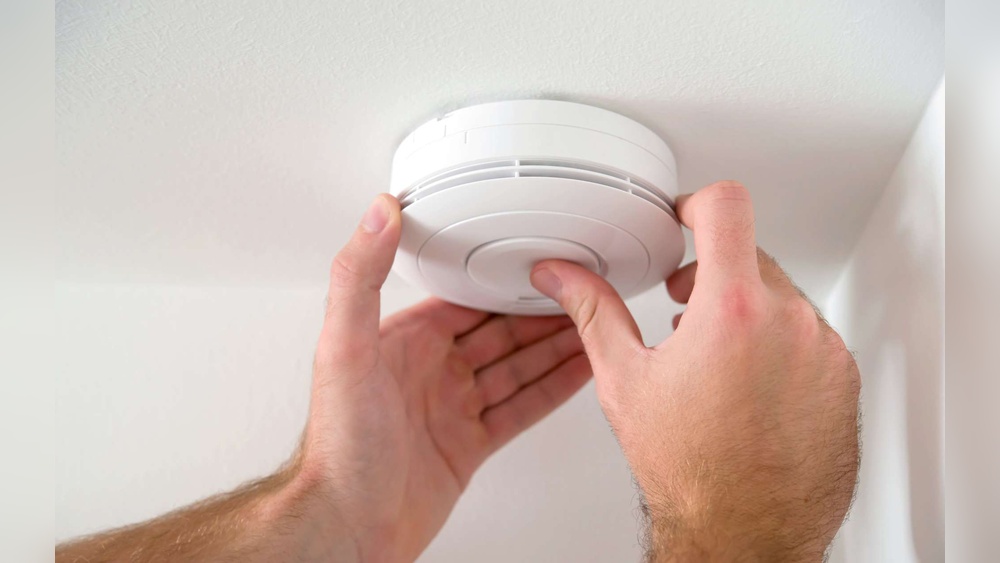

Is your smoke detector beeping nonstop and driving you crazy? That constant chirp isn’t just annoying—it’s trying to tell you something important.
Ignoring it could put your safety at risk, but fixing it is often easier than you think. You’ll discover simple, step-by-step solutions to stop your smoke detector from beeping. Keep reading, and you’ll have peace of mind—and silence—back in no time.
Common Causes Of Beeping
Smoke detectors beep to alert you about potential problems. Knowing why they beep helps fix the issue fast. Some causes are simple, others need more care.
Low Battery Warning
The most common cause is a low battery. Smoke detectors beep every few minutes as a warning. Changing the battery usually stops the beeping. Use the right battery type for your model.
Dust And Debris
Dust can block the smoke sensor. It makes the detector beep or work poorly. Clean the detector gently with a soft brush or vacuum. Regular cleaning prevents false alarms and beeping.
End Of Life Indicator
Smoke detectors don’t last forever. Most last about 8 to 10 years. After this, the detector beeps to signal replacement time. Check the date on your device. Replace old units to stay safe.
Electrical Issues
Hardwired smoke detectors may beep due to electrical problems. Loose wires or power surges cause interruptions. Inspect the wiring or call an electrician. Proper electrical connections keep alarms reliable.

Credit: waynealarm.com
Basic Troubleshooting Steps
Smoke detectors often beep to warn about issues. These sounds can be annoying but useful. Basic troubleshooting helps stop the beeping fast. It also ensures your safety is not at risk. Follow these simple steps to fix the problem.
Resetting The Alarm
First, try to reset the smoke detector. Find the reset button on the device. Press and hold it for about 15 seconds. This clears minor errors or false alarms. The beeping should stop after the reset. If it continues, try the next step.
Cleaning The Detector
Dust or dirt can cause false alarms. Use a soft brush or vacuum cleaner. Gently clean around the detector’s openings. Remove any cobwebs or insects inside. A clean detector works better and stops beeping. Clean it regularly to avoid future problems.
Replacing The Battery
Low battery power is the main cause of beeping. Open the detector’s battery compartment. Take out the old battery carefully. Insert a new battery with the right size and type. Close the compartment tightly. Check if the beeping stops after replacement.
When To Replace The Smoke Detector
Smoke detectors keep your home safe from fire risks. Knowing when to replace them is important. Old or faulty detectors may not alert you in time. Here are key points to decide if your smoke detector needs replacement.
Detector Age Limits
Most smoke detectors last about 10 years. Check the manufacture date on the back of the unit. If it is older than 10 years, replace it. Aging detectors lose sensitivity and may fail to work.
Signs Of Malfunction
Beeping sounds often signal problems. Continuous chirping or false alarms show a malfunction. If cleaning and battery replacement don’t stop the beeping, it’s time to change the detector. Also, physical damage or discoloration means it should be replaced.
Choosing A New Model
Select a smoke detector with good reviews and safety certifications. Consider models with long-life batteries or hardwired options. Opt for units with both smoke and carbon monoxide detection for better protection. Easy installation and maintenance are also important factors.

Credit: www.angi.com
Preventing False Alarms
False alarms from smoke detectors can be annoying and stressful. Preventing these false alarms saves time and keeps your home peaceful. Simple steps help your smoke detector work better and avoid unnecessary beeping.
Proper Placement Tips
Place smoke detectors away from kitchens and bathrooms. Steam and cooking smoke often trigger false alarms. Avoid installing detectors near windows or vents. Drafts can cause dust or smoke to enter and set off alarms. Install detectors on ceilings or high on walls. Smoke rises, so detectors work best in these spots. Keep detectors at least 10 feet from cooking appliances. This distance reduces false alarms from normal cooking fumes.
Regular Maintenance Schedule
Check smoke detectors every month. Clean dust and dirt from sensors using a soft brush or vacuum. Replace batteries at least once a year. Weak batteries can cause beeping noises. Test detectors regularly by pressing the test button. Replace smoke detectors every 8 to 10 years. Old detectors may become less reliable and cause false alarms. A good maintenance routine keeps your home safe and quiet.
Additional Tips For Hardwired Alarms
Hardwired smoke detectors need special care. They connect directly to your home’s electrical system. This means the steps to fix beeping alarms differ from battery-only models. Follow these tips to handle common issues with hardwired alarms.
Checking Power Connections
Hardwired alarms rely on steady power from your home. A loose wire or bad connection can cause beeping. Turn off the power at the breaker first. Then, remove the alarm from its mounting. Check all wires for tight, clean connections. Look for any signs of damage or corrosion. Fix any loose wires by tightening them carefully. Restore power and see if the beeping stops.
Dealing With Interconnected Systems
Many hardwired alarms link together. If one alarm senses smoke, all alarms sound. A problem in one alarm can trigger beeping in the others. Test each alarm separately by disconnecting them one at a time. This helps find the faulty unit. Replace or repair the problem alarm to stop all beeping. Make sure each alarm’s wiring matches the manufacturer’s instructions. Proper setup avoids false alerts and saves energy.

Credit: www.angi.com
Frequently Asked Questions
Why Is My Smoke Detector Beeping Repeatedly?
Your smoke detector beeps repeatedly due to low battery, dust, or sensor malfunction. Replace batteries and clean the unit to fix it.
How Often Should I Replace Smoke Detector Batteries?
Replace smoke detector batteries at least once a year. Regular replacement prevents false alarms and ensures reliable operation.
What Causes Smoke Detector To Beep Without Smoke?
Smoke detectors beep without smoke due to low battery, dust buildup, or electrical issues. Cleaning and battery checks usually resolve this.
How Do I Reset A Beeping Smoke Detector?
To reset, press and hold the test button for 15-20 seconds. This clears minor errors and stops beeping.
Conclusion
Fixing a smoke detector beep is simple and important. Check the battery first; weak power often causes beeping. Clean the detector to remove dust and dirt. Reset the device if needed to stop false alarms. Remember, a working smoke detector keeps your home safe.
Regular checks help avoid annoying sounds and protect your family. Stay alert and act quickly when the beep starts. Safety begins with small steps like fixing your smoke detector.