
Is your smoke detector beeping nonstop and driving you crazy? You’re not alone.
That constant beep can be frustrating, especially when you don’t know why it’s happening or how to stop it. But don’t worry—this guide will show you simple steps to fix your smoke detector quickly. By the end, you’ll know exactly what to do to silence that annoying sound and keep your home safe.
Keep reading—you’re just a few easy fixes away from peace and quiet.

Credit: waynealarm.com
Common Causes Of Beeping
Smoke detectors beep to warn about potential problems. These sounds help keep your home safe. Understanding why the beeping happens helps fix it fast. Common causes include battery issues, dirt buildup, wrong installation, and device age. Each of these problems is easy to check and solve.
Low Battery Issues
A low battery is the most common cause of beeping. Smoke detectors beep in short bursts to alert you. Replacing the battery usually stops the noise. Using fresh batteries keeps the detector working well. Check batteries every six months to avoid surprises.
Dust And Dirt Buildup
Dust and dirt can block sensors inside the detector. This buildup causes false alarms or constant beeping. Cleaning the device gently with a vacuum or cloth helps. Regular cleaning keeps the smoke detector clear and accurate.
Improper Installation
Wrong placement or loose mounting causes beeping. Smoke detectors need to be on the ceiling or high on walls. They must be firmly attached to avoid movement. Check the installation guide to ensure correct setup.
End Of Device Life
Smoke detectors do not last forever. After 8 to 10 years, sensors wear out. The device beeps to signal it needs replacement. Check the manufacture date on the back. Replace old detectors to maintain home safety.
Quick Battery Replacement Tips
Quick battery replacement helps stop a smoke detector’s beeping fast. This process keeps your home safe and quiet. Follow simple steps to change the battery right away. Avoid common mistakes to make your smoke detector work well.
Choosing The Right Battery
Pick the battery type your smoke detector needs. Most use 9-volt or AA batteries. Check the device label or user manual. Use fresh batteries for best results. Old or wrong batteries cause beeping or no power.
Safe Battery Removal
Turn off the smoke detector before removing the battery. Open the battery compartment carefully. Avoid shaking or dropping the device. Remove the battery gently to avoid damage. Dispose of old batteries properly, following local rules.
Installing A New Battery Properly
Insert the new battery with correct polarity. Look for “+” and “-” signs in the compartment. Push the battery firmly but gently into place. Close the battery cover securely. Test the smoke detector by pressing its test button.
Cleaning The Smoke Detector
Cleaning a smoke detector is a simple way to stop it from beeping. Dust and dirt inside the device can cause false alarms. Regular cleaning helps the smoke detector work properly and keeps your home safe.
Tools Needed For Cleaning
- A soft brush or a small paintbrush
- A vacuum cleaner with a hose attachment
- A dry cloth or microfiber cloth
- Batteries (optional, for replacement)
Step-by-step Cleaning Process
- Turn off the power to the smoke detector to avoid accidents.
- Remove the detector from the ceiling or wall carefully.
- Use the soft brush to gently clean the vents and outer shell.
- Vacuum around the detector’s openings to remove dust inside.
- Wipe the surface with a dry cloth to remove remaining dirt.
- Check the battery and replace it if needed.
- Reattach the smoke detector and restore power.
- Test the alarm to ensure it works properly.
When To Clean Regularly
Clean your smoke detector at least twice a year. Dust builds up faster in dusty or smoky environments. Clean more often if your detector beeps without reason. Regular cleaning keeps your device ready for emergencies.

Credit: www.angi.com
Resetting The Smoke Detector
Resetting a smoke detector can stop the annoying beeping. It clears errors and resets the device’s system. This step is often quick and easy. It helps ensure your smoke detector works properly.
Manual Reset Instructions
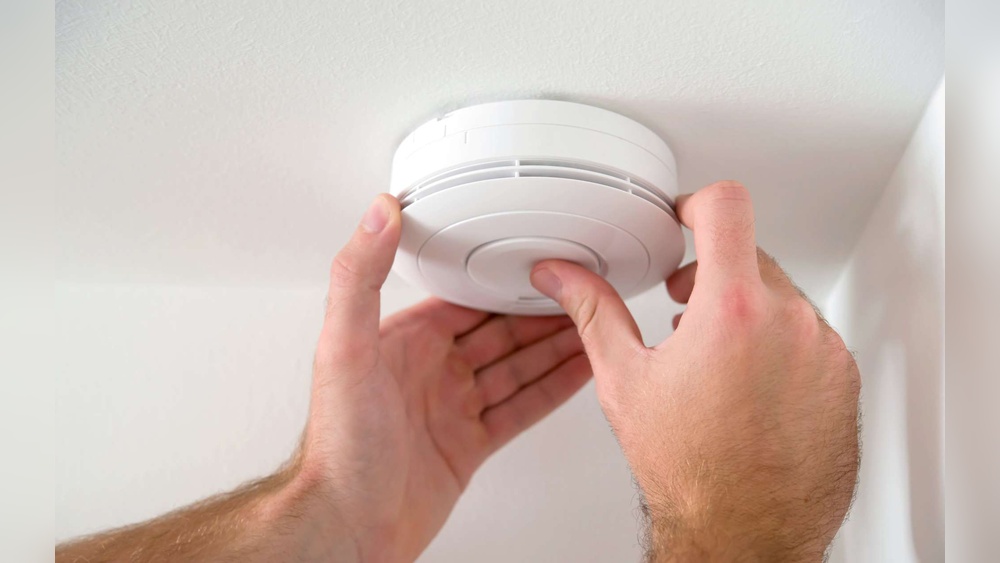
First, locate the reset button on your smoke detector. It is usually small and red or black. Press and hold the reset button for 15 to 20 seconds. Release the button and wait for a beep or light flash. This confirms the reset is complete. If the beeping continues, try other troubleshooting steps.
Using The Test Button
Most smoke detectors have a test button. Press and hold the test button for a few seconds. The alarm will sound if the device works. This can also reset minor errors in the system. After testing, the beeping should stop. If not, a full reset may be needed.
When To Perform A Reset
Reset your smoke detector after changing batteries. Also reset it if false alarms happen often. Perform a reset after cleaning the unit. Sometimes dust or bugs cause false beeps. Resetting helps clear these small issues. Avoid resetting too often without fixing the cause.
Checking Installation And Placement
Checking the installation and placement of your smoke detector is important. Incorrect placement can cause it to beep often. This section guides you to find the best spot and fix common problems.
Ideal Locations For Installation
Install smoke detectors in every bedroom and outside sleeping areas. Place one on each floor of your home. Mount them on the ceiling or high on the wall. Avoid corners and areas near windows or doors.
Keep detectors away from kitchens and bathrooms. Steam and cooking smoke can trigger false alarms. The best location is at least 10 feet from these areas.
Avoiding False Alarms
False alarms cause beeping and frustration. Keep detectors away from vents, fans, and heating units. These can blow dust or steam into the sensor. Dust buildup also makes alarms beep.
Clean detectors regularly with a soft brush or vacuum. Check batteries and replace them every year. This helps reduce false alarms and beeping.
Secure Mounting Tips
Make sure your smoke detector is tightly mounted. Loose detectors can cause beeping. Use screws and anchors suited for your wall or ceiling type. Avoid using just tape or adhesives.
Check the detector often to ensure it stays secure. A solid mount keeps the sensor working properly and stops random beeping.
When To Replace The Smoke Detector
Smoke detectors save lives by warning about fire and smoke. Over time, these devices wear out. Knowing when to replace your smoke detector is key to staying safe. Old or faulty detectors may beep often and fail to alert you.
Signs Of Device Aging
Look for yellowing or discoloration on the smoke detector. Dust or dirt buildup can affect performance. Frequent false alarms or constant beeping signal aging. If pressing the test button fails, the unit may be old. Listen for weak or irregular sounds from the alarm.
Manufacturer’s Lifespan Recommendations
Most smoke detectors last about 8 to 10 years. Check the label on the back for the manufacturing date. Replace the detector once it reaches this age. Manufacturers set these limits to ensure reliability. Using an old device can risk your safety.
Disposal And Replacement Options
Remove the old smoke detector carefully before installing a new one. Some detectors contain batteries that need special disposal. Follow local rules for battery and device disposal. Choose a replacement that fits your home needs. Test the new detector after installation to confirm it works.
Additional Troubleshooting Tips
Sometimes, fixing a beeping smoke detector needs more than just changing the battery. Other issues can cause the beeping sound. Try these extra steps to stop the noise and keep your home safe.
Dealing With Interconnected Alarms
Many homes have smoke detectors that connect to each other. One alarm beeping can trigger others. Check all alarms in your home. Replace batteries in every unit, not just one.
Reset all interconnected alarms after battery replacement. Press the reset button on each alarm. This clears false alarms and stops the beeping.
Handling Environmental Factors
Dust, dirt, and insects can cause false alarms. Clean your smoke detector gently with a soft brush or vacuum.
Humidity and steam may also trigger beeping. Avoid placing alarms near kitchens or bathrooms. Use exhaust fans to reduce moisture in these areas.
Consulting Professional Help
If your smoke detector keeps beeping after these steps, call a professional. An electrician or fire safety expert can find hidden problems. They can replace faulty alarms or fix wiring issues.
Regular inspections help prevent future problems. Stay safe by getting expert advice when needed.

Credit: www.angi.com
Frequently Asked Questions
Why Does My Smoke Detector Keep Beeping?
A smoke detector beeps due to low battery, dust buildup, or sensor issues. Regular maintenance and battery replacement usually fix this problem quickly.
How Often Should I Change Smoke Detector Batteries?
Replace smoke detector batteries at least once a year. Use fresh, high-quality batteries to ensure consistent performance and avoid false alarms.
What If The Smoke Detector Beeps After Battery Replacement?
If beeping continues after changing batteries, clean the detector and reset it. Persistent beeping may indicate a faulty unit needing replacement.
Can Dust Cause Smoke Detector Beeping?
Yes, dust and debris can trigger false alarms or beeping. Regularly clean your smoke detector with a soft brush or vacuum to prevent this.
Conclusion
A beeping smoke detector should never be ignored. Start by checking the battery and replacing it if needed. Clean the detector to remove dust or dirt. Make sure it is installed properly and not too close to cooking areas. Test the alarm regularly to ensure it works well.
A quiet smoke detector means your home stays safe. Taking small steps can stop the beeping fast. Stay alert and keep your family protected.