Imagine being able to control your devices just by speaking to them—no switches, no remote controls, no hassle. With a voice control device circuit, you can turn this idea into reality.
Whether you want to switch on a lamp, operate a fan, or manage home appliances, your voice becomes the powerful tool that commands your electronics. If you’ve ever wished for a smarter, hands-free way to interact with your gadgets, this guide will show you how to build and understand a voice control device circuit step by step.
Ready to bring convenience and innovation into your daily life? Keep reading and discover how simple components and clear instructions can transform your home or project with voice-activated control.
Voice Control Basics
Voice control technology lets users operate devices by speaking commands. It uses microphones and software to recognize and respond to spoken words. This technology makes interacting with electronics easier and more natural.
Voice control circuits form the core of these devices. They receive audio signals, process them, and trigger specific actions. Understanding the basics helps in designing and using these systems effectively.
Types Of Voice Control Devices
There are simple and advanced voice control devices. Basic models respond to a few preset commands. Advanced devices use artificial intelligence to understand natural language. Examples include smart speakers, voice-activated switches, and digital assistants.
Common Applications
Voice control is used in homes, cars, and workplaces. It controls lights, fans, and appliances. Many smartphones and computers accept voice commands for hands-free use. It also helps people with disabilities operate devices easily.
Advantages Of Hands-free Tech
Hands-free voice control improves safety and convenience. It allows users to multitask without using their hands. Voice commands speed up device operation and reduce physical effort. This technology also helps reduce the spread of germs by minimizing touch.
Credit: www.imagesco.com
Core Components
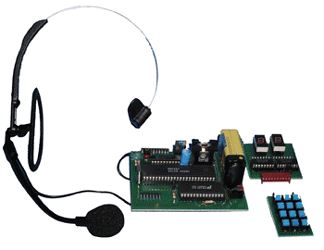
The core components of a voice control device circuit work together to make voice commands possible. Each part plays a unique role in capturing, processing, and acting on your voice. Understanding these key elements helps in building or troubleshooting a voice control system.
The main parts include microcontrollers, speech recognition chips, power supplies, and relays. These components interact to deliver quick and accurate responses to voice commands. The following sections explain their functions in simple terms.
Microcontrollers And Modules
Microcontrollers act as the brain of the voice control circuit. They receive signals from the speech recognition module. Then, they process these signals and send commands to other parts of the system.
Common microcontrollers used are Arduino and Raspberry Pi. They are easy to program and connect to various modules. These microcontrollers control the timing and logic of the device.
Speech Recognition Chips
Speech recognition chips convert voice commands into digital signals. They filter background noise and detect specific words or phrases. Popular chips include the Elechouse Voice Recognition Module and the EasyVR module.
These chips simplify voice detection without needing a computer. They allow offline voice control, which is faster and more secure. The chip sends the recognized command to the microcontroller for action.
Power Supply And Relays
The power supply provides the necessary voltage and current for the circuit. It must be stable to avoid errors or damage. Common power sources include batteries or adapters.
Relays act as electronic switches controlled by the microcontroller. They turn appliances or devices on and off based on voice commands. Relays isolate the low-power circuit from high-power devices for safety.
Circuit Design
Designing a voice control device circuit involves careful planning and precise connections. The circuit must interpret voice commands accurately and control devices effectively. Each part of the circuit plays a key role in the system’s overall function.
Understanding the circuit design helps build a reliable and responsive voice control system. Clear wiring and proper integration ensure smooth operation of all components.
Wiring The Microcontroller
Begin by connecting the microcontroller to a stable power source. Use the recommended voltage for your specific model. Connect input pins to the voice recognition module’s output pins. Ground all components to avoid interference. Make sure all connections are secure to prevent data loss.
Integrating Voice Modules
Choose a voice module compatible with your microcontroller. Connect the module’s output to the microcontroller’s input pins. Set the module’s power supply as per its specifications. Test the module separately before integration. Proper integration ensures the microcontroller receives clear commands.
Connecting Output Devices
Output devices include LEDs, relays, or motors. Connect these devices to the microcontroller’s output pins. Use suitable drivers or transistors if needed to handle higher currents. Ensure the output device receives the correct voltage and current. This step controls your appliances based on voice commands.

Credit: www.amazon.com
Software Setup
Setting up the software is key to making a voice control device circuit work. It involves programming the device to understand your commands. The software connects your voice to the hardware, allowing smooth operation. This process requires careful coding and testing to ensure accuracy.
Programming Voice Commands
Start by defining clear voice commands. Use simple words that the device can easily recognize. Assign each command to a specific action in the circuit. Write code that listens and matches spoken words with these commands. Keep commands short and distinct to avoid confusion.
Using Offline Recognition
Offline voice recognition runs without internet. It helps devices work faster and more securely. Choose libraries or tools that support offline mode. Train the system with your voice samples for better accuracy. This setup is ideal for privacy and places with poor connectivity.
Debugging And Testing
Test the voice commands in different environments. Check for background noise and different voice tones. Fix errors by reviewing the code and command setup. Use debugging tools to find and solve issues quickly. Repeat tests until the device responds correctly every time.
Building The Device
Voice control device circuits offer many practical uses in daily life. They simplify tasks by allowing hands-free operation. This technology fits well in homes and offices, improving convenience and safety. Below are common use cases that show how voice control circuits enhance modern living.
Voice-controlled Lamps
Voice-controlled lamps let users switch lights on or off using commands. This feature helps people move freely without searching for switches. It is useful at night or in dark rooms. Users can also adjust brightness or change colors with voice commands.
Smart Home Appliances
Many home appliances work with voice control circuits for easy operation. Devices like fans, coffee makers, and TVs respond to simple voice instructions. This control reduces physical effort and saves time. It also supports better energy management by turning off devices when not needed.
Security And Automation
Voice control circuits improve home security and automation systems. Users can lock doors, turn on alarms, or check cameras using voice commands. This hands-free control enhances safety and quick response. Automated routines can also trigger multiple actions through a single voice command.

Credit: community.home-assistant.io
Use Cases
Troubleshooting a voice control device circuit can be challenging. Problems often arise from voice recognition errors, noise interference, or hardware faults. Understanding these common issues helps maintain smooth operation and quick fixes. Below are useful tips to solve typical problems and improve performance.
Improving Voice Recognition
Clear voice commands increase recognition accuracy. Speak slowly and clearly near the microphone. Use a good quality microphone for better sound capture. Adjust the sensitivity settings in your device software. Train the system with your voice for personalized recognition. Avoid speaking too softly or too loudly. Keep the microphone at a consistent distance from your mouth.
Dealing With Noise And Interference
Background noise can confuse the voice control system. Use the device in a quiet environment to reduce errors. Place the microphone away from noisy appliances or fans. Use noise-cancelling microphones if possible. Shield wires and components to prevent electrical interference. Test the device in different locations to find the best spot. Lower the volume of other electronic devices nearby.
Common Hardware Issues
Check all wiring connections for loose or broken links. Inspect the microphone and speaker for damage or dirt. Replace faulty components with compatible parts. Ensure the power supply voltage matches the device requirements. Update the device firmware to fix bugs and improve stability. Test the circuit with a multimeter to find shorts or open circuits. Secure all components to avoid movement or disconnection during use.
Troubleshooting Tips
The future of voice control device circuits holds exciting possibilities. Technology is evolving fast to make these devices smarter and more user-friendly. Innovations aim to improve accuracy, speed, and the range of applications. Expect voice control to become more reliable and accessible for everyone.
Developers focus on enhancing the core features and expanding device integration. This progress will transform how we interact with everyday electronics. Voice control will move beyond simple commands to more complex, context-aware functions.
Ai Integration
Artificial Intelligence is key to future voice control systems. AI helps devices understand natural language better. It allows learning from user habits and preferences. This makes responses more accurate and personalized. AI can also predict commands before they are fully spoken. This reduces response time and improves user experience.
Offline Voice Control Advances
Offline voice control is gaining importance. Devices will process commands without needing the internet. This improves privacy and reduces delays. Advances in edge computing enable this shift. Offline systems also work in places with poor connectivity. Users gain more control and security over their data.
Expanding Device Compatibility
Future trends include wider device compatibility. Voice control will work across more gadgets and brands. Standardized protocols will make integration easier. Smart homes will have seamless communication between devices. Users will control lights, appliances, and security systems with one voice interface. This creates a more connected and convenient environment.
Frequently Asked Questions
What Are Voice-controlled Devices?
Voice-controlled devices respond to spoken commands to operate gadgets like lights, speakers, and appliances using virtual assistants.
How Do I Fix My Voice Control?
Check your device’s internet connection and move to a quiet area. Speak slowly and clearly. Use a headset microphone and repeat commands if needed.
How To Make A Voice Control Switch?
To make a voice control switch, connect a microphone to a microcontroller. Program it to recognize voice commands. Use a relay module to control power. Power the circuit safely. Test the switch by speaking commands to turn devices on or off.
What Is Voice Control Used For?
Voice control allows users to operate devices and appliances using spoken commands. It enhances hands-free interaction and accessibility.
Conclusion
Building a voice control device circuit opens many possibilities. It offers hands-free operation for various appliances. The design uses simple components and clear steps. Anyone can follow along and create their own system. Voice control adds convenience and modern touch to daily life.
Experimenting with circuits helps improve your electronics skills. Start small, learn, and expand your projects over time. This technology will keep growing and becoming more useful.