

Imagine controlling your devices just by speaking to them—no buttons, no screens, no hassle. Voice activated device control puts you in charge with simple words, making your life easier and more efficient.
Whether you want to turn on the lights, adjust the thermostat, or play your favorite song, your voice becomes the remote control. Curious how this technology works and what it means for your daily routine? Keep reading to discover the smart secrets behind voice commands and how you can start using them today.

Credit: www.tripwire.com
How Voice Control Works
Voice activated device control works by turning spoken words into actions. It involves several key steps that help devices understand and respond to voice commands quickly and accurately.
The process starts with capturing sound and ends with the device performing the requested task. Each step uses advanced technology to make voice control smooth and reliable.
Microphone And Audio Capture
Microphones pick up your voice from the environment. They convert sound waves into digital signals. Devices often use multiple microphones to capture sound from different directions. This helps focus on the speaker’s voice and ignores background noise.
Noise Reduction Techniques
Noise reduction filters out unwanted sounds. It removes background noise like traffic or chatter. This makes the voice command clearer. Techniques like echo cancellation and beamforming improve voice clarity. They help the device hear you better, even in noisy places.
Speech To Text Conversion
Speech to text technology changes your spoken words into written text. This step is called speech recognition. It breaks down sounds into words the device can understand. Fast and accurate conversion is important for quick responses. Many devices use cloud services or onboard processors for this task.
Role Of Natural Language Processing
Natural Language Processing, or NLP, helps devices understand the meaning behind words. It analyzes sentence structure and context. NLP allows devices to grasp commands like “turn on the light” or “set an alarm.” It also helps handle different accents and phrasing. This makes voice control more flexible and user-friendly.
Machine Learning Enhancements
Machine learning improves voice control over time. Devices learn from user interactions and feedback. They get better at recognizing voices and understanding commands. This technology adapts to new words and languages. It helps keep voice control accurate and efficient as it evolves.
Popular Voice Devices
Voice activated devices have become common in many homes. They make daily tasks easier by responding to simple voice commands. These devices vary in type and function, fitting different needs and budgets. Understanding popular voice devices helps you choose the right tools for your home.
Smart Speakers And Remotes
Smart speakers like Amazon Echo and Google Nest respond to voice commands instantly. They play music, answer questions, and control other smart devices. Voice remotes let you control your TV or streaming device hands-free. These devices offer convenience and add fun to your entertainment.
Voice-controlled Smart Plugs
Smart plugs connect to your home appliances and respond to voice commands. You can turn lights, fans, or coffee makers on and off without moving. These plugs are affordable and easy to set up. They bring smart control to devices that are not normally connected to the internet.
Home Automation Kits
Home automation kits include multiple devices controlled by voice. They often contain smart bulbs, sensors, and hubs. These kits create a connected home experience. You can control lighting, temperature, and security with simple voice instructions.
Universal Remote Controls
Universal remotes with voice control manage many devices at once. They work with TVs, sound systems, and streaming boxes. These remotes replace multiple controllers with one device. Voice commands make switching channels and adjusting volume faster and easier.
Setting Up Voice Control
Setting up voice control for your devices is simple and quick. It lets you manage your smart home or gadgets using just your voice. Follow these steps to get your devices ready and responsive to your commands.
Connecting Devices To Wi-fi
First, connect your device to a stable Wi-Fi network. Check that your router is working and the signal is strong. Use the device app or settings menu to find the Wi-Fi option. Enter your network name and password carefully. Wait for the device to confirm the connection before moving on.
Configuring Voice Assistants
Next, set up your preferred voice assistant like Google Assistant, Alexa, or Siri. Open the assistant app on your phone or tablet. Follow the prompts to sign in or create an account. Grant necessary permissions for microphone and device access. Test by saying the wake word to ensure the assistant responds.
Customizing Voice Commands
Make your voice control more personal by customizing commands. Use the assistant’s app to add shortcuts or routines. Assign specific phrases to turn on lights, play music, or adjust temperature. Keep commands short and clear for better recognition. This customization saves time and adds convenience.
Troubleshooting Common Issues
If your device does not respond, check the Wi-Fi connection first. Restart your device and the voice assistant app. Ensure the microphone is not muted or blocked. Update the device firmware and app to the latest version. Consult the help section or support if problems persist.

Credit: www.researchgate.net
Hands-free Navigation Tips
Hands-free navigation makes controlling devices easier and safer. Voice commands allow users to operate gadgets without touching screens or buttons. This is helpful while cooking, driving, or multitasking. Using simple voice instructions speeds up tasks and improves accessibility for everyone.
Basic Commands For Screens
Use short voice commands to move through screens quickly. Say “go back” to return to the previous page. Saying “go home” takes you to the main screen. Commands like “scroll down” or “scroll up” help you read long pages. These basic commands reduce the need for touching your device.
Interacting With Apps By Voice
Many apps support voice interaction for hands-free use. Say “open [app name]” to launch apps instantly. You can say “click [button name]” to press buttons inside apps. Commands like “search for [term]” work in browsers and shopping apps. Voice control in apps saves time and keeps your hands free.
Voice Access For Android
Voice Access is a tool for controlling Android phones with voice. It lets you navigate, type, and use apps without touching the screen. After enabling Voice Access, speak commands like “tap” or “swipe right.” The tool is designed for people with limited mobility or those who want hands-free control.
Optimizing Response Times
Faster voice command responses improve your experience. Speak clearly and close to the device microphone. Use simple and direct commands to avoid confusion. Keep your device updated to benefit from the latest improvements. Reducing background noise also helps the device understand you better.
Privacy And Security Concerns
Voice activated devices offer great convenience but raise important privacy and security concerns. Users often worry about how their voice data is collected, stored, and used. Understanding these issues helps you stay safe while using voice technology.
Always Listening Myth
Many believe voice devices only listen after hearing a wake word. The truth is, they continuously listen for that trigger. This means the microphone is always on, but the device processes sounds locally until it detects the wake word. This design raises concerns about accidental recordings and privacy.
Data Processing On Servers
Once the device hears the wake word, it sends voice data to remote servers for processing. Cloud servers analyze the commands and send back responses. This transfer can expose data to hacking or misuse. Some companies store voice recordings for improving services, which may risk user privacy.
Risks Of Voice Data Exposure
Voice data can reveal sensitive information like personal habits and locations. If hackers access these recordings, they might misuse the data. Devices with weak security or outdated software increase exposure risks. Users must be aware of these dangers when enabling voice controls.
Best Practices For Privacy
To protect your privacy, review device settings regularly. Disable features that record and store voice data unnecessarily. Use strong passwords and enable two-factor authentication. Keep software updated to fix security flaws. Limit device access to trusted people only.
Limitations And Challenges
Voice activated device control offers convenience and hands-free operation. Yet, it faces several limitations and challenges that affect user experience. Understanding these issues helps users set realistic expectations and choose the right device for their needs.
Latency And Response Delays
Devices often take time to process voice commands. This delay can frustrate users expecting instant responses. Network speed and device power impact how fast commands execute. Longer delays reduce the feeling of seamless control.
Speech Recognition Errors
Voice systems sometimes misunderstand commands. Errors occur due to unclear speech or similar-sounding words. These mistakes force users to repeat commands or switch to manual control. Improving accuracy remains a key focus for developers.
Accent And Dialect Variability
Different accents and dialects challenge voice recognition software. Systems trained on limited speech samples may fail to understand diverse users. This issue limits accessibility for people with non-standard accents. More inclusive training data can reduce this barrier.
Environmental Noise Impact
Background noise reduces voice command accuracy. Noisy environments cause devices to miss or misinterpret instructions. This problem is common in busy homes or public spaces. Noise-canceling microphones and better algorithms help, but noise still poses a challenge.
Future Of Voice Control
The future of voice control holds exciting possibilities. This technology will become smarter, faster, and more connected. Voice commands will feel natural and reliable. Devices will respond quickly and accurately, making everyday tasks easier. Voice control will blend deeply with our digital environments, changing how we live and work.
Advances In Ai And Nlp
Artificial Intelligence (AI) and Natural Language Processing (NLP) are improving rapidly. Devices will understand context and emotions better. They will recognize different accents and speech patterns. This will reduce errors and make conversations smoother. Voice assistants will handle complex requests with ease. AI will allow devices to learn user preferences over time.
Edge Computing For Faster Processing
Edge computing processes data near the user, not in distant servers. This lowers response times significantly. Voice commands will trigger instant actions without delays. It also improves privacy by keeping data local. Devices will work even without internet access. Faster processing means more reliable and secure voice control.
Integration With Iot Devices
Voice control will link with more Internet of Things (IoT) devices. Smart homes, cars, and offices will respond to voice commands. Lights, thermostats, and security systems will adjust instantly. This integration will create seamless user experiences. Managing multiple devices will become simple and hands-free. Voice will become the main way to control connected tech.
Expanding Use Cases In Smart Living
Voice control will reach beyond homes into many areas. Healthcare devices will assist patients and caregivers. Education will use voice to help students learn interactively. Retail stores may offer voice shopping and support. Voice commands will aid people with disabilities daily. Smart living will become more accessible and convenient for everyone.
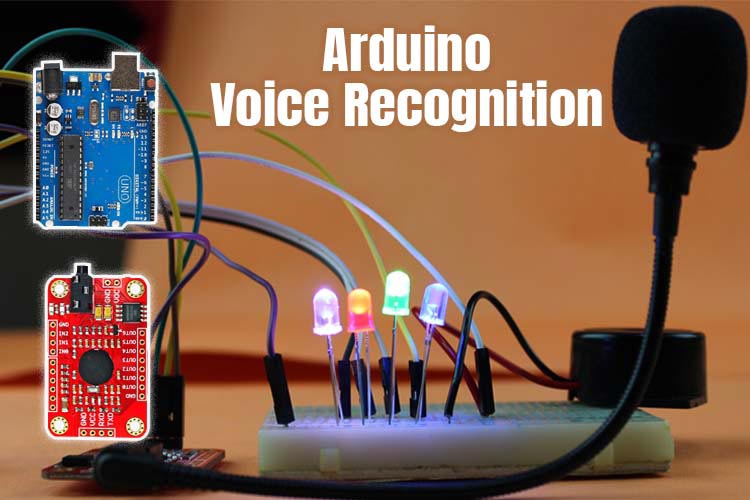
Credit: quartzcomponents.com
Frequently Asked Questions
How Can I Control My Device With My Voice?
Control your device by speaking commands like “go back,” “click,” or “scroll down. ” Use voice assistants such as Google Assistant or Alexa for hands-free operation. Ensure your device’s microphone and voice control features are enabled for seamless interaction.
Are Voice-activated Devices Always Listening?
Voice-activated devices constantly listen for wake words like “Alexa” or “Hey Siri. ” They only record after detecting these words. This background listening enables quick responses but raises privacy concerns.
What Are The Disadvantages Of Voice-activated Devices?
Voice-activated devices may cause privacy risks by always listening. They can misinterpret commands and respond slowly. Background noise often reduces accuracy. Some require internet, raising data security concerns.
How Do Voice-activated Devices Work?
Voice-activated devices capture your voice using a microphone, convert it to digital data, and analyze it with AI. They understand commands via natural language processing and perform actions accordingly.
Conclusion
Voice-activated device control makes life simpler and more convenient. You can operate many gadgets just by speaking. This hands-free method saves time and effort every day. It also helps people with limited mobility or busy hands. While privacy matters, technology keeps improving for safer use.
Voice control continues to grow in homes and workplaces worldwide. Try it out to see how easily it fits your routine. Simple commands can change how you interact with technology. The future of device control is clearly voice-driven.


