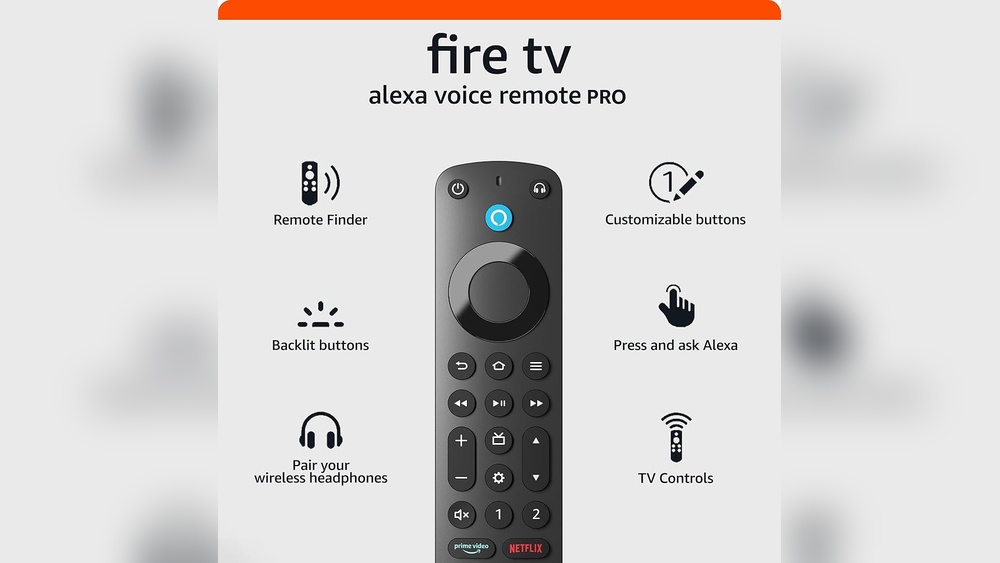

Imagine controlling your entire home entertainment system with just your voice. No more fumbling for multiple remotes or getting up to adjust settings.
With the Alexa Voice Remote, you hold the power to easily manage your TV, sound system, and even smart home devices—all by simply speaking. If you’ve ever wished for a hands-free way to control your devices, this guide will show you how to unlock that convenience.
Keep reading to discover how the Alexa Voice Remote can transform your daily routine, making entertainment and smart home control effortless and fun.

Credit: www.amazon.com
Alexa Voice Remote Basics
The Alexa Voice Remote makes controlling your smart devices simple. It combines voice commands with traditional remote functions. This helps you manage your TV, sound systems, and smart home gadgets easily. Learning the basics can improve your experience and save time.
With this remote, you speak to Alexa to find shows, adjust volume, or control lights. It reduces the need for multiple remotes and apps. The remote’s design supports quick access to popular features. Understanding its core functions is the first step to using it effectively.
Key Features
The Alexa Voice Remote includes a built-in microphone for voice commands. It has buttons for power, volume, and navigation. You can use it to search for content without typing. The remote supports hands-free listening on some devices. It also allows you to control smart home gadgets with simple phrases.
Supported Devices
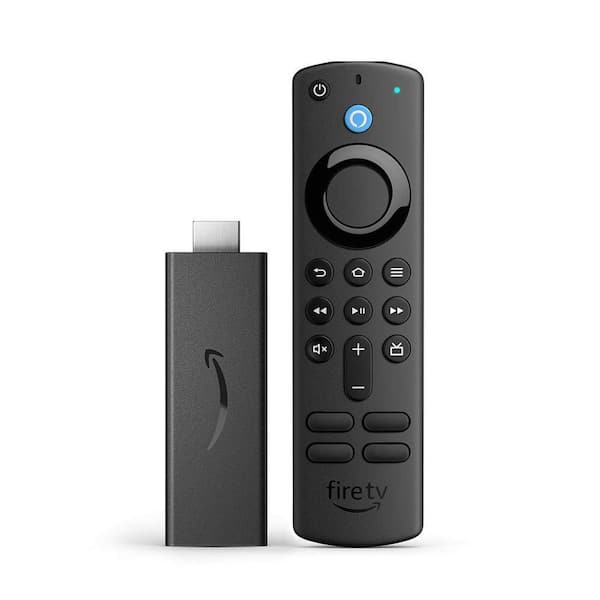
This remote works with Fire TV devices, like Fire TV Stick and Fire TV Cube. It can also control some smart TVs and soundbars. Many smart home devices connect through the Alexa app, which the remote supports. Check your device compatibility in the product details or user manual. Supported devices receive regular updates to improve performance.
Setting Up Your Remote
Start by inserting batteries into the remote. Press and hold the Home button to pair it with your Fire TV. Follow the on-screen instructions to complete setup. Use the Alexa app to link smart home devices if needed. Test voice commands to ensure everything works smoothly. Setup usually takes only a few minutes.

Credit: www.nytimes.com
Connecting Smart Devices
Using voice commands with the Alexa Voice Remote makes controlling your smart home easy. Speak naturally and Alexa responds quickly. This hands-free control saves time and effort. Simple phrases manage many devices around you.
Alexa understands many commands for common devices. From lights to entertainment, you can direct Alexa to adjust settings without touching any switches. This section covers key voice commands you can use daily.
Controlling Lights And Switches
Turn lights on or off by saying, “Alexa, turn on the living room light.”
Adjust brightness with commands like, “Alexa, dim the kitchen lights to 50%.”
Control smart plugs or switches by saying, “Alexa, turn off the fan.”
Create groups to control multiple lights with one command, such as, “Alexa, turn off all lights.”
Adjusting Thermostats
Change the temperature by saying, “Alexa, set the thermostat to 72 degrees.”
Ask for the current temperature with, “Alexa, what is the thermostat set to?”
Switch between heating and cooling modes using commands like, “Alexa, set the thermostat to cool.”
Manage schedules by telling Alexa to adjust temperatures at specific times.
Managing Entertainment Devices
Control your TV by saying, “Alexa, turn on the TV.”
Change channels or volume with commands like, “Alexa, increase the volume.”
Play music or videos by telling Alexa, “Play jazz music on Spotify.”
Pause, resume, or stop playback using simple voice commands.
Voice Commands For Control
Troubleshooting common issues with the Alexa Voice Remote helps keep your devices running smoothly. Small problems can stop your voice commands from working. Quick fixes often solve these glitches. Understanding the typical issues saves time and frustration. Follow these tips to get your Alexa Voice Remote back on track fast.
Device Not Responding
Check if the remote has fresh batteries. Weak batteries cause poor response. Make sure the remote is within range of your device. Remove any objects blocking the signal. Restart the device and remote to refresh connections. Press the microphone button firmly when speaking. Confirm the device is powered on and not muted.
Connectivity Problems
Wi-Fi issues often disrupt Alexa’s connection. Verify your internet is working properly. Restart your router to clear network errors. Ensure the device and remote use the same Wi-Fi network. Move closer to your Wi-Fi router for a stronger signal. Disable any VPN or firewall that may block Alexa. Update your network settings if needed.
Skill And App Updates
Outdated skills or apps cause command failures. Open the Alexa app and check for updates. Enable automatic updates to keep skills current. Remove and reinstall problematic skills if they fail to work. Restart the Alexa app after updates. Make sure your device’s firmware is up to date. Updated software improves performance and fixes bugs.
Troubleshooting Common Issues
Controlling devices with the Alexa Voice Remote offers convenience but raises important privacy and security questions. Understanding how your data is handled and how to protect your smart home helps you use Alexa safely. This section explains key privacy aspects and ways to secure your devices.
Data Processing Concerns
Alexa processes voice commands by sending audio data to Amazon servers. This data helps improve responses and services. Some users worry about how much data is collected and stored. Amazon states it uses strong encryption to protect this data. Users can control settings to limit data collection and sharing.
Managing Voice Recordings
Alexa saves voice recordings to improve recognition. You can review and delete these recordings anytime. The Alexa app allows easy access to your voice history. Deleting recordings regularly enhances your privacy. You can also set Alexa to stop saving voice data automatically.
Securing Your Smart Home
Smart devices connected to Alexa need strong security. Use unique, strong passwords for your accounts and devices. Enable two-factor authentication for extra protection. Keep your device software updated to fix security flaws. Monitor device activity to spot unusual behavior early.
Privacy And Security
Maximizing your smart home experience with the Alexa Voice Remote makes daily tasks easier. Using voice commands, you control many devices without lifting a finger. This hands-free convenience helps create a seamless, connected home environment. Alexa’s remote lets you manage lights, thermostats, and entertainment systems quickly.
Smart homes adapt to your lifestyle. Customizing routines and integrating various devices enhance comfort and efficiency. Subscription features add extra benefits for users seeking advanced control and personalization.
Custom Routines And Scenes
Set up custom routines to automate multiple tasks with one command. For example, say “Alexa, good night” to turn off lights and lock doors. Scenes group devices to create the perfect mood or setting. Adjust brightness, temperature, and music all at once. These routines save time and simplify your day.
Integrating Third-party Devices
Alexa Voice Remote supports many third-party smart devices. Connect security cameras, smart plugs, and even coffee makers. This integration expands your smart home’s capabilities. Use one remote to control devices from different brands easily. Compatibility ensures your home stays connected and responsive to voice commands.
Subscription Features And Benefits
Subscription services offer extra control and customization. Some plans provide advanced voice recognition and hands-free features. Others include premium skills and faster response times. These options improve your Alexa experience by making commands smoother. Subscriptions can add value for users who want more from their smart home setup.
Credit: www.homedepot.com
Frequently Asked Questions
Can Alexa Control Other Devices?
Alexa can control smart home devices like lights, thermostats, and locks using voice commands or the Alexa app.
Why Are People Getting Rid Of Alexa?
People are ditching Alexa due to discontinued older devices, removed features, privacy concerns, and Amazon’s push for paid subscriptions.
How To Use Alexa Voice Remote?
Press the voice button on the Alexa remote. Speak your command clearly. Alexa will respond and execute the task instantly. Use it to control smart devices, search content, or get information hands-free.
Why Is Alexa Not Controlling My Devices?
Alexa may not control devices due to Wi-Fi issues, device incompatibility, outdated app, or incorrect setup. Check connections and update settings.
Conclusion
Controlling devices with the Alexa Voice Remote makes daily tasks simpler. You can manage lights, TVs, and more with just your voice. Setting up smart home groups helps control multiple devices at once. Alexa’s easy commands save time and reduce hassle.
This hands-free control suits busy lifestyles and all skill levels. Using Alexa Voice Remote adds convenience without extra effort. Try it today and experience smoother device control at home.