
Are you ready to upgrade your home security without the hassle of traditional keys? Installing a smart code door lock is easier than you think, and it can give you peace of mind every time you leave your house.
Imagine never fumbling for keys again or worrying about lost copies. In this guide, you’ll discover simple steps to install your smart code door lock quickly and correctly. By the end, you’ll have a secure, keyless entry that makes your life safer and more convenient.
Let’s get started!

Credit: iveise.com
Choosing The Right Smart Code Door Lock
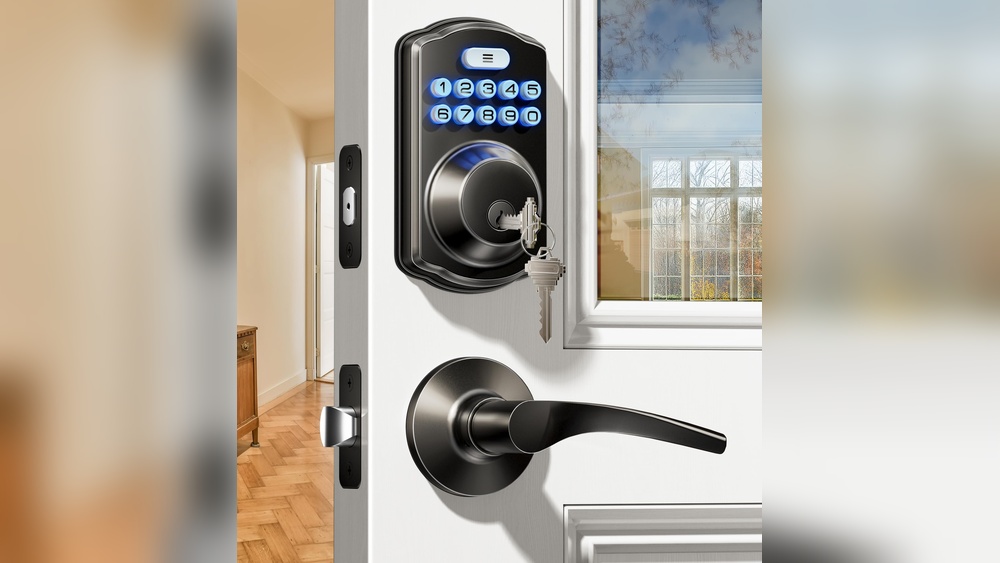
Choosing the right smart code door lock is important for home security. It helps keep your home safe and gives easy access to trusted people. Picking the best lock means understanding the types, features, and door compatibility. This guide will help you make a smart choice.
Types Of Smart Locks
Smart locks come in many styles. Some attach to the inside of your door. Others replace the whole lock system. Keypad locks let you enter a code to open the door. Some use fingerprint scanners for extra security. Choose the type that fits your needs and lifestyle.
Key Features To Consider
Look for features like battery life and ease of use. Some locks connect to your phone via Bluetooth or Wi-Fi. This lets you control the lock remotely. Check if the lock has an alarm for break-in alerts. Make sure it offers a backup key or code option.
Compatibility With Doors
Not all locks fit every door. Measure your door’s thickness before buying. Check if the lock works with your door’s material. Metal, wood, and glass doors may need different locks. Confirm the lock fits your door’s existing holes and setup.
Credit: pacha-automation.com
Gathering Required Tools
Gathering the right tools is the first step in installing a smart code door lock. Having everything ready makes the process smooth and fast. This guide lists the basic and optional tools you might need. Check your package and door type to know what fits best.
Basic Tools Checklist
- Screwdriver (Phillips and flathead)
- Drill with drill bits
- Measuring tape
- Level
- Pencil or marker
- Chisel (for door adjustments)
- Battery (usually AA or AAA for the lock)
- Installation manual (included with the lock)
Optional Tools For Advanced Installation
- Power screwdriver for faster work
- Wood filler for fixing holes
- Multimeter to check battery and wiring
- Template or stencil for precise drilling
- Utility knife for trimming excess material
- Safety glasses and gloves for protection
- Extra screws or mounting hardware
Preparing The Door
Preparing the door is the first step to install your smart code door lock. It ensures the lock fits well and works correctly. Proper preparation saves time and prevents problems later. You need to remove old parts and check measurements carefully.
Removing Old Lock Components
Start by taking off the existing lock. Use a screwdriver to remove screws from the door handle and lock plate. Keep the screws in a safe place if needed later. Remove the latch and deadbolt from the door edge. Clean the area to remove dirt or debris. This clears space for the new smart lock.
Measuring And Marking
Measure the door thickness to match the lock’s requirements. Use a tape measure to check the hole size for the lock cylinder. Mark new drill points if the smart lock needs extra holes. Use a pencil to mark clearly. Double-check all measurements before drilling. Accurate marking helps the lock fit perfectly and work smoothly.
Installing The Lock Mechanism
Installing the lock mechanism is a key step in setting up your smart code door lock. It involves placing both the outside and inside parts correctly. This ensures your door locks and unlocks smoothly. Follow each step carefully to avoid errors.
Mounting The Exterior Assembly
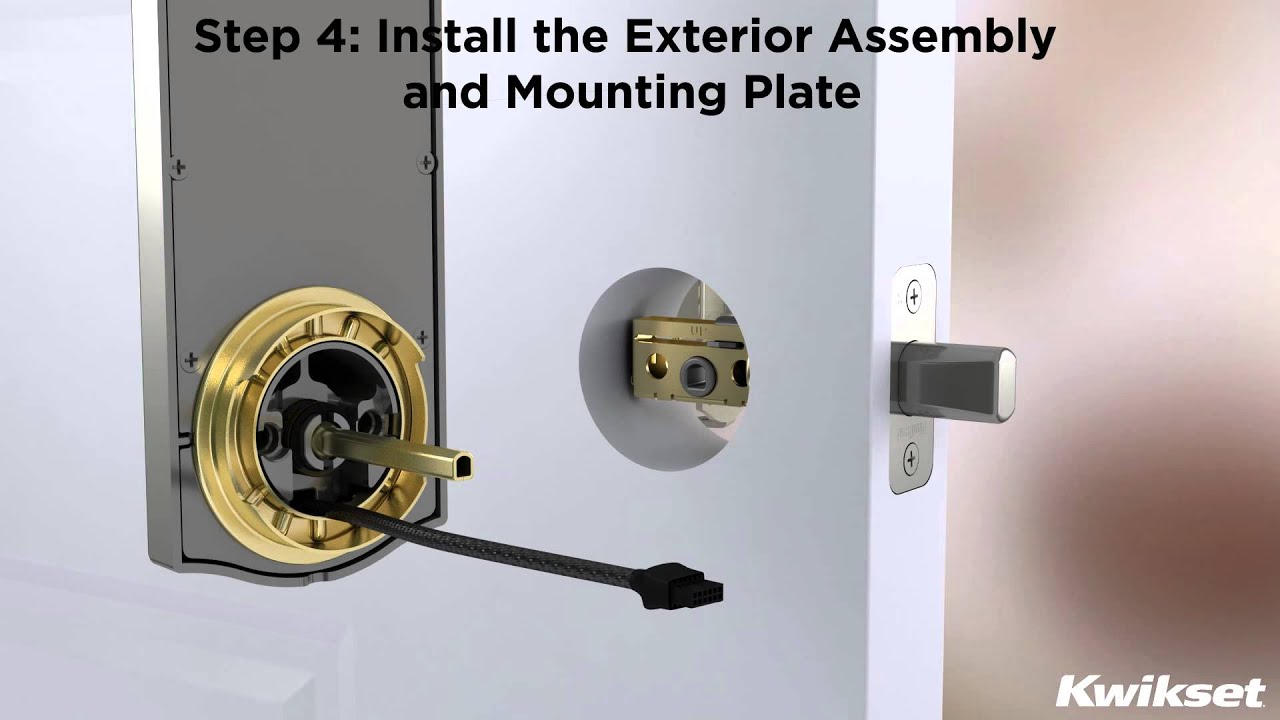
Start by placing the exterior assembly on the outside of the door. Align it with the holes you drilled earlier. Make sure the keypad faces outward and is level. Feed the connecting cable through the door hole gently. Secure the assembly with screws but do not tighten them fully yet.
Installing The Interior Assembly
Next, attach the interior assembly inside your door. Connect the cable from the exterior side to the interior unit. Align the interior part with the screw holes on the door. Insert screws and tighten them enough to hold the unit firmly. Check the alignment with the exterior assembly before fully tightening.
Securing The Deadbolt
Insert the deadbolt into the door edge. Make sure it slides smoothly without resistance. Attach the faceplate over the deadbolt and secure it with screws. Test the deadbolt by locking and unlocking manually. This step ensures the lock mechanism works properly before final setup.
Connecting The Lock Components
Connecting the lock components is a key step in installing a smart code door lock. It ensures the lock works smoothly and securely. This step involves putting together the internal and external parts carefully. Proper connection prevents issues like jamming or battery drain.
Take your time to connect each piece correctly. The lock must fit tightly on the door. Loose parts can cause problems later. Follow the instructions closely for best results.
Aligning The Parts
Start by placing the exterior keypad on the outside of the door. Make sure the keypad is straight and level. Next, align the interior assembly on the inside of the door. The two parts must line up perfectly to connect.
Check that the spindle or tailpiece fits through the door hole. This piece links the keypad to the interior lock. Adjust the position until the parts fit without force. Proper alignment helps the lock operate smoothly.
Securing Screws And Fasteners
After aligning, fasten the lock components with screws. Use the screws provided in the package. Tighten them evenly but do not over-tighten. Over-tightening can damage the lock or door.
Secure all screws to hold the lock firmly in place. Check for any loose parts and tighten as needed. Well-secured screws ensure the lock stays stable and works well over time.

Credit: www.amazon.com
Setting Up The Smart Features
Setting up the smart features of your code door lock is simple and quick. This step lets you control who enters your home with ease. You can customize access, track usage, and connect to your phone. Follow these steps to get started smoothly.
Powering The Lock
Start by installing the batteries. Most smart locks use AA or rechargeable batteries. Open the battery compartment, insert the batteries correctly, and close it securely. The lock will light up or beep to show it has power. Change batteries when the lock warns low power.
Programming Access Codes
Next, set your personal access codes. Use the keypad on the lock to enter the programming mode. Follow the instructions in the manual to add new codes. Choose simple numbers you can remember but hard for others to guess. Assign different codes for family or guests to keep track of who enters.
Pairing With Mobile Apps
Many smart locks connect to apps for remote control. Download the lock’s app on your smartphone. Open the app and follow the steps to pair it with your lock. This often involves scanning a QR code or entering a code from the lock. Once paired, you can lock or unlock the door from anywhere.
Testing The Lock Functionality
Testing the lock functionality is a crucial step after installing your smart code door lock. It ensures the lock works smoothly and securely. This step helps catch any problems early. Testing covers both manual and digital operations. Follow these simple tests to verify your lock’s performance.
Manual Operation Test
Start by testing the lock manually. Turn the key or thumb turn inside the door. Check if the deadbolt moves freely. Make sure the door locks and unlocks without resistance. The lock should feel smooth, not stiff. Close the door and try to open it without using the key. The lock should hold the door firmly in place.
Digital Access Test
Next, test the digital keypad or app access. Enter your code or use the app to unlock the door. The lock should respond quickly and silently. Try locking the door using the keypad or app. Confirm the lock clicks and secures the door. Test multiple codes if you set more than one. Each code must work properly and independently.
Troubleshooting Common Issues
If the lock does not work properly, check the battery first. Low battery often causes slow or no response. Make sure the lock is correctly aligned with the door frame. Misalignment can cause jamming. Reset the lock if codes do not work. Follow the user manual for reset steps. If problems persist, contact customer support for help.
Maintaining Your Smart Lock
Maintaining your smart code door lock ensures it works smoothly and lasts longer. Regular care helps avoid problems like lockouts or malfunctions. A well-kept lock keeps your home safe and secure.
Battery Replacement Tips
Check the battery level often. Replace batteries before they run out completely. Use the type of battery recommended by the manufacturer. Keep spare batteries nearby for quick replacement. Low batteries can cause the lock to fail.
Regular Cleaning
Clean the lock’s surface gently with a soft cloth. Avoid harsh chemicals that can damage the finish. Remove dust and dirt around the keypad and mechanism. Keeping the lock clean helps it respond better to your touch.
Firmware Updates
Install updates from the lock’s app or website. Updates fix bugs and improve security features. Set reminders to check for new firmware regularly. Updated software keeps your lock running smoothly and safely.
Frequently Asked Questions
What Tools Are Needed To Install A Smart Code Door Lock?
You need a screwdriver, drill, measuring tape, and batteries. These tools help secure the lock and ensure proper installation. Always check the lock’s manual for specific tool requirements before starting.
How Do I Program The Access Codes On My Lock?
Access codes are programmed via the lock’s keypad or app. Follow the manufacturer’s instructions to add, delete, or change codes. Always test the codes after programming to confirm proper access.
Can I Install A Smart Code Lock On Any Door?
Most smart code locks fit standard doors, but check door thickness and compatibility. Measure your door before buying to ensure a perfect fit. Some locks require specific door types or sizes.
How Long Does It Take To Install A Smart Code Door Lock?
Installation typically takes 20 to 40 minutes, depending on your skill. Reading instructions beforehand speeds up the process. Take your time to avoid mistakes and ensure security.
Conclusion
Installing a smart code door lock is simple and secure. Follow each step carefully for the best results. Take your time to avoid mistakes and ensure the lock fits well. Test the lock several times to confirm it works smoothly.
This upgrade adds convenience and safety to your home. Enjoy the ease of keyless entry every day. Smart locks bring peace of mind with modern technology. Start your installation today and protect your home with confidence.