
Are you ready to upgrade your home security with the August Smart Door Lock? Installing this smart lock can give you more control, convenience, and peace of mind.
But you might be wondering—how exactly do you set it up without hassle? In this guide, you’ll find simple, step-by-step instructions that make the installation process easy and stress-free. By the end, you’ll know exactly how to secure your door with smart technology and start enjoying all the benefits right away.
Keep reading to transform your front door into a smart entry point in no time!

Credit: support.august.com
Preparing For Installation
Preparing for the installation of your August Smart Door Lock sets the stage for a smooth process. This phase ensures you have everything ready and reduces any chances of errors. Taking time here makes the actual setup faster and easier.
Check Compatibility
Start by confirming your door works with the August Smart Lock. Measure the thickness of your door and check the type of deadbolt. The lock fits most standard single-cylinder deadbolts. Also, verify if your door swings inward or outward. Knowing this helps avoid installation issues later.
Gather Necessary Tools
Collect all tools before starting. You will need a screwdriver, a tape measure, and possibly a drill. Some models may require additional items like batteries or mounting hardware. Having these tools ready saves time. It prevents interruptions during the process.
Charge The Lock Battery
Charge the lock’s battery fully before installation. A full battery ensures the lock works without problems right away. Most August locks use rechargeable batteries or standard AA batteries. Follow the instructions in the manual to charge or insert them correctly. This step avoids power issues after setup.
Removing Existing Lock
Removing the existing lock is the first step in installing your August Smart Door Lock. This step ensures a smooth setup for the new device. Start by carefully taking off the old lock parts. Prepare your tools before you begin to make the process quick and easy.
Unscrew The Old Lock
Use a screwdriver to remove all screws holding the old lock in place. Keep the screws safe if you plan to reuse them. Remove the screws on both the inside and outside of the door. Gently pull the lock away from the door after all screws are out.
Remove Door Hardware
Take off the door handle or knob connected to the lock. Check for any additional parts like plates or covers. Remove these pieces carefully to avoid damage. Set all hardware aside in a safe spot for later use or disposal.
Clean The Door Surface
Wipe the door surface where the lock was installed. Remove dirt, dust, and old adhesive residues. Use a damp cloth and mild cleaner for best results. Let the area dry completely before installing the new lock. A clean surface helps the new lock fit securely and work properly.
Installing The August Smart Lock
Installing the August Smart Lock is a simple process. It takes only a few steps to secure your door with smart technology. This guide will help you install the lock easily and quickly.
Attach Mounting Plate
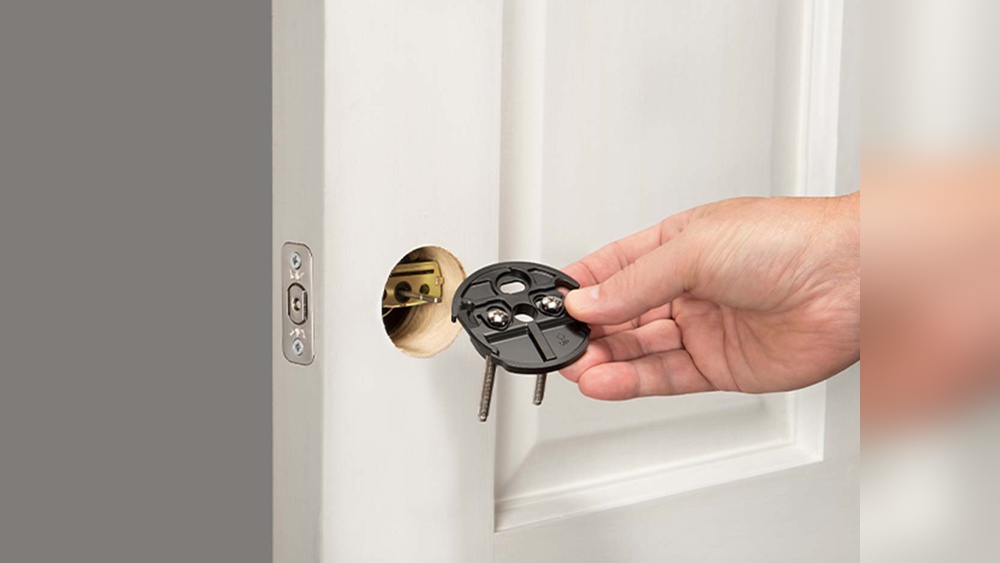
Start by removing the existing deadbolt thumb turn. Place the mounting plate on the inside of your door. Align it with the holes from the removed thumb turn. Use the screws included in the package to fasten the mounting plate. Tighten the screws until the plate is secure but not too tight.
Secure The Lock To The Door
Hold the August Smart Lock body and line it up with the mounting plate. Slide the lock onto the plate carefully. Make sure the lock fits snugly against the door. Use the screws provided to secure the lock. Tighten them firmly to prevent any movement.
Install The Adapter Collar
The adapter collar fits between the lock and your deadbolt. Choose the right collar size based on your door’s deadbolt model. Attach the collar to the back of the lock motor. Press it until it clicks into place. This step ensures the lock turns your deadbolt smoothly.

Credit: www.youtube.com
Setting Up The Lock
Setting up the August Smart Door Lock is simple and quick. This process lets you control your door from anywhere. Follow these steps carefully to ensure smooth installation and connection.
Download The August App
Start by downloading the August app on your smartphone. The app is free and works on both iOS and Android devices. Search for “August Home” in your app store. Download and install the app before moving to the next step.
Create An Account
Open the August app after installation. You need to create a new account to use the lock features. Enter your email address and choose a strong password. Follow the on-screen instructions to complete the signup process. Verify your email if needed.
Connect Lock To Wi-fi
Turn on your August Smart Lock. Make sure your phone’s Bluetooth is active. Follow the app instructions to find and connect the lock. Choose your home Wi-Fi network and enter the password. The lock will connect to your Wi-Fi, enabling remote access.
Calibrating The Lock
Calibrating the August Smart Door Lock is an important step. It helps the lock work smoothly and securely. Proper calibration ensures the lock knows the correct positions for locking and unlocking. This makes your door safer and the lock more reliable.
Follow App Instructions
Open the August app on your phone. The app guides you through the calibration process. Follow each step carefully. The app will ask you to lock and unlock the door. It may also ask you to confirm the lock’s position. This helps the lock learn how your door moves.
Test Lock Operation
After calibration, test the lock several times. Lock and unlock the door using the app or the physical lock. Make sure the lock turns smoothly. The door should lock tightly and unlock without resistance. Testing helps catch any issues early.
Adjust Settings If Needed
If the lock feels stiff or does not align properly, adjust the settings. Use the app to fine-tune the lock’s position. You can also repeat the calibration if needed. Small adjustments improve performance and prevent damage to the lock or door.
Troubleshooting Tips
Installing the August Smart Door Lock is usually simple. Still, some problems can happen. This section helps you fix common issues fast. Follow these tips to keep your lock working well.
Common Installation Issues
Sometimes, the lock does not fit the door right. Check if the lock parts match your door type. Tighten all screws firmly but not too tight. Make sure the lock moves smoothly without sticking. Align the lock with the latch correctly. A misaligned lock can stop it from working.
Battery And Connectivity Problems
Low battery can cause the lock to fail. Use fresh batteries and check battery placement. The lock needs a strong Wi-Fi or Bluetooth signal. Keep the lock near your router during setup. Move the phone closer if connection fails. Restart the lock or app if needed.
When To Contact Support
Some problems may need expert help. Contact support if the lock does not respond after troubleshooting. Call them if the app cannot connect to the lock. Reach out when parts are missing or broken. Support can guide you step-by-step to fix complex issues.

Credit: www.youtube.com
Frequently Asked Questions
How Do I Install August Smart Door Lock?
To install, first remove your existing deadbolt. Attach the August mounting plate, then secure the smart lock. Finally, pair it with the app for control and settings customization.
What Tools Are Needed For Installation?
You will need a screwdriver, batteries, and your smartphone. No special tools are required. The August lock kit usually includes all necessary parts.
How Long Does Installation Take?
Installation typically takes 15 to 30 minutes. It’s a quick process suitable for DIY. Following the instructions carefully ensures a smooth setup.
Can I Install It On Any Door Type?
August Smart Lock fits most standard doors with single-cylinder deadbolts. It’s compatible with wood, metal, or fiberglass doors. Check compatibility before purchase.
Conclusion
Installing the August Smart Door Lock is simple and quick. Follow the steps carefully, and you will have it ready soon. Make sure the lock fits your door type before starting. Test the lock several times to ensure it works well.
Enjoy added security and easy access to your home. Smart locks bring convenience without extra hassle. Keep your phone nearby to control the lock anytime. This upgrade makes your door safer and smarter. A small effort can improve your home’s security a lot.