
Have you ever wondered how the Ring Video Doorbell 2 actually works to keep your home safe? Imagine being able to see, hear, and speak to anyone at your door no matter where you are.
This smart device does more than just ring—it gives you control and peace of mind right from your phone. You’ll discover the simple technology behind the Ring Video Doorbell 2 and how it transforms your front door into a powerful security hub.
Keep reading to find out how it protects your home and makes your life easier.

Credit: www.aboutamazon.com
Ring Video Doorbell 2 Features
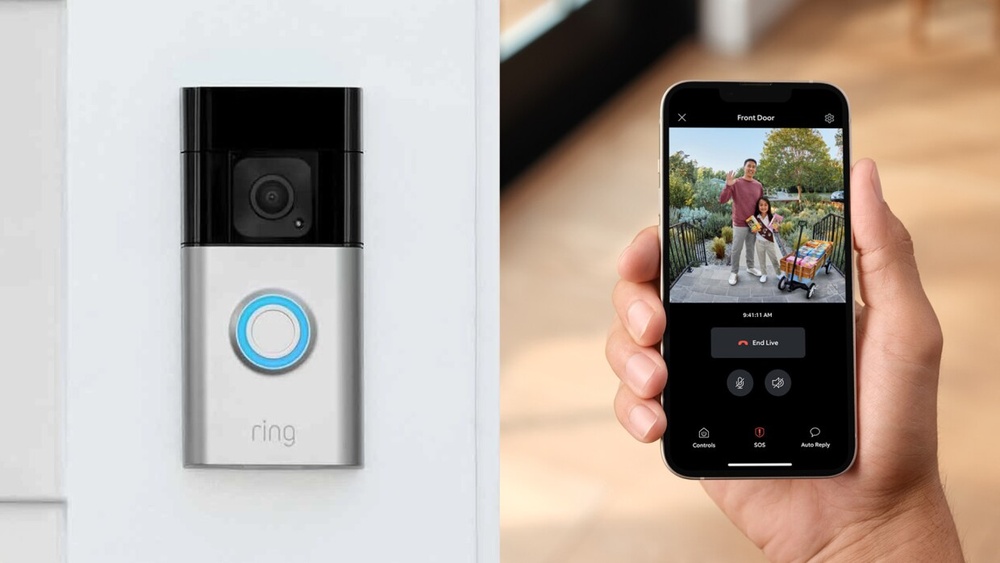
The Ring Video Doorbell 2 offers several features that enhance home security. It combines smart technology with user-friendly design. These features help you see, hear, and speak to visitors easily. The device works smoothly with your smartphone, giving you control anywhere.
Design And Build
The Ring Video Doorbell 2 has a sleek, modern look. It fits well on most doorframes. The device is weather-resistant, perfect for outdoor use. Its sturdy build ensures long-lasting performance. Installation is simple, with clear instructions.
Video Quality
This doorbell records in 1080p HD, offering sharp video. The wide-angle lens captures a large view area. Night vision lets you see clearly in the dark. Live video streaming is smooth and reliable. These features help you monitor your home effectively.
Motion Detection
Ring Video Doorbell 2 detects motion near your door. It sends instant alerts to your phone. You can adjust motion zones to avoid false alarms. This feature helps catch visitors or packages quickly. It keeps your home safer by alerting you in real time.
Two-way Audio
The built-in microphone and speaker allow two-way talk. You can speak to visitors from anywhere using the app. This lets you greet guests or warn strangers. The audio is clear and easy to hear. It adds a layer of interaction and security.
Power Options
This model offers flexible power choices. It can run on a rechargeable battery or hardwired power. Battery life lasts several months with typical use. Hardwiring keeps the device always powered on. These options let you choose what fits your home best.

Credit: www.esseg.eu
Installation Process
The installation process of the Ring Video Doorbell 2 is simple and quick. It allows you to start securing your home without hassle. The device comes with clear instructions and needs only a few tools. Follow these steps carefully to set up your doorbell correctly.
Tools Required
You will need a drill or screwdriver, a level, and the mounting screws included in the box. Also, have a charged smartphone ready for app setup. A pencil helps mark where to drill holes. Make sure the tools are nearby before starting.
Mounting Steps
Start by selecting the best spot near your door. Use the level to ensure the doorbell is straight. Mark the screw holes with a pencil. Drill small holes if you have a hard surface. Attach the mounting bracket with screws. Finally, snap the doorbell onto the bracket until it clicks.
Connecting To Wi-fi
Press the doorbell button to power it on. The device will enter setup mode automatically. Open the Ring app and follow the prompts to find your doorbell. Choose your home Wi-Fi network and enter the password. Wait a few moments for the connection to establish. A confirmation message shows the device is online.
Setting Up The App
Download the Ring app from the app store. Create an account or log in if you already have one. Add your new device by scanning the QR code on the doorbell. Customize settings like motion alerts and video quality. Test the live video feed to confirm everything works well.
How Motion Detection Works
The Ring Video Doorbell 2 uses motion detection to alert you about activity near your door. It senses movement and starts recording video instantly. This helps you see who is outside, even before they press the doorbell.
Sensor Technology
The doorbell uses infrared sensors to detect heat and movement. These sensors pick up changes in temperature caused by people or animals. They work in both daylight and low light to detect motion accurately.
The sensors send signals to the camera to start recording. This technology helps reduce false alerts from things like leaves or cars passing by. It focuses on real activity near your doorstep.
Customizing Motion Zones
You can set specific areas for motion detection. These motion zones tell the doorbell where to watch closely. For example, you can ignore the street and focus on your porch.
Custom zones help avoid alerts from far away or less important spots. You control which parts of your view trigger a motion alert. This keeps notifications relevant and useful.
Notification Settings
The doorbell sends instant alerts to your smartphone or tablet. You get notified whenever motion is detected in your set zones. Notifications include video clips or live views for quick checks.
You can adjust how often and when to receive alerts. This customization allows quiet times or frequent updates. It ensures you stay informed without constant interruptions.
Video Streaming And Storage
The Ring Video Doorbell 2 offers clear video streaming and reliable storage options. It helps you see visitors in real time and saves recordings for later. The system uses smart technology to stream and store videos securely.
Live View Functionality
Live View lets you watch video from your doorbell at any time. Open the Ring app on your phone or tablet to see real-time footage. It shows a clear, color video with sound. This feature helps you check your doorstep anytime, even if no one rings the bell.
Cloud Storage Options
Videos are saved to the cloud, not just on your device. This means your footage stays safe even if the doorbell is damaged or stolen. Ring offers different plans to store video clips for several days. You can choose a plan that fits your needs and budget.
Video Playback Features
Playback lets you watch recorded videos easily. Scroll through past events to see visitors or deliveries. The app highlights motion and ring alerts for quick access. You can save or share clips from the app anytime you want.
Integrations And Compatibility
The Ring Video Doorbell 2 works well with many smart devices. It fits into different home systems easily. This helps users control their doorbell and other gadgets together. The integrations make the doorbell more useful and simple to manage.
Smart Home Integration
The Ring Video Doorbell 2 connects with popular smart home platforms. It works with systems that control lights, locks, and cameras. This lets users create routines. For example, lights can turn on when someone presses the doorbell. The doorbell’s video feed can appear on smart displays instantly.
Supported Devices
This doorbell supports many devices. It works with smartphones, tablets, and computers. Both Android and iOS systems are compatible. Users can see live video and get alerts on these devices. It also supports Wi-Fi, so it connects easily without wires.
Alexa Compatibility
The Ring Video Doorbell 2 works with Alexa. You can ask Alexa to show the doorbell camera on Echo Show devices. Alexa can announce visitors or ring alerts through Echo speakers. This hands-free control adds convenience and keeps users aware of visitors.

Credit: www.esseg.eu
Troubleshooting Common Issues
Ring Video Doorbell 2 is easy to use, but sometimes problems occur. Troubleshooting helps keep your device working well. This section covers common issues and simple fixes. Follow these tips to solve problems fast.
Connectivity Problems
Connection issues stop your doorbell from working right. Check your Wi-Fi signal near the doorbell. Move your router closer if the signal is weak.
Restart your router and the Ring app. Make sure your Wi-Fi password is correct. Remove and re-add your doorbell in the app if needed.
Video Quality Fixes
Blurry or lagging video can be frustrating. Clean the camera lens gently with a soft cloth. Dirt or water drops can cause poor video.
Check your internet speed. Slow internet causes low video quality. Try lowering video resolution in the app to improve streaming.
Battery Life Tips
Battery drains fast with heavy use. Turn off motion alerts for less important areas. This saves battery power.
Charge the battery fully before reinstalling. Use the included charger for best results. Keep the doorbell out of extreme weather to protect the battery.
Frequently Asked Questions
How Does Ring Video Doorbell 2 Detect Motion?
Ring Video Doorbell 2 uses advanced motion sensors to detect movement near your door. It sends instant alerts to your smartphone for real-time monitoring.
What Powers The Ring Video Doorbell 2?
The device is powered by a rechargeable battery. It can also connect to existing doorbell wiring for continuous power.
How Does Ring Video Doorbell 2 Connect To Wi-fi?
It connects via your home’s Wi-Fi network. This enables live video streaming and instant notifications on your phone.
Can I Speak Through The Ring Video Doorbell 2?
Yes, it features two-way audio. You can hear and talk to visitors directly through your smartphone.
Conclusion
The Ring Video Doorbell 2 helps you see visitors clearly. It sends alerts to your phone fast. You can talk to guests without opening the door. The device uses motion sensors to detect activity. It works well with Wi-Fi for smooth video streaming.
Setting it up is simple and quick. This doorbell adds safety and convenience to your home. A smart choice for anyone wanting better home security. Easy to use and reliable every day.