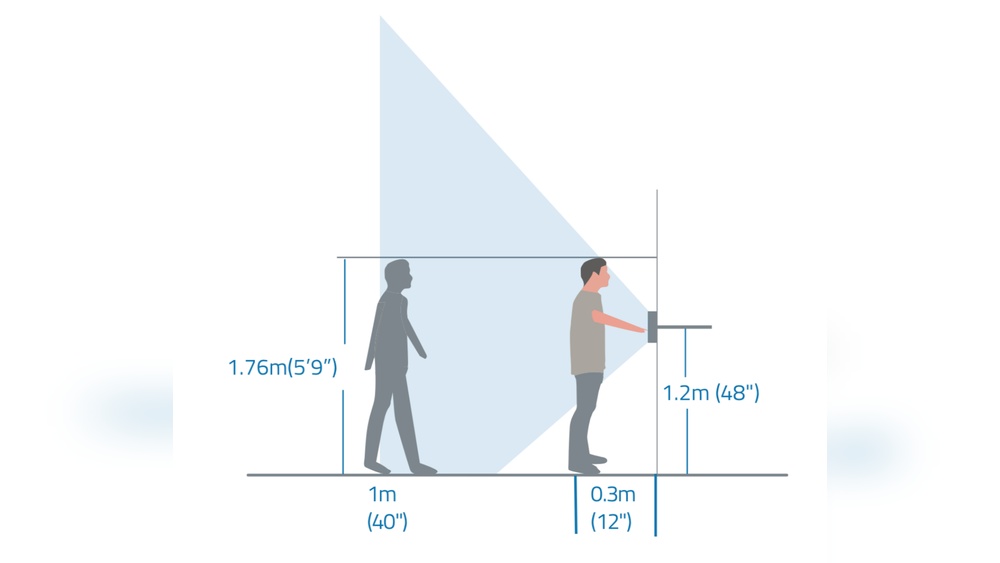

Are you wondering how high to mount your video doorbell for the best view and performance? Getting the height just right can make all the difference in capturing clear footage and making sure your device works perfectly.
In this post, you’ll discover the ideal mounting height that keeps your home secure and your visitors clearly visible. Keep reading to learn simple tips that will help you install your video doorbell like a pro—no guesswork needed!

Credit: www.doorbellmount.com
Ideal Height For Video Doorbells
Choosing the right height for your video doorbell is important. It affects how well the camera captures visitors. It also changes how easy it is to use the doorbell button. Setting the perfect height helps improve security and user experience.
Standard Mounting Heights
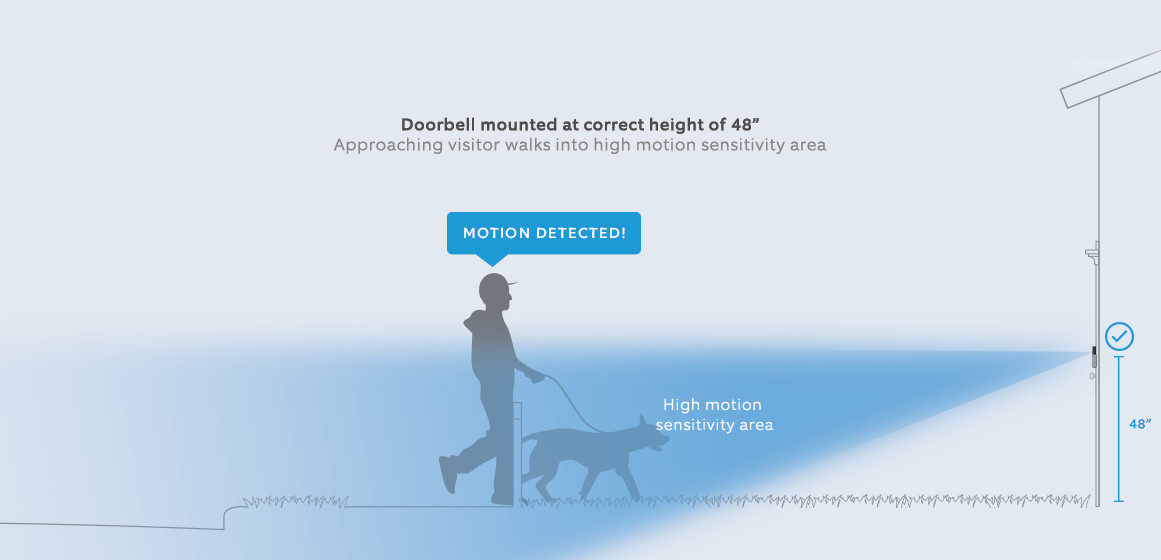
Most video doorbells mount between 48 and 52 inches from the ground. This height fits most people and captures faces well. It also keeps the device out of easy reach for small children. This range balances security and convenience for most homes.
Adjusting For Camera Angle
The camera angle changes with the height you choose. Mounting too high can miss faces or show too much ground. Mounting too low might capture feet or miss taller visitors. Adjust the height to get a clear, centered view of visitors’ faces.
Considering User Heights
Think about who will use the doorbell most. If many people are shorter or taller than average, adjust the height. Make sure children can reach the button if needed. Also, consider wheelchair users to ensure easy access. A little change can make a big difference.
Factors Influencing Placement
Choosing the right height for your video doorbell matters a lot. It affects how well the camera sees visitors and how clear the video is. Several factors guide the best placement. These factors help you get the most from your doorbell’s features.
Field Of View And Coverage
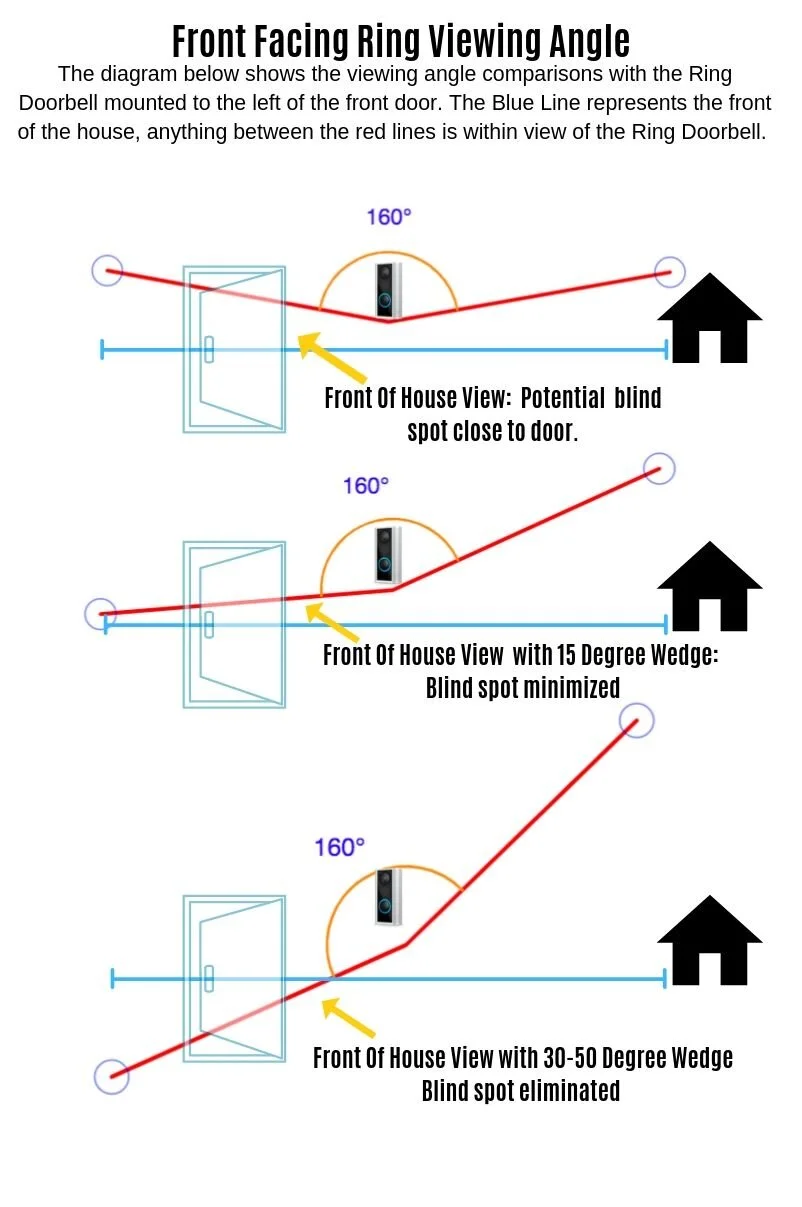
The camera’s field of view shows what the doorbell can see. Mounting too high or low can limit this view. Aim to cover the entire entryway and porch. A clear view helps catch faces and packages.
Lighting Conditions
Good lighting improves video quality. Avoid bright lights directly behind the doorbell. Shadows or glare can hide faces or details. Place the doorbell where natural light is steady and not harsh.
Avoiding Obstructions
Objects like plants, decorations, or walls can block the camera. These reduce the video’s clarity and coverage. Make sure the doorbell has a clear, open view. This ensures better motion detection and alerts.
Installation Tips For Optimal Performance
Proper installation ensures your video doorbell works well and lasts long. This section covers key tips to get the best results. Follow these steps for a smooth setup and clear video capture. Focus on securing the device, protecting it from weather, and managing the power source.
Securing The Device
Mount the video doorbell at about 48 inches from the ground. This height captures faces clearly. Use the mounting bracket that comes with the device. Tighten all screws firmly to stop movement or theft. Check the doorbell’s angle to cover the entryway fully. Avoid loose or shaky installation.
Weatherproofing Measures
Choose a sheltered spot to reduce weather impact. Use silicone sealant around the edges to block water. Avoid placing the doorbell where direct rain or sun hits it. Clean the device regularly to prevent dirt buildup. Proper weatherproofing extends the doorbell’s life and keeps video clear.
Power Source Considerations
Check if your doorbell needs wiring or batteries. For wired models, turn off power before installation. Use proper tools to connect wires safely. For battery models, use high-quality batteries for longer life. Replace batteries before they run out to avoid service interruption. Ensure constant power for reliable alerts and video.
Common Mistakes To Avoid
Mounting a video doorbell sounds simple, but many make avoidable mistakes. These errors can reduce the device’s effectiveness and cause frustration. Understanding common pitfalls helps ensure your video doorbell works well and keeps your home safe.
Mounting Too High Or Low
Placing the doorbell too high or too low limits its view. Too high misses faces, especially of children or short visitors. Too low may capture feet or ground instead of faces. Aim for eye level, about 48 inches from the ground. This spot gives the best view of anyone at your door.
Ignoring Doorbell Wi-fi Range
A weak Wi-Fi signal causes delays or no video feed. Some install the doorbell far from the router without checking signal strength. Test your Wi-Fi before mounting. Use a Wi-Fi extender if needed to keep the video smooth and reliable.
Neglecting Privacy Concerns
Video doorbells record public and private spaces. Avoid aiming the camera where neighbors expect privacy. Respect local laws about recording in shared areas. Adjust the angle to focus only on your property. This protects privacy and avoids legal issues.
Customizing Placement For Unique Entrances
Customizing the placement of your video doorbell is key for clear views and reliable alerts. Each entrance has its own shape and size. Adjusting the height and position helps capture the best video and sound. Consider the entrance layout to find the perfect spot for your doorbell.
Mounting On Walls Vs. Door Frames
Walls offer sturdy support and flexible height options. Mounting on walls allows wide camera angles and better visibility. Door frames are narrower but closer to the door. They can limit the camera’s view but keep the doorbell within easy reach. Choose the surface that fits your entrance shape and viewing needs.
Dealing With Porches And Steps
Porches and steps change the viewing angle of your doorbell. Position it higher if the porch is raised. This avoids blind spots caused by steps or railings. Lower mounting works well for flat entrances. Adjust the angle to capture faces clearly, even if visitors stand on steps.
Adjusting For Multiple Entry Points
Entrances with several doors or gates need special planning. Place the doorbell where it covers the main entry. Use extra cameras for side doors or gates. Check the distance between entry points to avoid blind spots. Proper placement keeps all entrances monitored and secure.
Credit: kdfoundation.org
Credit: meyer-sansboeuf.com
Frequently Asked Questions
What Is The Ideal Height To Mount A Video Doorbell?
The ideal height to mount a video doorbell is 48 to 52 inches from the ground. This height captures clear facial views and allows easy access for most visitors. It balances security and usability effectively.
Why Should Video Doorbells Be Mounted At Eye Level?
Mounting video doorbells at eye level ensures the camera captures faces clearly. This positioning improves identification and enhances security. It also allows visitors to reach the button comfortably.
Can Mounting Height Affect Video Doorbell Performance?
Yes, mounting height affects camera angle and field of view. Incorrect height can cause distorted or incomplete footage. Proper height ensures optimal coverage and better motion detection.
How Does Mounting Height Impact Visitor Interaction?
Proper mounting height makes it easy for visitors to press the button. It also ensures clear communication through the doorbell’s speaker. This improves overall user experience and security.
Conclusion
Mounting your video doorbell at the right height matters a lot. It helps capture clear faces and good video quality. Place it around 48 to 52 inches from the ground. This height works well for most homes and visitors. Test the view before fixing it permanently.
Adjust if needed to avoid blind spots or glare. A well-placed doorbell keeps your home safer and makes visitors feel welcome. Simple steps lead to better security and peace of mind.