
Wondering how to charge your Arlo Video Doorbell quickly and safely? You’re in the right place.
Keeping your doorbell powered means never missing a visitor or important alert. In this guide, you’ll discover simple steps to recharge your device without hassle. Ready to make sure your Arlo Video Doorbell stays charged and ready? Let’s dive in and get your doorbell powered up today.

Credit: www.youtube.com
Arlo Doorbell Battery Basics
The Arlo Video Doorbell relies on a built-in rechargeable battery. Understanding the battery basics helps keep the doorbell working without interruption. Knowing the battery type and how long it lasts allows better planning for recharging times. This section explains the battery type, capacity, and expected battery life of the Arlo Doorbell.
Battery Type And Capacity
The Arlo Video Doorbell uses a lithium-ion battery. This battery type is lightweight and holds charge well. It has a capacity of about 3000 mAh. This capacity supports long use between charges. The battery is rechargeable through a USB cable. It is removable for easy charging outside the doorbell. This design helps maintain the device without hassle.
Expected Battery Life
The battery life depends on usage and settings. Normally, the Arlo Doorbell lasts about 3 to 6 months per charge. Frequent motion alerts and video recording reduce battery life. Using lower video quality and fewer alerts can extend battery life. Keeping the battery charged ensures the doorbell stays active and ready.
When To Charge Your Doorbell
Knowing the right time to charge your Arlo Video Doorbell helps keep it working well. A charged doorbell records video and alerts you without interruption. Avoid low battery issues by understanding the signs and indicators. This keeps your home safe and your device ready.
Battery Level Indicators
Arlo doorbells show battery levels in the app. Check the battery icon for color changes. Green means good charge. Yellow warns the battery is getting low. Red signals the battery needs charging soon. Keep an eye on this icon daily.
Common Signs Of Low Battery
The doorbell may act slow or stop working. You might miss alerts or see poor video quality. The LED light on the doorbell may flash or change color. Sounds can become weak or stop. These signs mean it is time to charge the battery.
Preparing For Charging
Preparing your Arlo Video Doorbell for charging is simple. Taking the right steps ensures safe and effective charging. Follow these easy instructions to get ready.
First, gather the necessary tools. Then, remove the doorbell carefully to avoid damage.
Tools And Accessories Needed
Have a small screwdriver ready. A flathead or Phillips may be required.
Use the charging cable that came with your doorbell. Avoid third-party chargers to protect your device.
Keep a clean cloth nearby. It helps to wipe the doorbell’s surface if needed.
Removing The Doorbell Safely
Turn off power to the doorbell at the breaker box. This prevents electric shock.
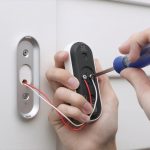
Use the screwdriver to loosen screws holding the doorbell. Keep screws safe for reinstallation.
Gently pull the doorbell from the mounting plate. Avoid pulling wires or forcing it off.
Place the doorbell on a soft surface to avoid scratches while charging.
Charging Methods
Charging your Arlo Video Doorbell is simple and flexible. It offers different ways to keep the battery full. Knowing these methods helps you choose the best one for your setup.
Using Usb Charger
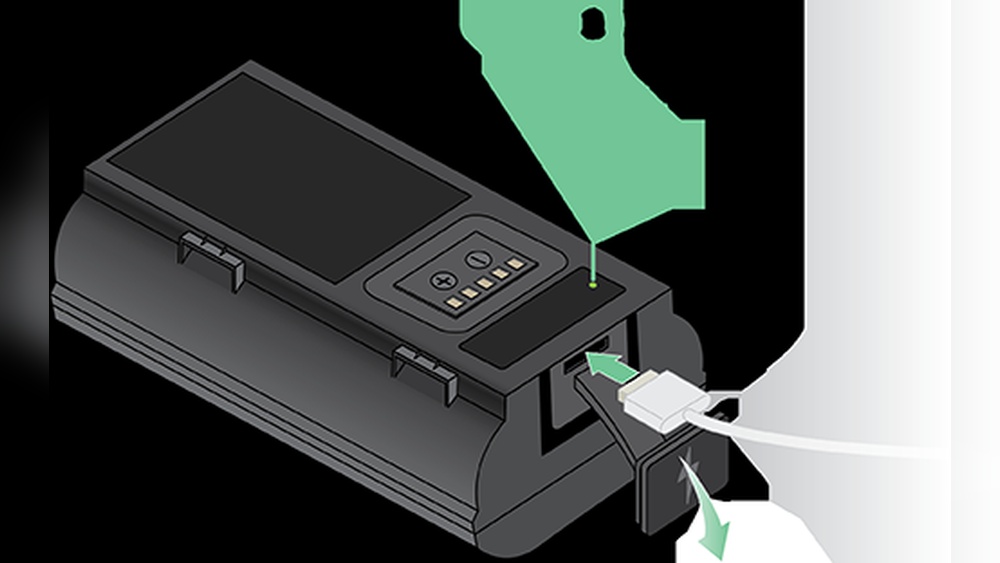
One easy way to charge your Arlo Video Doorbell is with a USB charger. Remove the battery from the doorbell. Connect it to a USB cable and plug it into a power source. Charging usually takes a few hours. This method is quick and works anywhere with a USB outlet.
Charging With Solar Panel
You can also use a solar panel to charge the doorbell. The solar panel attaches near your doorbell. It uses sunlight to keep the battery charged. This method is eco-friendly and saves electricity. It works best in places with good sunlight. No need to remove the battery for charging.
Charging Without Removal
Some Arlo Video Doorbells allow charging without taking out the battery. You plug a charging cable directly into the doorbell. This method is convenient and fast. You do not have to uninstall the device. Keep your doorbell powered without any hassle.
Charging Time And Tips
Charging your Arlo Video Doorbell correctly helps keep it ready to protect your home. Knowing the charging time and following simple tips can extend battery life. This section covers how long charging takes and ways to care for the battery.
Estimated Charging Duration
The Arlo Video Doorbell usually takes about 3 to 4 hours to fully charge. Charging time may change based on the charger used. Using the original charger gives the best results. Avoid quick chargers that may harm the battery. A full charge allows the doorbell to work for weeks.
Maximizing Battery Health
Charge the doorbell before the battery is empty. Avoid leaving it plugged in for too long after full charge. Keep the charging contacts clean and dry. Store the doorbell in a cool place during long breaks. Regular charging and good care help the battery last longer.
Troubleshooting Charging Issues
Charging issues with the Arlo Video Doorbell can be frustrating. The doorbell might not charge properly or seem stuck at low battery. Understanding common problems and quick fixes helps keep your device ready to use. This section guides you through simple steps to solve charging troubles fast.
Common Problems
One common problem is a loose charging cable. The cable may not connect well to the doorbell or power source. Dirt or dust on the charging port can block the connection. Sometimes, the charger or adapter is faulty. Another issue is a worn-out battery that won’t hold charge. Overheating during charging can also cause problems. Lastly, software glitches may stop the battery indicator from updating correctly.
Quick Fixes
Check the charging cable and port for dirt. Clean them gently with a dry cloth. Make sure the charger fits tightly into the doorbell. Try a different power adapter or USB cable to test the charger. Restart the doorbell by removing and reinserting the battery if possible. Update the doorbell’s firmware through the Arlo app for better performance. Avoid charging the device in extreme temperatures to protect the battery. Replace the battery if it no longer holds a charge well.
Maintaining Battery Performance
Maintaining your Arlo Video Doorbell’s battery is key to keeping it working well. A healthy battery means your doorbell stays active and ready. Regular care helps avoid sudden power loss and extends battery life. Follow simple steps to keep it charged and functioning smoothly.
Regular Charging Habits
Charge your Arlo Video Doorbell before the battery drops below 20%. This prevents deep discharge, which can harm battery health. Use the original charger or one with the same power rating. Avoid charging overnight to stop overcharging. Check the battery level weekly and charge as needed. Keeping a routine helps the battery last longer.
Seasonal Care Tips
Cold weather can reduce battery performance. Keep the doorbell warm by installing it in a sheltered spot. During winter, charge the battery more often. In hot weather, avoid direct sunlight on the device to prevent overheating. Store spare batteries in a cool, dry place. Seasonal care keeps your doorbell ready all year.

Credit: www.amazon.com

Credit: kb.arlo.com
Frequently Asked Questions
How Do I Charge My Arlo Video Doorbell?
To charge the Arlo Video Doorbell, remove it from the mounting bracket. Connect the USB charging cable to the doorbell and a power source. Charge until the LED indicator turns solid green, signaling a full battery.
How Long Does Arlo Video Doorbell Battery Last?
The Arlo Video Doorbell battery typically lasts 3 to 6 months on a full charge. Usage frequency and settings can affect battery life. Regular charging ensures uninterrupted performance.
Can I Charge Arlo Video Doorbell Without Removing It?
No, you must remove the Arlo Video Doorbell from its mount to charge it. The USB charging port is accessible only when detached. This ensures proper and safe charging.
What Type Of Charger Is Compatible With Arlo Doorbell?
Use a standard USB charger with 5V/1A output for the Arlo Video Doorbell. Avoid fast chargers or higher voltage adapters to prevent damage. Always use the original or certified cables.
Conclusion
Charging your Arlo Video Doorbell is simple and quick. Keep the battery charged to ensure your doorbell works well. Use the right cable and charger for safety. Regular charging helps your doorbell stay ready to record and alert you. Follow the steps carefully, and you won’t face any issues.
A charged doorbell means better security for your home. Stay prepared and keep your device powered up. That’s all you need for easy charging!