
Is your smoke detector beeping nonstop, and you don’t want to replace the battery right now? That constant beep can drive anyone crazy, especially when you’re trying to focus or get some rest.
But don’t worry—there are simple ways to stop that annoying sound without popping in a new battery immediately. You’ll discover easy steps to silence your smoke detector safely and quickly. Keep reading, and regain your peace of mind today.

Credit: www.youtube.com
Common Causes Of Beeping
Smoke detectors beep to alert you of problems. Beeping without a battery can be confusing. It happens for several common reasons. Understanding these causes helps stop the noise quickly.
Low Battery Indicators
Most smoke detectors beep when batteries run low. Even without a battery, some models have a backup power source. This backup can trigger a beep if it is failing. Sometimes, old batteries left inside cause alerts. Always check for hidden or forgotten batteries inside the unit.
Dust And Debris
Dust or dirt inside the smoke detector can cause false alarms. Tiny particles block sensors and confuse the device. Regular cleaning helps keep detectors working right. Use a soft brush or vacuum gently around the unit.
Humidity And Temperature
High humidity or extreme temperatures affect smoke detectors. Steam from showers or cooking may cause beeping. Very cold or hot rooms can also trigger false signals. Keep detectors in well-ventilated areas away from moisture sources.
Electrical Issues
Hardwired smoke detectors connect to home power. Loose wires or electrical faults cause intermittent beeps. Power surges or outages may reset the alarm. Check wiring or call an electrician if needed. Safety depends on a stable power supply.

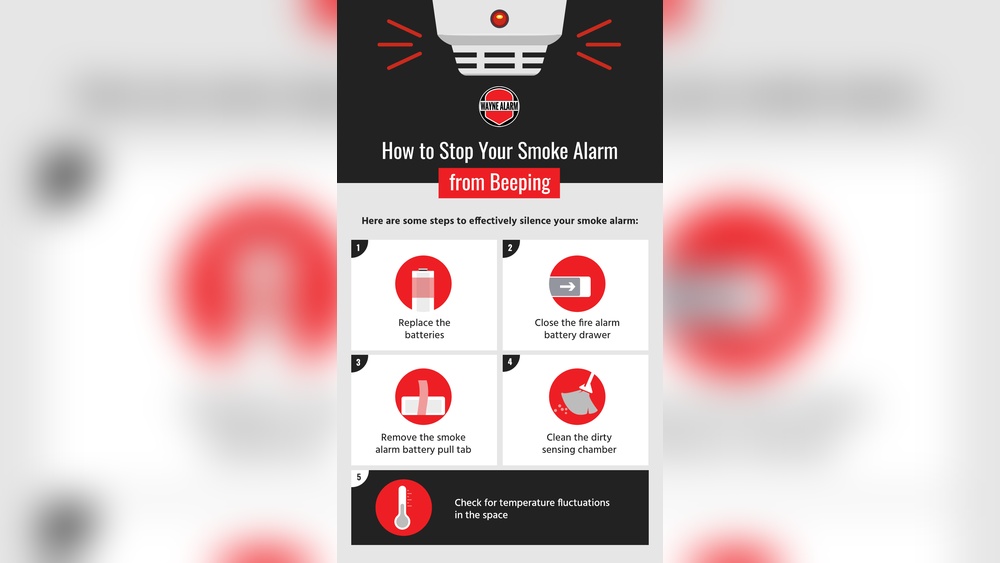
Credit: waynealarm.com
Immediate Steps To Silence Beeping
Beeping smoke detectors can be annoying, especially without a battery. Acting quickly can stop the noise and keep your home safe. Follow these steps to silence the detector immediately.
Resetting The Detector
Resetting the smoke detector often stops the beeping. Press and hold the reset button for about 15 seconds. This clears any errors in the system. If your detector has no button, try unplugging it from the power source. Wait a few seconds, then plug it back in. This can refresh the device and stop the sound.
Cleaning The Device
Dust and dirt cause false alarms and constant beeping. Use a vacuum cleaner with a soft brush to remove dust. Gently clean around the sensor and vents. Avoid using water or cleaning sprays. Cleaning helps the detector work correctly and stops unwanted beeps.
Checking The Power Source
Some smoke detectors use a backup power source. Even if the battery is missing, the device might have a capacitor or wired connection. Check if the detector is connected to your home’s electricity. Ensure the power is steady and not interrupted. Fixing power issues can stop the beeping quickly.
Advanced Fixes Without Battery Replacement
Smoke detectors beep to warn about danger or faults. Sometimes, they beep even without a battery. This can confuse many. Advanced fixes help stop the beeping without replacing batteries. These methods focus on wiring, power sources, and parts. They need careful attention but can save time and money.
Inspecting Wiring Connections
Check the wires connected to your smoke detector. Loose or damaged wires cause beeping sounds. Turn off the power before inspection. Look for frayed or disconnected wires. Secure any loose connections tightly. Use electrical tape if needed. Clean any dust around the wires. Proper wiring ensures stable power flow. This stops false alarms caused by electrical issues.
Using Temporary Power Solutions
Sometimes, your smoke detector may lose power without a battery. Use a temporary power source like a USB power bank or adapter. Connect it carefully to the detector’s power terminals. This can keep the detector running while you fix other issues. Monitor the device for continued beeping. Temporary power helps identify if power loss causes the beep. It also prevents false alarms during repairs.
Replacing Faulty Components
Smoke detectors have parts that can wear out or fail. The circuit board or sensor may cause beeping. Open the detector carefully and check for signs of damage. Look for burnt areas or broken parts. Replace faulty components with exact matches. Use a small screwdriver and proper tools. Faulty parts often cause constant beeping. Replacing them restores the detector’s normal function.
Preventing Future False Alarms
False alarms from smoke detectors can be frustrating and disruptive. Preventing these false beeps helps maintain safety without constant annoyance. Simple steps can reduce unnecessary alarms and keep your detector working properly.
Regular Maintenance Tips
Clean your smoke detector at least once a month. Use a soft brush or a vacuum cleaner to remove dust and debris. Dust can block sensors and cause false alarms. Test the detector regularly to ensure it works well. Replace parts if they look worn out or damaged.
Proper Detector Placement
Place smoke detectors away from kitchens and bathrooms. Steam and cooking smoke often trigger false alarms. Avoid installing them near windows or vents. Drafts can affect the sensor’s accuracy. Position detectors on ceilings or high walls for best results.
Upgrading To New Models
Old smoke detectors may beep without cause. New models have better technology to reduce false alarms. Look for detectors with built-in humidity and dust sensors. These adjust sensitivity based on the environment. Upgrading ensures your home stays safe and quiet.
When To Call A Professional
Smoke detectors are essential for home safety. Sometimes, they beep even without a battery. This can be confusing and frustrating. Knowing when to call a professional helps keep your home safe. Professionals can find hidden issues that you might miss. They ensure your smoke detector works properly without risk.
Signs Of Electrical Problems
Beeping without a battery may signal electrical trouble. Flickering lights or power surges nearby can be a clue. A burning smell near the detector is a serious warning. Damaged wiring inside walls can cause the alarm to beep. These signs need a professional to check and fix. Do not ignore electrical problems as they can be dangerous.
Persistent Beeping Issues
Sometimes, the smoke detector keeps beeping after changing batteries. Cleaning the sensor might help but not always. If beeping continues, it could mean a faulty unit. A professional can test the device with special tools. They can also replace or repair the detector safely. Persistent beeping means you need expert help to avoid false alarms or risks.

Credit: www.angi.com
Frequently Asked Questions
Why Does Smoke Detector Beep Without Battery?
Smoke detectors may beep due to residual charge or dust buildup. Sometimes, wiring or sensor issues cause false alarms even without batteries.
How To Stop Smoke Detector Beeping Temporarily?
To stop beeping, press and hold the reset button for 15-20 seconds. Cleaning the unit with a vacuum can also help.
Can Humidity Cause Smoke Detector To Beep?
Yes, high humidity or steam can trigger false alarms. Ensure proper ventilation to reduce moisture near the detector.
Is It Safe To Disable Smoke Detector Beeping?
Disabling beeping without fixing the issue is unsafe. Always address the root cause or replace the unit promptly.
Conclusion
Stopping a smoke detector from beeping without a battery is possible. Check for dust or dirt inside the device. Clean the detector gently with a soft cloth. Make sure the device is properly connected. Reset the smoke detector by pressing the test button.
Remember, safety matters most. Never ignore a constant beep for long. Regular maintenance helps keep your home safe. Stay calm and follow these simple steps. Your peace of mind is worth it.