
Is your smoke detector beeping nonstop, driving you crazy? That annoying sound can interrupt your day, steal your focus, and keep you up at night.
You might feel frustrated and unsure about what to do next. But don’t worry—you’re not alone, and the solution is easier than you think. You’ll discover simple, effective steps to stop your smoke detector from beeping and restore peace to your home.
Keep reading, and say goodbye to that irritating noise for good.
Common Reasons For Beeping
Smoke detectors beep for several common reasons. These alerts keep your home safe by notifying you of issues. Understanding these causes helps you fix the problem quickly. Here are the main reasons your smoke detector might beep.
Low Battery Alerts
One of the most frequent causes of beeping is a low battery. Smoke detectors use batteries to function properly. When the battery runs low, the alarm beeps to warn you. Replace the battery immediately to stop the noise. Use fresh batteries for the best results.
Dust And Debris Issues
Dust and dirt can build up inside the smoke detector. This can cause false alarms or continuous beeping. Clean the detector regularly with a soft brush or vacuum. Keep the area around the detector free of dust and debris.
Sensor Malfunctions
The smoke detector sensors may sometimes stop working correctly. Sensor malfunctions trigger beeping to alert you of the fault. Resetting the alarm might help, but a replacement may be necessary. Check the manufacturer’s guide for troubleshooting steps.
End Of Life Signals
Smoke detectors have a limited lifespan, usually around 8-10 years. When they near the end, they beep to signal replacement is needed. Do not ignore this warning, as old detectors may fail to work. Replace the unit to ensure your safety.

Credit: www.angi.com
Immediate Steps To Stop Beeping
Hearing your smoke detector beep can be stressful. It signals a problem that needs quick action. Taking immediate steps can stop the beeping fast. These simple fixes help keep your home safe and quiet.
Resetting The Detector
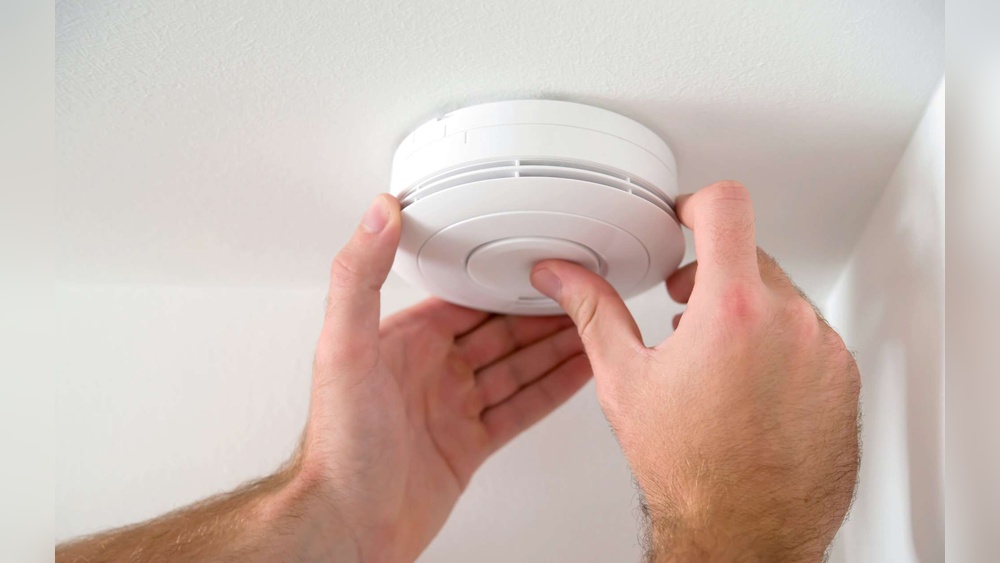
First, try resetting the smoke detector. Find the test or reset button on the device. Press and hold it for 15-20 seconds. This clears false alarms and resets the sensor. Wait a moment to see if the beeping stops. If the sound continues, move to the next step.
Replacing The Battery
Dead or weak batteries often cause beeping sounds. Open the smoke detector’s cover carefully. Remove the old battery and replace it with a new one. Use the correct battery type listed in the manual. Close the cover firmly. The beeping should stop after battery replacement.
Cleaning The Sensor
Dust and dirt can block the sensor, causing false alarms. Use a vacuum cleaner with a soft brush attachment. Gently clean around the sensor and vents. Avoid using water or cleaners inside the detector. Regular cleaning prevents beeping and keeps the device working well.
When To Replace The Smoke Detector
Smoke detectors save lives by warning you about fire early. Knowing when to replace them keeps your home safe. Old or damaged detectors may fail to alert you. Replacing smoke detectors on time ensures they work well.
Lifespan Of Smoke Detectors
Most smoke detectors last about 8 to 10 years. Check the manufacture date on the back of your device. After 10 years, the sensor can weaken. The battery may still work, but the detector might not. Replace the smoke detector after this period for safety.
Signs Of Irreparable Damage
Some signs mean your smoke detector needs replacing right away. It beeps even after changing batteries. The detector has physical damage like cracks or corrosion. It does not respond to the test button. Dust or dirt inside blocks the sensor. These signs show the detector is unreliable.

Credit: www.angi.com
Preventing Future Beeping
Stopping a smoke detector from beeping is important, but preventing future beeps is even better. Regular care and smart choices can keep your detector working well. This saves you from the annoying sounds and helps keep your home safe. Simple steps make a big difference in avoiding frequent beeping.
Regular Maintenance Tips
Check your smoke detector every month. Dust and dirt can cause false alarms. Use a soft brush or vacuum to clean the detector gently. Replace the batteries at least once a year. Some detectors have a low battery warning. Don’t ignore the beep; change batteries right away.
Test your smoke detector every month. Press the test button to ensure it works. Replace the whole unit every 10 years. Old detectors can fail or beep without reason. Keep a maintenance schedule to stay on track.
Choosing The Right Detector
Select a smoke detector that fits your home’s needs. Ionization detectors are good for fast flaming fires. Photoelectric detectors work better for slow, smoldering fires. Dual-sensor detectors combine both types for full protection. Look for detectors with a long-life battery. This reduces battery changes and beeping.
Buy smoke detectors from trusted brands. Check for safety certifications. Avoid cheap models that may beep often or fail. A good detector keeps your family safe and reduces false alarms.
Proper Installation Practices
Install smoke detectors in the right places. Place them on every level of your home. Put detectors inside and outside sleeping areas. Avoid installing near kitchens or bathrooms. Steam and cooking smoke can cause false alarms. Mount detectors on the ceiling or high on walls. Follow the manufacturer’s instructions closely.
Keep detectors away from windows and vents. Air drafts can trigger false beeps. Proper installation helps the detector sense real smoke only. This prevents annoying, unnecessary beeping sounds.
Dealing With Hardwired Smoke Detectors
Hardwired smoke detectors connect directly to your home’s electrical system. They often have a battery backup to keep working during power outages. These detectors can beep for several reasons. Understanding how to check their power source and replace backup batteries helps stop the beeping.
Power Source Checks
Start by turning off the power at the circuit breaker. Remove the smoke detector from its mounting plate. Check the wiring for loose or damaged connections. Make sure the detector is securely connected to the power supply. Restore power and see if the beeping stops. A reset may be needed by pressing the test button for 15 seconds.
Battery Backup Replacement
Even hardwired detectors need working backup batteries. Open the battery compartment carefully. Remove old batteries and replace them with fresh ones. Use the type recommended by the manufacturer. Close the compartment and test the detector. Replace batteries every year to avoid future beeping.

Credit: waynealarm.com
Safety Precautions During Fixes
Fixing a beeping smoke detector requires careful steps. Safety should be your top priority during any repair. Taking precautions helps keep your home safe and your detector working right. Follow simple rules to avoid risks and ensure the device works properly after the fix.
Ensuring Detector Functionality
Before fixing, test the smoke detector. Press the test button to check its alarm sound. Replace old batteries with fresh ones. Use the battery type recommended by the manufacturer. Avoid removing batteries for long periods. A non-working detector is dangerous. After any fix, test the detector again. Make sure it sounds loud and clear.
Avoiding False Alarms
Clean the smoke detector gently to prevent false alarms. Dust and insects often cause beeping. Use a soft brush or vacuum cleaner. Do not spray cleaner directly on the detector. Keep it away from steam, smoke, and strong odors. These can trigger false alarms. Place the detector in proper locations. Avoid areas near kitchens or bathrooms where false alarms are common.
Frequently Asked Questions
Why Is My Smoke Detector Beeping Intermittently?
Your smoke detector beeps intermittently to signal low battery or a malfunction. Replace the battery first. If beeping continues, clean the unit or consider replacement.
How Do I Stop A Smoke Detector From Beeping?
To stop beeping, replace the battery with a fresh one. Clean dust or debris from the detector. Reset the unit by pressing the test button.
When Should I Replace My Smoke Detector?
Replace your smoke detector every 10 years or if it malfunctions. Regularly check batteries and sensor functionality for safety and proper operation.
Can Humidity Cause My Smoke Detector To Beep?
Yes, high humidity or steam can trigger false alarms. Place detectors away from bathrooms or kitchens to reduce false beeping caused by moisture.
Conclusion
A beeping smoke detector can be very annoying. Check the battery first and replace it if needed. Clean the detector gently to remove dust. Make sure it is properly installed and not too old. Test the alarm after fixing it to ensure it stops beeping.
Regular checks keep your home safe and quiet. Don’t ignore the beeping; it warns you of safety issues. Simple steps can solve the problem quickly. Stay calm and follow these easy tips.