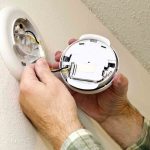
Is your smoke detector beeping nonstop and driving you crazy? That annoying sound can disrupt your peace and make it hard to focus.
You might be wondering why it keeps beeping and how to make it stop quickly. Don’t worry—this guide will help you fix the problem fast. By the end, you’ll know exactly what to do to silence your smoke detector and keep your home safe.
Keep reading to find out simple, effective steps you can take right now.

Credit: www.angi.com
Common Causes Of Beeping
Smoke detectors beep to warn you about potential problems. Knowing the common causes helps you stop the noise quickly. Beeping often means your detector needs attention or maintenance. Ignoring it can risk your safety and cause frustration. Below are the main reasons why your smoke detector beeps.
Low Battery Alerts
Most smoke detectors beep when batteries run low. This warning sounds every few minutes. It tells you to replace the battery soon. Using fresh batteries keeps your detector working well. Always check the battery type before replacing.
Dust And Debris
Dust and dirt can build up inside the detector. This buildup triggers false alarms and beeping sounds. Clean the detector gently with a soft brush or vacuum. Regular cleaning prevents dust from causing problems.
Electrical Issues
Wired smoke detectors may beep due to power problems. Loose connections or power surges can cause the noise. Check wiring carefully or call an electrician. Fixing electrical issues stops random beeps and keeps you safe.
End Of Life Signal
Smoke detectors have a lifespan of about 8-10 years. After this, they beep to signal replacement time. This sound warns you the detector may not work well. Replacing old detectors ensures continuous protection for your home.
Immediate Steps To Silence Beeping
Beeping smoke detectors signal a problem that needs quick attention. The sound warns you of low batteries or device issues. Acting fast stops the noise and keeps your home safe. This section shows simple steps to silence the beeping immediately.
Resetting The Smoke Detector
First, try resetting your smoke detector. Press and hold the reset button for 15-20 seconds. This clears any error signals in the device. The beeping often stops after a reset. If the sound continues, try other steps.
Replacing The Battery
Low batteries cause most smoke detector beeps. Open the detector’s cover carefully. Remove the old battery and insert a new one. Use the right battery type, usually 9-volt or AA. Close the cover and test by pressing the reset button. The beeping should stop.
Cleaning The Device
Dust or debris can trigger false alarms and beeping. Use a soft brush or vacuum to clean vents and sensors. Gently wipe the outside with a dry cloth. Cleaning removes blockages that cause errors. After cleaning, press reset to check if beeping stops.
Battery Replacement Tips
Battery problems often cause smoke detectors to beep continuously. Replacing the battery correctly stops the noise and keeps your home safe. Follow these tips to change the battery the right way.
Choosing The Right Battery
Not all batteries fit every smoke detector. Check the user manual or the label on the device. Most detectors use 9-volt or AA batteries. Use fresh, high-quality batteries for longer life. Avoid cheap or old batteries that may fail quickly.
Safe Battery Installation
Turn off the power or remove the detector from the ceiling before starting. Open the battery compartment carefully. Insert the new battery with the correct positive and negative ends aligned. Close the compartment firmly to avoid loose contacts. Test the smoke detector by pressing the test button. A clear beep means the battery is installed properly.
Cleaning And Maintenance
Cleaning and maintenance keep your smoke detector working well. Dust and dirt can cause it to beep. Regular care stops false alarms and keeps your home safe.
Proper Cleaning Tools
Use a soft brush or a vacuum cleaner with a soft brush attachment. Avoid harsh chemicals or water. A dry cloth can wipe the outside of the detector. These tools remove dust without damaging the device.
Regular Maintenance Schedule
Check your smoke detector once a month. Clean it carefully to remove any dust or bugs. Replace batteries every six months to avoid low battery beeps. Write these tasks on your calendar to remember them.
When To Replace The Smoke Detector
Knowing when to replace your smoke detector is key to home safety. Smoke detectors do not last forever. Over time, their parts wear out and become less reliable. Replacing them at the right time keeps your home protected and stops annoying beeping sounds.
Signs Of Wear And Tear
Look for physical damage like cracks or discoloration. Smoke detectors may beep often without cause. This can mean the sensor is failing. Dust build-up inside can also reduce sensitivity. If cleaning does not help, replacement is needed. Frequent false alarms or no alarms at all are clear signs.
Manufacturer’s Lifespan Guidelines
Most smoke detectors have a lifespan of 8 to 10 years. Check the back of your device for a date. This shows when it was made. Replace the detector once it reaches this age. Older units may not detect smoke properly. Following these guidelines helps ensure your safety.

Credit: www.youtube.com
Preventing Future Beeping
Stopping a smoke detector from beeping is important, but preventing future beeps is better. Regular care keeps your detector working well. It helps avoid annoying sounds and ensures safety. Simple habits and correct setup make a big difference. Follow these tips to keep your smoke detector quiet and reliable.
Routine Checks
Check your smoke detector once a month. Press the test button to make sure it works. Replace batteries at least once a year. Use fresh batteries, not old or used ones. Clean dust and dirt from the detector. Use a soft brush or vacuum cleaner. Dust can cause false alarms and beeping.
Proper Installation Tips
Install smoke detectors on the ceiling or high on walls. Avoid placing them near windows or vents. Airflow can affect their sensors and cause beeping. Keep detectors away from kitchens and bathrooms. Steam and cooking smoke trigger false alarms. Install detectors in every bedroom and outside sleeping areas. Follow the manufacturer’s instructions for best results.

Credit: waynealarm.com
Frequently Asked Questions
Why Is My Smoke Detector Beeping Repeatedly?
Your smoke detector beeps to signal low battery or a fault. Replace the battery first. If it still beeps, clean or replace the detector.
How Can I Stop A Smoke Detector Beeping At Night?
Replace the battery immediately. Press the reset button to silence the alarm. Ensure the detector is clean and properly installed to avoid false alarms.
What Causes A Smoke Detector To Beep Without Smoke?
Low battery, dust buildup, or electrical issues cause false beeping. Clean the detector and change batteries regularly. Check wiring if beeping persists.
How Often Should I Replace Smoke Detector Batteries?
Replace batteries at least once a year. Some detectors use 10-year sealed batteries. Regular replacement prevents false alarms and ensures safety.
Conclusion
Stopping a beeping smoke detector is simple with these steps. Check the battery first; weak batteries cause most beeps. Clean the detector to remove dust or dirt. Reset the device by pressing its button. Replace old detectors every 10 years for safety.
Regular checks keep your home safe and quiet. Don’t ignore the sound—it protects your family. Quick fixes help you avoid stress and noise. Stay alert and maintain your smoke detectors well. Peace of mind comes from a working alarm.