
Are you ready to boost your home’s security with a smart, easy-to-use device? Installing the Toucan Video Doorbell can give you peace of mind by letting you see and talk to visitors right from your phone.
But if you’re worried about complicated setups or confusing instructions, don’t be. This guide breaks down every step clearly, so you can have your video doorbell up and running quickly. Keep reading to discover how simple it is to protect your home and stay connected with just a few tools and easy steps.
Gather Required Tools
Gathering the right tools is the first step to install your Toucan Video Doorbell. Having everything ready makes the installation smooth and fast.
Missing tools can cause delays or poor setup. Prepare all items before you start.
Power Drill
A power drill helps make holes for mounting the doorbell. Choose a drill with a suitable bit size. This tool speeds up the process and ensures secure fixing.
Screwdriver
A screwdriver is essential to tighten screws. A Phillips head screwdriver works best for most doorbell screws. Keep it handy to attach the mounting bracket and cover.
Level
Use a level to keep the doorbell straight. A tilted doorbell may affect camera view and button access. Check the alignment before final fixing.
Measuring Tape
Measuring tape helps set the correct height for the doorbell. Measure from the ground or door frame to ensure easy reach. Accurate placement improves device use.
Pencil Or Marker
Mark drill spots with a pencil or marker. Clear marks guide you to drill in the right place. This prevents mistakes during mounting.
Safety Gear
Wear safety glasses and gloves for protection. Drilling and handling wires can cause injuries. Safety gear keeps you safe while working.
Check Package Contents
Start by opening the package and checking all parts inside. Make sure the doorbell, mounting tools, and instructions are included. Missing items can delay installation.
Unpack And Identify Each Item
Start by opening the Toucan Video Doorbell box carefully. Lay out all items on a flat surface. Check each piece against the included list. Make sure nothing is missing before you begin installation. This saves time and prevents frustration later.
Essential Components Inside The Box
The package usually contains the video doorbell, mounting bracket, screws, and anchors. Look for the power adapter or batteries, depending on your model. A quick start guide should be included too. These parts are vital for proper setup and function.
Check For Damage Or Defects
Inspect each item for any signs of damage. Broken parts or scratches may affect performance. Contact customer support if you find defects. Using damaged equipment can cause installation problems or safety risks.
Turn Off Power Supply
Before installing the Toucan Video Doorbell, safety is very important. Turning off the power supply stops electricity from flowing. This step helps avoid shocks or damage during installation.
Always make sure the power is off before touching any wires. It protects both you and your device. Let’s see how to safely turn off the power supply.
Locate The Main Circuit Breaker
Find the main circuit breaker in your home. It is usually in the electrical panel or fuse box. This box holds switches for different parts of your house.
Look for the switch labeled “doorbell” or “front door.” If you cannot find it, turn off the main power switch to be safe.
Switch Off The Power
Flip the circuit breaker switch to the OFF position. This stops electricity from reaching the doorbell wiring. Double-check that the power is off before continuing.
Use a non-contact voltage tester near the wires. It shows if electricity is still present. No light or sound means the power is off.
Confirm Power Is Completely Off
After switching off, test the existing doorbell button. Press it. If no sound comes, power is off. This check makes sure no current flows to the wires.
Do not skip this step. It ensures your safety during installation.
Remove Old Doorbell
Removing the old doorbell is the first step before installing your new Toucan Video Doorbell. This process makes sure the area is clear and ready for the new device. Take your time and follow these simple steps to avoid damage or confusion.
Turn Off The Power
Locate the circuit breaker for your doorbell. Switch it off to stop electricity flow. This step protects you from electric shocks during removal.
Unscrew The Old Doorbell
Use a screwdriver to remove screws holding the doorbell. Gently pull the doorbell away from the wall. Be careful not to damage the wires behind it.
Disconnect The Wires
Note which wires connect to your old doorbell. Loosen the wire nuts or screws to free the wires. Keep wires separated to avoid short circuits.
Check The Wall Surface
Look for any damage or holes in the wall. Clean the surface to ensure the new doorbell fits well. Repair any cracks or holes if needed.
Mount The Toucan Doorbell
Mounting the Toucan Doorbell is a key step to secure your home. Proper placement ensures clear video and easy access for visitors. Follow simple steps to mount it safely and correctly.
Focus on choosing the best spot and attaching the mounting plate firmly. These steps help your doorbell work well and stay stable.
Choose Mounting Location
Pick a spot near your front door at about 48 inches high. This height captures visitors’ faces clearly. Avoid direct sunlight or heavy rain areas to protect the doorbell. Make sure the area has good Wi-Fi signal. Check there is space for the doorbell and no obstacles blocking the view.
Attach Mounting Plate
Use the screws and anchors included in the package. Hold the mounting plate against the wall. Mark the drill holes with a pencil. Drill holes carefully and insert anchors for a strong hold. Screw the plate tightly to the wall. Ensure it is level and steady before attaching the doorbell.
Connect Wiring
Connecting the wiring is a key step in installing the Toucan Video Doorbell. This step makes sure your doorbell gets power and can send video to your phone. Proper wiring helps the doorbell work smoothly without interruptions.
Take your time with each wire. Double-check the connections to avoid mistakes. Safety first—turn off the power before touching any wires. This prevents shocks or damage.
Locate The Existing Doorbell Wires
Find the wires from your old doorbell first. These usually come from inside your wall near the doorframe. Use a flashlight if the area is dark. Identify two wires: one for power, one for the chime.
Strip Wire Ends Carefully
Use a wire stripper tool to remove a small part of the insulation. About half an inch of exposed wire is enough. Avoid cutting too much to prevent short circuits. Clean wire ends ensure a good connection.
Attach Wires To Toucan Doorbell Terminals
Look for the terminals marked on the back of your Toucan doorbell. Usually labeled as “Front” and “Trans” or similar. Connect each wire to its matching terminal. Tighten screws to hold wires firmly.
Secure Wiring And Check Connections
Make sure wires are not loose or touching each other. Use electrical tape if needed to cover bare wires. Push wires gently back into the wall cavity. Loose wiring can cause faults or signal loss.
Secure Doorbell Unit
Securing your Toucan Video Doorbell unit is key to its performance and safety. A properly secured doorbell prevents theft and damage. It also ensures clear video and reliable alerts.
Follow these steps to mount the doorbell unit firmly. Use the right tools and materials to avoid loose installation. A secure doorbell keeps your home safer and your device working well.
Choose The Right Mounting Location
Pick a spot near your front door. It should have a clear view of visitors. Avoid places with direct sunlight or heavy rain. A sheltered area helps protect the unit.
Use The Included Mounting Bracket
Attach the mounting bracket to the wall first. Use the screws and anchors provided. Make sure the bracket is level and tight. This forms a strong base for the doorbell.
Secure The Doorbell To The Bracket
Slide the Toucan Video Doorbell onto the bracket. Push gently until it clicks into place. Check that it does not move or wiggle. A tight fit stops accidental drops.
Lock The Doorbell For Extra Security
Use the security screws to lock the unit. These screws need a special tool to remove. It prevents thieves from easily taking your doorbell. Keep the tool in a safe place.
Test The Stability Of The Installation
Gently shake the doorbell to test its hold. It should feel firm and not shift. If loose, tighten the screws again. A stable doorbell works better and lasts longer.

Credit: www.youtube.com
Restore Power
Restoring power is a key step after installing your Toucan Video Doorbell. Power must flow correctly for the device to work. Without electricity, the doorbell cannot function or connect to your Wi-Fi.
This step ensures your doorbell receives electricity safely. It also helps prevent any damage to the device or your home wiring. Follow the instructions carefully to avoid mistakes.
Turn On The Circuit Breaker
Locate your home’s electrical panel. Find the breaker labeled for your doorbell or front door area. Flip the switch to the “on” position. This restores power to the doorbell wiring.
Check that no other breakers tripped. Reset any that did. This keeps your home’s power stable and safe.
Test The Doorbell Power
After turning on the breaker, test the doorbell. Press the button and see if the light or sound activates. The video feed should also turn on in the app.
If the doorbell does not respond, check wiring connections. Ensure the wires are tight and correctly placed. Loose wires can stop power from reaching the device.
Use A Voltage Tester
Use a voltage tester to confirm power at the doorbell wires. This tool shows if electricity flows properly. It helps find wiring issues before finalizing installation.
Touch the tester probes to the doorbell wires. Look for a reading between 16 and 24 volts. This range is safe for the Toucan Video Doorbell.
Set Up The App
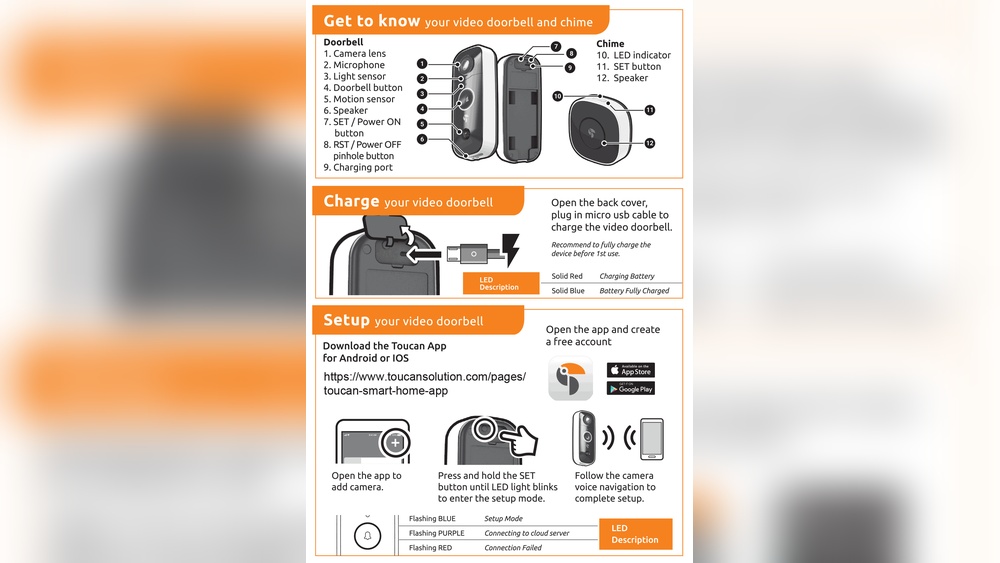
Setting up the app is the first step to start using your Toucan Video Doorbell. The app lets you control the doorbell from your phone. It sends alerts and shows live video. Follow these simple steps to get the app ready and connect your doorbell.
Download And Install
Open the App Store or Google Play Store on your phone. Search for “Toucan Video Doorbell” app. Tap the download button to install the app. Wait for the app to finish installing before opening it.
Create Account
Open the app after installation. Tap “Sign Up” to create a new account. Enter your email address and create a password. Confirm the password and tap “Create Account.” Check your email for a confirmation link. Click the link to verify your account.
Connect Doorbell
Log in to the app with your new account details. Tap “Add Device” or the plus (+) icon. Follow the on-screen instructions to connect your doorbell to Wi-Fi. Make sure your phone is near the doorbell during setup. Once connected, the app will show the live feed from your doorbell camera.

Credit: www.amazon.com
Test Doorbell Functionality
Testing the doorbell functionality is an important step after installation. It ensures that the Toucan Video Doorbell works properly. This step helps you avoid problems later. You can check if the video, audio, and notifications are working as expected.
Check Video Feed
Open the Toucan app on your phone. Press the doorbell button. Watch the live video feed from the doorbell camera. Make sure the image is clear and the camera angle covers your doorway.
Test Two-way Audio
Speak into your phone’s microphone. Listen to the speaker near your doorbell. Confirm you can hear your voice outside. Then ask someone at the door to speak. Check if you hear them clearly on your phone.
Verify Notification Alerts
Push the doorbell button. See if your phone receives an alert. Test notifications with app sounds and vibrations. Ensure the alerts come quickly and reliably.
Assess Motion Detection
Walk near the doorbell. Watch for motion alerts on your phone. Confirm the doorbell detects movement correctly. Adjust motion sensitivity in the app if needed.
Troubleshooting Tips
Troubleshooting your Toucan Video Doorbell can save time and frustration. Simple fixes often solve common issues quickly. This section shares easy tips to help your doorbell work properly.
Check Your Wi-fi Connection
Strong Wi-Fi is essential for your doorbell to work well. Make sure your router is near the doorbell. Test your internet speed using a phone or computer. Restart your router if the connection is slow or unstable.
Reset The Doorbell
Resetting the doorbell fixes many problems. Press and hold the reset button for 10 seconds. Wait for the device to restart and connect to Wi-Fi again. This often clears errors and restores function.
Inspect The Power Supply
Low power causes frequent disconnections. Check the doorbell’s batteries or wiring. Replace batteries if they are old or weak. Confirm the wiring is secure and intact. Power issues can stop the doorbell from working.
Update The Doorbell Firmware
Firmware updates improve performance and fix bugs. Open the Toucan app and check for updates. Download and install any available updates. Keep your doorbell software current for best results.
Clear The App Cache
App glitches can cause problems with the doorbell. Clear the cache in your phone’s settings. Restart the Toucan app after clearing. This helps the app run smoothly and connect properly.

Credit: www.toucansolution.com
Frequently Asked Questions
How Do I Install The Toucan Video Doorbell?
First, turn off power to your doorbell circuit. Remove the old doorbell and mount the Toucan bracket. Connect the wires to the Toucan terminals. Secure the doorbell, then restore power. Finally, download the app to complete setup and test the device.
What Tools Are Needed To Install Toucan Doorbell?
You will need a screwdriver, drill, wire stripper, and voltage tester. These tools help secure the doorbell and ensure safe wire connections. Having a ladder and level can also make installation easier and more precise.
Can I Install The Toucan Doorbell Myself?
Yes, the Toucan Doorbell is designed for easy DIY installation. Follow the included instructions carefully. If you feel unsure, consider hiring a professional electrician for safety and optimal setup.
How Do I Connect Toucan Doorbell To Wi-fi?
After mounting, power the doorbell and open the Toucan app. Follow in-app prompts to select your Wi-Fi network and enter the password. Ensure your network is 2. 4 GHz for compatibility and strong signal.
Conclusion
Installing the Toucan Video Doorbell is simple and quick. Follow each step carefully for the best results. This device helps keep your home safer every day. You can check visitors easily from your phone. No need to worry about missing deliveries or guests.
Enjoy peace of mind with a clear video feed. Regularly check the device to ensure it works well. Now, you are ready to use your new doorbell confidently. Stay safe and connected with this smart home tool.