
Have you ever wondered how the Ring Video Doorbell keeps your home safe and lets you see who’s at your door no matter where you are? Understanding how this smart device works can help you make the most of its features and protect your family better.
You’ll discover the simple technology behind the Ring Video Doorbell and why it’s become a must-have for so many homeowners. Keep reading to unlock the secrets of this clever gadget and find out how it can change your home security for the better.

Credit: www.aboutamazon.com
Ring Video Doorbell Features
The Ring Video Doorbell offers many useful features to keep your home safe. It combines smart technology with easy use. You can see, hear, and speak to visitors from anywhere. Let’s explore the main features that make this device popular.
Video Quality And Field Of View
The video quality is clear and sharp. It uses HD resolution to show detailed images. The wide field of view covers a large area in front of your door. This helps to see visitors and any activity nearby. You won’t miss any important moments.
Motion Detection Technology
The doorbell detects movement near your door. It sends instant alerts to your phone. You can adjust the sensitivity to reduce false alarms. This feature keeps you aware of visitors or unusual activity. It works day and night.
Two-way Audio Communication
You can talk to visitors through the doorbell. The built-in microphone and speaker make it easy. It helps you greet guests without opening the door. You can also warn unwanted visitors. This adds a layer of security and convenience.
Night Vision Capabilities
The doorbell uses infrared lights to see in the dark. It shows clear video even at night. This feature protects your home 24/7. You can check on your doorstep anytime, no matter the light conditions.
Installation Process
Installing the Ring Video Doorbell is simple and straightforward. The process includes a few key steps. Knowing what tools and options you need helps make installation easier. This guide breaks down each step for you.
Required Tools And Equipment
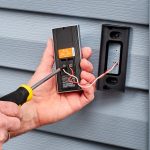
You need a drill, screwdriver, and level for installation. A pencil helps mark the drill spots. Ring includes screws and anchors in the package. A ladder may be needed for high door frames. Having these tools ready speeds up the process.
Wired Vs Battery-powered Options
Ring doorbells come in wired and battery-powered models. Wired versions connect to your existing doorbell wiring. Battery-powered ones run on rechargeable batteries. Wired models offer constant power but need wiring knowledge. Battery models are easier to install and flexible to move.
Mounting The Doorbell
Choose a spot near your door at chest height. Use the level to keep the doorbell straight. Mark the drill holes with a pencil. Drill holes carefully and insert anchors if needed. Screw the mounting bracket tightly to the wall. Attach the doorbell to the bracket until it clicks.
Connecting To Wi-fi Network
Download the Ring app on your smartphone. Follow in-app instructions to create an account. Select your doorbell model and start setup. Connect the doorbell to your Wi-Fi network. Strong Wi-Fi ensures clear video and fast alerts. Test the connection by pressing the doorbell button.
How Video Streaming Works
Understanding how video streaming works is key to knowing how Ring Video Doorbell keeps you connected. The device captures video and sends it to your phone or computer. This happens quickly and smoothly, so you see live activity at your door. The process involves sending video in real time, storing it safely, and linking everything through an app.
Real-time Video Transmission
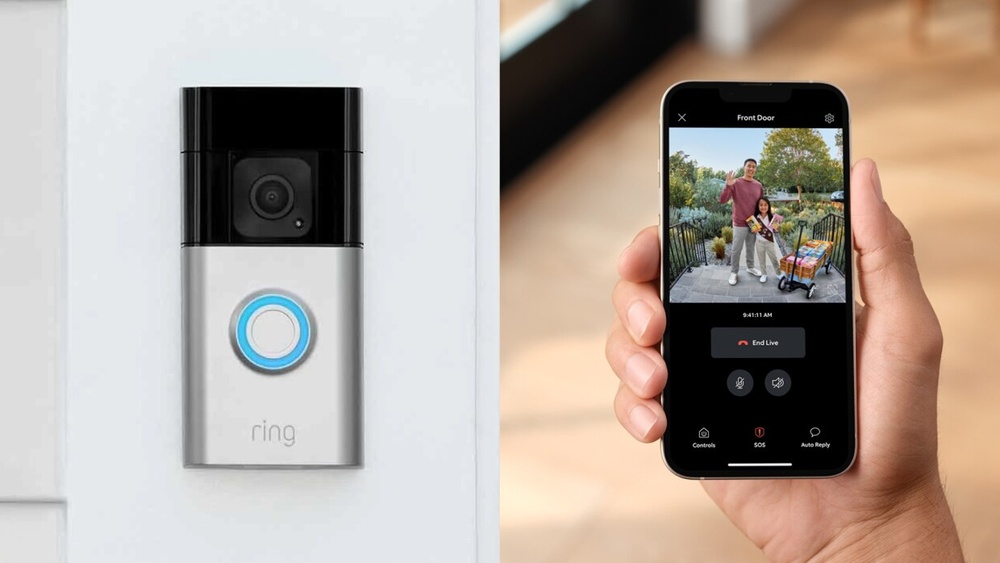
The Ring Video Doorbell uses Wi-Fi to send live video signals. It captures movement and sends video right away. This lets you watch who is at your door instantly. The live feed shows clear images with little delay. The doorbell’s camera and your device stay connected constantly.
Cloud Storage Of Footage
Videos from your doorbell are saved in the cloud. This means your footage is stored on secure servers online. You can access these videos anytime from your app. Cloud storage keeps your recordings safe even if the doorbell is damaged. This also frees up space on your phone.
Mobile App Integration
The Ring app links your video doorbell to your phone or tablet. It sends alerts when someone rings or moves near your door. You can watch live video or recorded clips anytime. The app allows you to talk to visitors using two-way audio. It makes controlling your doorbell easy and fast.
Motion Detection And Alerts
The Ring Video Doorbell uses motion detection to keep your home safe. It senses movement near your door and sends alerts to your phone. This way, you know when someone is outside, even if they don’t ring the bell. The system helps you watch over your property anytime, anywhere.
Customizing Motion Zones
You can set specific areas for motion detection. These are called motion zones. Choose spots where you want to detect movement. Ignore places like busy streets to avoid unnecessary alerts. This feature helps focus on important areas, like your porch or driveway.
Types Of Alerts And Notifications
The Ring Doorbell sends different alerts. It notifies you when it detects motion or when someone presses the doorbell. Alerts come as push notifications on your phone or tablet. You can also get email alerts. These options keep you informed no matter where you are.
Reducing False Alarms
False alarms can be annoying. The Ring Doorbell uses smart sensors to reduce them. You can adjust sensitivity settings to avoid alerts from pets or passing cars. This saves your time and helps you focus on real threats around your home.
Security And Privacy Features
The Ring Video Doorbell offers strong security and privacy features. These features protect your home and personal data. Ring uses smart technology to keep your information safe. Privacy is a top priority for Ring users. The device includes several layers of protection to prevent unauthorized access.
Data Encryption Methods
Ring uses data encryption to secure video and audio streams. Encryption changes data into unreadable codes. Only authorized users can decode these codes. This method stops hackers from spying on your camera feed. The device uses advanced encryption standards for safety.
User Access Controls
Access to the Ring app is controlled by passwords and two-factor authentication. Two-factor authentication adds a second step to login. It requires a code sent to your phone or email. This extra layer makes it hard for strangers to enter your account. Users can also manage who gets access to video footage.
Privacy Settings In The App
The Ring app lets you customize privacy settings easily. You can turn off the camera or microphone when needed. The app allows you to set privacy zones to block certain areas. This prevents recording in sensitive spots like neighbors’ yards. Notifications can be adjusted to avoid unwanted alerts.
Credit: kdfoundation.org
Integrations With Smart Home Systems
The Ring Video Doorbell works smoothly with various smart home systems. This feature makes it more useful and easier to control. You can link it with many devices to improve your home security and convenience.
Smart home integration allows you to manage the doorbell from one place. It can trigger actions in other devices. This setup creates a connected home experience that saves time and adds safety.
Compatibility With Alexa
Ring Video Doorbell pairs well with Alexa devices. You can ask Alexa to show the front door camera on Echo Show. It also lets you hear visitors and speak to them using voice commands. This hands-free control makes using the doorbell simple and fast.
Connecting To Other Devices
The doorbell links with smart lights, locks, and alarms. When someone rings the bell, lights can flash or locks can activate. This connection helps you respond to visitors even if you are far from home. It also adds layers of security and convenience.
Automating Home Security
Automation rules work well with Ring Video Doorbell. You can set it to record video or send alerts automatically. Combining it with sensors and alarms creates a strong security system. Automation helps catch events quickly and keeps your home safe 24/7.
Troubleshooting Common Issues
Troubleshooting common issues with your Ring Video Doorbell can save time and keep your device working smoothly. Problems like poor connection, low battery, and unclear video are typical. Fixing these issues often requires simple steps you can do yourself. Here are some tips to help you get the best from your Ring Video Doorbell.
Connectivity Problems
Weak Wi-Fi signals often cause connection problems. Place your router closer to the doorbell. Avoid thick walls or metal objects blocking the signal. Restart your router and doorbell if the connection drops. Check the Ring app for signal strength. Make sure your internet speed meets Ring’s minimum requirements.
Battery Life Tips
Battery drains faster in cold weather. Lower the motion sensitivity to save power. Turn off notifications for less important alerts. Charge the battery fully before reinstalling. Remove the battery during long periods of no use. Keep the firmware updated for better battery management.
Improving Video Quality
Clean the doorbell camera lens regularly. Dirt or smudges blur the video. Adjust the camera angle to avoid direct sunlight. Use a strong Wi-Fi connection for better streaming. Lower video resolution in the app to reduce lag. Update the app and device for the latest features.
Credit: www.youtube.com
Frequently Asked Questions
How Does The Ring Video Doorbell Connect To Wi-fi?
The Ring Video Doorbell connects to your home Wi-Fi network using its built-in Wi-Fi module. This enables real-time video streaming and notifications on your smartphone or tablet. A stable 2. 4 GHz or 5 GHz Wi-Fi connection is essential for smooth performance and instant alerts.
What Powers The Ring Video Doorbell?
Ring Video Doorbells are powered either by rechargeable batteries or existing doorbell wiring. Battery models offer flexible installation, while wired versions provide continuous power without recharging. Both options ensure the doorbell stays functional and ready to capture video at all times.
How Does Ring Detect Motion And Alert Users?
Ring uses advanced motion sensors to detect activity near your door. When motion is detected, it sends instant alerts to your smartphone or device. You can customize motion zones and sensitivity to reduce false alarms and focus on important areas.
Can I Talk To Visitors Through The Ring Doorbell?
Yes, the Ring Video Doorbell features two-way audio. This allows you to hear and speak to visitors using your smartphone or tablet. It’s a convenient way to interact with guests or delivery personnel remotely, enhancing home security and communication.
Conclusion
The Ring Video Doorbell helps you see and talk to visitors anytime. It uses motion sensors and a camera to keep your home safe. You get alerts directly on your phone when someone approaches. The device is easy to install and works with Wi-Fi.
It shows clear video day and night. This smart tool adds convenience and peace of mind to your daily life. Simple technology that protects your home and keeps you connected. A useful addition for anyone wanting extra security.