
Is your smoke detector beeping nonstop and driving you crazy? That annoying sound can disrupt your peace and make it hard to focus.
But don’t worry—you’re not alone, and fixing it is easier than you think. You’ll discover simple and effective steps to stop your smoke detector from beeping, so you can bring back quiet and safety to your home. Keep reading—you’ll be glad you did.
Common Causes Of Beeping
Smoke detectors beep to warn you of problems. Knowing why your smoke detector beeps helps fix it fast. Some causes are easy to solve. Others mean the device needs attention or replacement. This section covers the most common reasons for beeping sounds.
Low Battery Signals
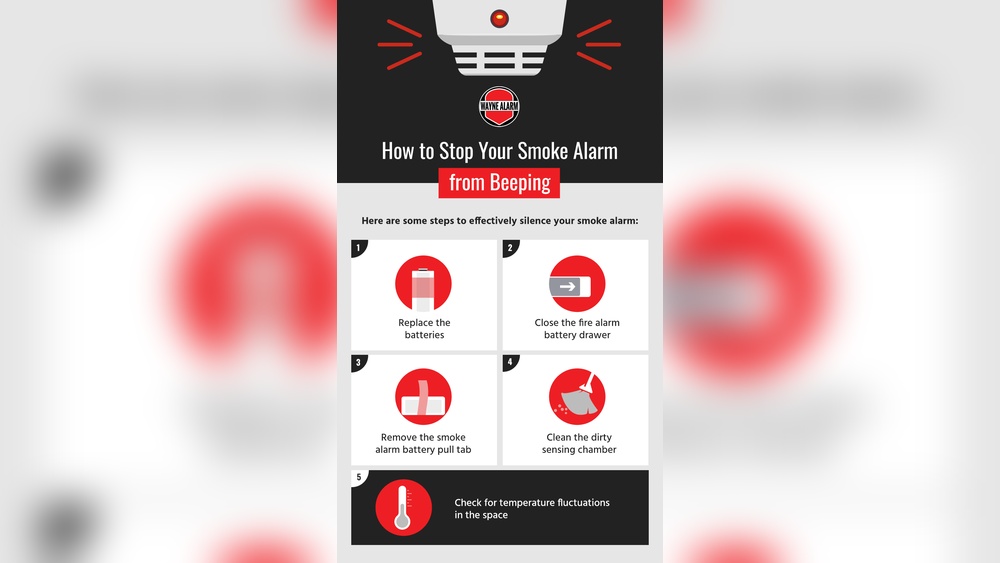
Most smoke detectors beep when the battery runs low. The beep is short and repeats every minute. This alert means the device needs a new battery. Replace the battery with the right type quickly. A fresh battery keeps your home safe.
Dust And Dirt Interference
Dust and dirt can get inside the smoke detector. These particles block the sensor. The detector may beep or sound false alarms. Cleaning the device gently with a soft brush or vacuum helps. Regular cleaning stops false beeps and keeps it working well.
End Of Life Alerts
Smoke detectors have a limited lifespan, usually 8-10 years. After this time, the device may beep to show it is old. This beep warns that the detector might not work properly. Replacing an old smoke detector ensures reliable protection for your home.

Credit: www.angi.com
Quick Battery Replacement Tips
Smoke detectors often beep to warn about low battery power. Quick battery replacement stops the annoying beeping fast. Follow simple steps to keep your detector working well and your home safe.
Choosing The Right Battery
Use the battery type recommended by the manufacturer. Most detectors use 9-volt or AA batteries. Check your smoke detector’s label or manual before buying. Choose fresh batteries from a reliable store. Avoid old or used batteries to prevent frequent beeping.
Safe Removal And Installation
Turn off the smoke detector before removing the battery. Twist or slide the detector off its mounting bracket carefully. Remove the old battery by gently pulling it out. Insert the new battery with the positive and negative ends aligned correctly. Place the detector back on its bracket and secure it firmly.
Resetting After Replacement
Press and hold the test button for 15-20 seconds. This resets the smoke detector and stops beeping. Some models beep once after reset, which is normal. If the beeping continues, check the battery installation or try a different battery. Resetting ensures the detector works properly after battery change.
Cleaning And Maintenance Tricks
Smoke detectors can beep due to dust and poor maintenance. Keeping them clean and well-maintained helps stop false alarms. Proper care extends their life and keeps your home safe. Follow these simple cleaning and maintenance tricks to reduce beeping and ensure your smoke detector works well.
Proper Dust Removal
Dust buildup often causes smoke detectors to beep. Use a soft brush or vacuum cleaner to remove dust. Gently clean vents and sensors without damaging parts. Avoid using water or sprays that might harm the detector. Clean your smoke detector at least twice a year for best results.
Avoiding Moisture Damage
Moisture can cause false alarms and damage smoke detectors. Keep the detector away from bathrooms and kitchens. Ensure good ventilation to reduce humidity near the device. Wipe the detector with a dry cloth if it gets damp. Prevent moisture to keep the detector working properly.
Regular Inspection Schedule
Check your smoke detector regularly to catch issues early. Test the alarm button once a month to ensure it sounds. Replace batteries at least once a year or when the low battery beep starts. Look for physical damage or dirt during inspections. A regular schedule keeps your smoke detector reliable and quiet.
Resetting The Smoke Detector
Resetting a smoke detector is a common way to stop it from beeping. Sometimes, the detector needs a simple reset to clear errors or low battery alerts. Resetting helps the device work properly again without extra noise.
Follow these steps to reset your smoke detector safely and easily. Each method suits different situations. Choose the one that fits your case best.
Manual Reset Steps
First, locate the reset button on the detector. It is usually small and on the front or side.
Press and hold the reset button for about 15 seconds. You may hear a beep or see a light flash.
Release the button and wait. The beeping should stop, and the detector resets.
If it keeps beeping, check the battery or power source next.
Using The Test Button
The test button can also reset the alarm sound. Press and hold it for 5 to 10 seconds.
The detector will sound briefly, then stop. This shows the reset worked.
Use this method to check if the detector is working after resetting.
When To Power Cycle
Power cycling means turning off power to the smoke detector. It helps if reset buttons do not stop the beep.
Remove the detector from its mounting plate. Take out the battery if it has one.
Switch off the power at the circuit breaker for 30 seconds. This cuts all power to the detector.
Turn the power back on and reinstall the battery and detector. The beeping should stop.
When To Replace Your Smoke Detector
Knowing when to replace your smoke detector is important for safety. A beeping smoke detector might mean it is time for a new one. Old or faulty detectors do not protect your home well.
Replacing your smoke detector on time keeps your family safe. It helps avoid false alarms or missed warnings. Learn how to spot signs that show your detector needs replacing.
Signs Of Malfunction
A smoke detector that beeps often may be broken. It might not stop even after changing the battery. The alarm may sound for no clear reason. These are signs it is not working right.
Another sign is if the test button does not work. The light on the detector may not flash as usual. Dust or dirt can cause problems, but constant issues mean replacement.
End Of Life Indicators
Most smoke detectors last about 10 years. After that, they lose their ability to detect smoke well. Check the manufacture date on the back of the device. If it is older than 10 years, replace it.
Some detectors have a built-in end of life warning. This could be a beep or flashing light. This warning tells you the detector is too old to trust.
Choosing A New Detector
Choose a smoke detector that fits your home size and layout. Look for models with clear instructions and easy installation. Battery-operated or hardwired detectors are common choices.
Pick a detector with a loud alarm and a good battery life. Some newer models have a silence button to stop false alarms. Consider detectors with a sealed battery that lasts 10 years.

Credit: waynealarm.com
Preventing Future Beeping
Preventing future beeping from your smoke detector saves time and stress. Regular care and correct placement keep the device working well. Follow simple steps to stop annoying alerts before they start. This helps protect your home and keeps peace of mind.
Routine Maintenance Tips
Clean the smoke detector every month. Use a soft brush or vacuum to remove dust. Dust can cause false alarms and beeping. Test the alarm by pressing the test button once a month. Replace the smoke detector every 10 years for best safety.
Battery Replacement Schedule
Change the batteries at least once a year. Use fresh, high-quality batteries for better performance. Some smoke detectors have a low battery warning beep. Replace batteries as soon as you hear the warning. Keep spare batteries near the detector for quick changes.
Proper Installation Locations
Install smoke detectors away from kitchens and bathrooms. Steam and cooking smoke can cause false alarms. Place detectors in hallways, bedrooms, and living rooms. Avoid areas near windows or vents that cause drafts. Proper placement helps the detector work without false alerts.

Credit: www.youtube.com
Frequently Asked Questions
Why Is My Smoke Detector Beeping Constantly?
Your smoke detector beeps due to low battery, dust, or malfunction. Check and replace batteries first. Clean the detector and test it. If beeping persists, consider replacing the unit to ensure safety.
How Do I Stop A Smoke Detector From Beeping?
To stop beeping, replace the batteries with fresh ones. Press the reset button after battery change. Clean the detector to remove dust. If it still beeps, inspect for faults or replace the device.
Can A Smoke Detector Beep Without Smoke?
Yes, smoke detectors beep without smoke due to low battery or sensor issues. Dust or insects can trigger false alarms. Regular maintenance helps prevent unnecessary beeping and ensures proper functioning.
How Often Should I Replace Smoke Detector Batteries?
Replace smoke detector batteries at least once a year. Test monthly to ensure proper function. Use high-quality batteries to avoid frequent beeping and maintain reliable smoke detection.
Conclusion
A beeping smoke detector can be very annoying. You can stop it by checking the battery first. Clean the detector to remove dust and dirt. Make sure it is properly installed and not damaged. Regularly test your smoke detector to keep it working well.
Taking these simple steps helps keep your home safe and quiet. Don’t ignore the beeping; it warns you of danger. Stay calm and fix the issue quickly. Your safety matters most.