Have you ever wondered how your Ring Video Doorbell stays powered and ready to protect your home? Understanding what keeps this smart device running can help you make the most of its features without unexpected interruptions.
Whether you’re curious about battery life or wiring options, knowing how your Ring Doorbell gets its power will give you peace of mind. Keep reading to uncover the simple ways your device stays charged and what you can do to keep it working smoothly every day.
Power Options For Ring Video Doorbell
The Ring Video Doorbell offers different ways to stay powered. Choosing the right power option helps keep your doorbell working without interruptions. Each method suits different home setups and preferences.
Understanding these power options helps you pick the best one for your needs.
Battery Power
Most Ring Video Doorbells come with a built-in rechargeable battery. It allows easy installation without wiring. You can place the doorbell anywhere near your door. The battery lasts for months before needing a recharge. Charging is simple; just remove the battery or use the doorbell’s charging port. Battery power suits renters or those who want flexible placement.
Wired Power
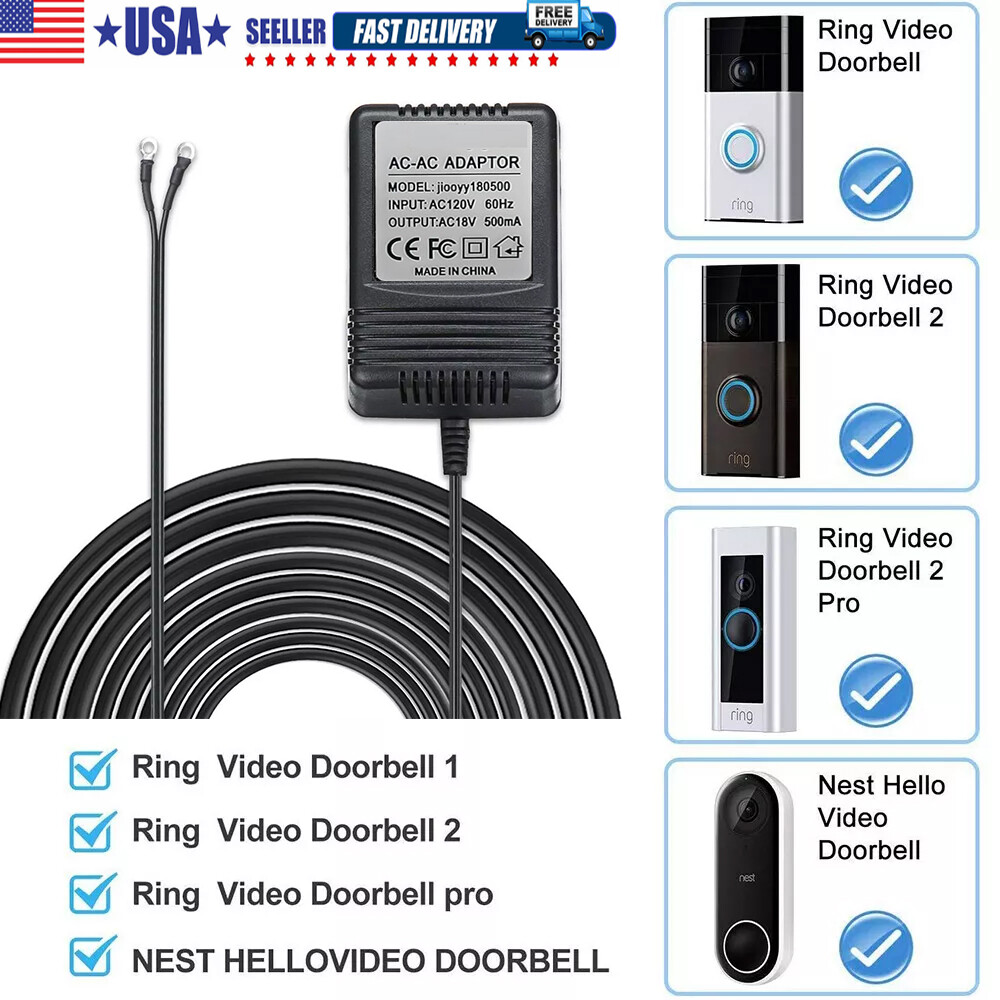
Wired power connects the Ring Doorbell to your home’s existing doorbell wiring. It provides continuous power, so you never worry about battery life. This option works well for homes with traditional doorbell systems. Installation requires some electrical work or help from a professional. Wired power keeps your device always ready and reduces maintenance.
Solar Power
Solar power is an eco-friendly option for Ring Doorbells. You attach a solar panel near the doorbell to capture sunlight. The panel charges the battery during the day. It reduces the need to recharge the battery manually. Solar power works best in sunny locations. It offers a green and low-maintenance way to keep your doorbell alive.
Credit: www.ebay.com
Battery Life And Maintenance
The battery life and maintenance of a Ring Video Doorbell are important for smooth operation. Knowing how long the battery lasts helps you plan charging times. Proper care keeps the device working well for a long time.
Understanding the battery details lets you avoid sudden power loss. You get peace of mind with a reliable doorbell camera.
Battery Capacity
The Ring Video Doorbell uses a rechargeable battery. Capacity varies by model but often ranges from 5,000 to 6,000 mAh. This size supports several weeks of use. Battery stores enough power to run video and motion alerts.
Charging Frequency
Charging frequency depends on device usage and settings. Heavy use means charging every 2 to 4 weeks. Low activity can extend charging intervals to 6 weeks. The app gives alerts when battery runs low. Regular checks help avoid unexpected shutdowns.
Tips To Extend Battery Life
Lower motion sensitivity to reduce alerts and save power. Use the app to set motion zones wisely. Turn off live view when not needed. Keep the doorbell firmware updated for efficiency. Remove the device during extreme cold to protect battery. These habits help stretch battery life effectively.
Wired Installation Details
Wired installation of the Ring Video Doorbell offers continuous power without the need for battery charging. This setup connects the device directly to your home’s existing doorbell wiring. It ensures the doorbell stays active and ready to use at all times.
Compatible Doorbell Systems
The Ring Video Doorbell works with most traditional doorbell systems. It fits systems that use 16 to 24 volts AC power. Mechanical or digital chimes are both compatible. Check your current doorbell’s voltage before installation.
Wiring Requirements
You need low-voltage doorbell wiring for the connection. The wires must carry 16 to 24 volts AC. Use existing doorbell wires if they meet these specs. If not, new wiring installation may be necessary. Ensure wires are in good condition and properly insulated.
Installation Process
Turn off power at the circuit breaker before starting. Remove your old doorbell and disconnect the wires. Attach the Ring doorbell mounting bracket to the wall. Connect the wires to the screws on the back of the Ring device. Secure the doorbell on the bracket. Restore power and test the device. Follow the Ring app instructions to complete setup.

Credit: www.amazon.com
Solar Charging Features
Ring Video Doorbells can use solar power to stay charged. Solar charging helps keep the doorbell working without needing frequent battery changes. It uses sunlight to power the device, making it eco-friendly and easy to maintain.
Solar charging suits homes with good sun exposure. It offers a steady power source that works well for outdoor use. The solar panel connects to the Ring doorbell to keep its battery full.
Solar Panel Compatibility
Ring doorbells work with specific solar panels made by Ring. These panels fit the doorbell’s size and power needs. Not all solar panels are compatible with Ring devices.
The official solar panel connects easily to the doorbell. It uses a simple plug-in design. This connection ensures steady charging without extra tools.
Installation Tips
Place the solar panel in a spot with direct sunlight. Avoid shaded areas or places blocked by trees or walls. The panel should face the sun for most of the day.
Mount the panel securely near the doorbell. Use the screws and brackets included in the package. Check the angle so the panel catches maximum sunlight.
Benefits Of Solar Power
Solar power reduces the need to remove the doorbell battery. It saves time and effort in charging or replacing batteries. The solar panel also lowers electricity costs.
Using solar energy helps the environment. It reduces reliance on traditional power sources. Solar charging keeps your Ring doorbell active and reliable.
Energy Efficiency And Usage
Understanding the energy efficiency of the Ring Video Doorbell helps users manage its power better. This device uses power smartly to stay active while saving battery life. The design supports long-term use with minimal energy waste. Let’s explore how the device consumes power and how to optimize its energy use.
Power Consumption Patterns
The Ring Video Doorbell uses power mainly when it detects motion or when someone presses the doorbell. During standby, it uses very little energy. Video recording and live streaming consume more power. Night vision and two-way talk features also increase power use. Power use varies based on how often the device is active.
Impact On Battery Life
Battery life depends on usage patterns and settings. Frequent motion alerts or live video streams drain the battery faster. Low activity can extend battery life to several months. Cold weather may reduce battery performance. Proper placement can reduce unnecessary activations and save power.
Optimizing Energy Use
Adjust motion sensitivity to reduce false alerts. Set motion zones to focus only on important areas. Limit live video streaming time. Use the lowest acceptable video quality to save power. Regularly update the device software for better energy management. Charge the battery before it fully drains to keep it healthy.
Troubleshooting Power Issues
Power issues can stop your Ring Video Doorbell from working properly. Troubleshooting these problems helps keep your doorbell active and secure. Understanding common problems and simple fixes saves time and stress.
Common Power Problems
Battery drains too fast or does not charge. Wired connections may be loose or broken. Power surges can damage the device. Cold weather can reduce battery life. Check if the device shows a low battery alert.
Resetting And Recharging
Try a reset to fix minor glitches. Hold the reset button for 15 seconds. Recharge the battery fully before testing again. Use the original charger for best results. Let the battery cool before recharging if it feels hot.
When To Replace Battery
Battery life decreases after many charge cycles. Replace battery if it drains quickly after a full charge. Use only official Ring batteries for safety. A swollen or damaged battery must be replaced immediately. Keep spare batteries ready for uninterrupted use.

Credit: www.amazon.com
Frequently Asked Questions
How Is The Ring Video Doorbell Powered?
The Ring Video Doorbell is powered either by a rechargeable battery or existing doorbell wiring. Battery models offer flexible placement. Wired models connect to your home’s doorbell transformer for continuous power.
Can I Use Battery Power For Ring Doorbell?
Yes, many Ring Doorbell models use rechargeable batteries. This allows easy installation without wiring. Batteries typically last 6 to 12 months, depending on usage and settings.
Does Ring Doorbell Need Electrical Wiring?
Not always. Some Ring Doorbells work solely on battery power. However, connecting to existing doorbell wiring provides constant power and avoids frequent charging.
How Long Does Ring Doorbell Battery Last?
Battery life varies by usage and model but typically lasts 6 to 12 months. Motion alerts and video recordings can affect battery consumption.
Conclusion
Ring Video Doorbell runs on either a rechargeable battery or existing doorbell wiring. You can choose the best power option for your home. Battery power offers flexibility and easy installation. Wired power provides continuous charging without battery replacement. Both methods keep your doorbell working day and night.
Understanding power helps you maintain your device easily. Choose what suits your needs and enjoy smart home security. Simple steps keep your Ring Doorbell ready to use anytime. Safe, reliable power means peace of mind at your door.