
Are you ready to make your home smarter and more secure? Installing the August Smart Lock Door Sensor is easier than you think, and it can give you peace of mind like never before.
Imagine knowing exactly when your door is opened or closed, right from your phone. In this guide, you’ll get simple, step-by-step instructions to set up your door sensor quickly and without hassle. Keep reading, and by the end, your smart lock will be up and running, protecting your home with ease.
Gather Required Tools
Gathering the right tools is the first step to a smooth August Smart Lock Door Sensor installation. Having everything ready saves time and avoids frustration during the process. This part guides you through checking the package and preparing your tools.
Check Package Contents
Start by opening the August Smart Lock Door Sensor box. Look for all the parts listed in the manual. Usually, the package includes the sensor, batteries, mounting screws, and an installation guide. Make sure none of these items are missing or damaged. Missing parts can delay your installation.
Inspect the sensor carefully. It should be clean and free from scratches. Check the batteries to see if they are included and properly installed. If the package is incomplete, contact the seller before moving forward.
Prepare Installation Tools
Gather basic tools needed for the installation. You will need a screwdriver, usually a Phillips head, to attach the sensor to the door frame. A measuring tape helps position the sensor correctly. A pencil or marker is useful for marking drill points.
Keep a ladder or step stool nearby if your door frame is high. Having a clean cloth can help wipe the area before installation. Organize these tools in one spot. This preparation makes the process faster and easier.
Prepare The Door
Preparing the door is the first step in installing the August Smart Lock Door Sensor. This step ensures the sensor works accurately. A clean and well-chosen spot helps the sensor detect door activity perfectly.
Clean Sensor Surface
Start by cleaning the area where the sensor will attach. Use a soft cloth and mild cleaner. Remove dust, dirt, and grease. A clean surface helps the sensor stick firmly and work well.
Choose Sensor Placement
Pick a spot on the door frame close to the lock. The sensor and magnet should align correctly for accurate readings. Avoid places with metal or electrical interference. Check that the spot does not block door movement.
Install The Door Sensor
Installing the August Smart Lock door sensor is a simple process. This sensor helps you monitor your door’s status. It lets you know if the door is open or closed. Follow these steps to install the sensor correctly and ensure it works well.
Attach Sensor To Door Frame
Start by cleaning the door frame surface. Use a dry cloth to remove dust and dirt. Peel off the backing from the sensor’s adhesive tape. Press the sensor firmly onto the door frame. Hold it in place for about 30 seconds. This helps the sensor stick securely. Avoid placing the sensor where it might get bumped.
Align Sensor Components
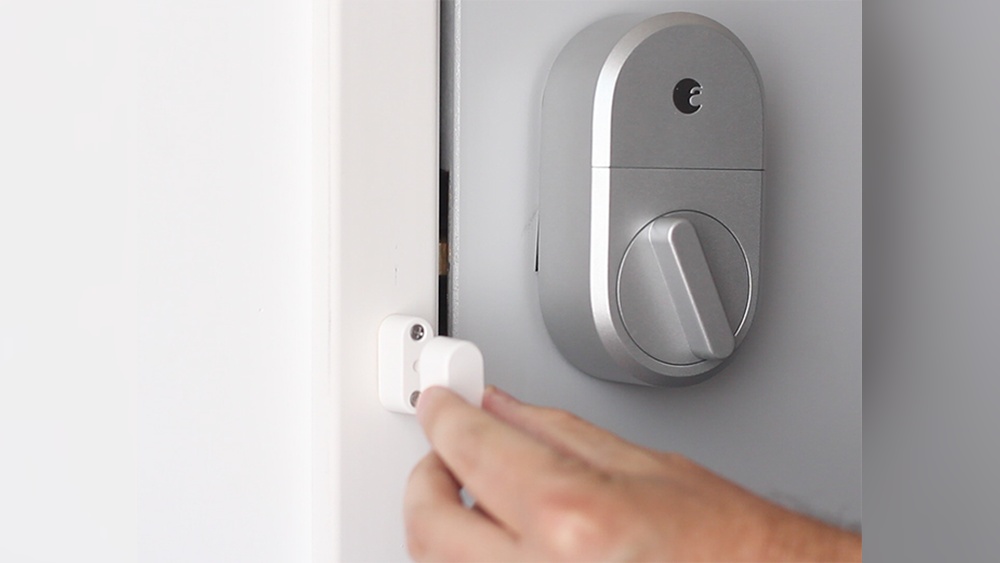
The sensor has two parts: the main sensor and the magnet. Place the magnet on the door, close to the sensor. The gap between the two should be less than half an inch. Align them so they line up perfectly. Proper alignment ensures accurate door status detection. Test by opening and closing the door slowly. Adjust if the sensor does not detect the door properly.
Credit: www.bestbuy.com
Connect With Smart Lock
Connecting your August Smart Lock Door Sensor to the smart lock is a simple step. This connection lets your sensor send important information to your lock. You will know when your door opens or closes. The setup takes only a few minutes. Follow the easy steps below to connect your sensor with the lock.
Download The August App
Start by downloading the August app on your smartphone. The app is free and available for both iOS and Android. Search for “August Home” in your app store. Install the app and open it. Create an account or log in if you already have one. The app controls both your lock and sensor.
Pair Sensor With Lock
Open the August app and go to the device section. Choose the option to add a new device. Select the door sensor from the list. Follow the on-screen instructions to pair the sensor with your lock. Keep the sensor close to the lock during pairing. The app will confirm when the sensor connects successfully. After pairing, test the sensor by opening and closing the door.
Test The Sensor
Testing the August Smart Lock door sensor is essential after installation. It ensures the sensor works correctly and keeps your home secure. This step helps avoid any issues with door status detection.
Verify Sensor Alignment
Check if the sensor and magnet align properly. They must be close without touching. Misalignment can cause false readings or no signal at all. Open and close the door slowly. Watch the sensor light or app to see if it detects the door movement. Adjust the sensor position if needed until it responds accurately.
Check Sensor Notifications
Open the August app on your phone. Look for notifications about door status changes. The app should alert you when the door opens or closes. Test several times to confirm notifications arrive quickly and reliably. If notifications fail, check your Wi-Fi or sensor battery. Proper alerts keep you informed about your door’s security in real time.
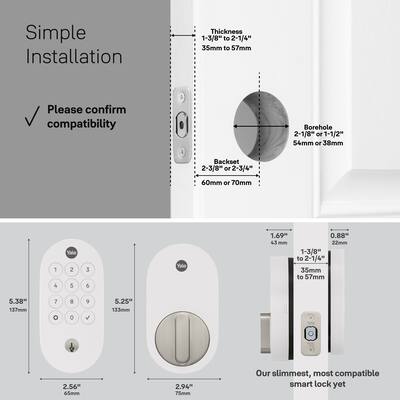
Credit: www.bestbuy.com
Troubleshoot Common Issues
Troubleshooting common issues with your August Smart Lock Door Sensor helps keep your smart home secure. Problems like connection errors or sensor misalignment can stop your lock from working properly. Fixing these issues is simple with the right steps. Follow the tips below to get your sensor back on track quickly.
Fix Connection Problems
Start by checking your Wi-Fi or Bluetooth connection. Make sure your smartphone and sensor are within range. Restart your router or Bluetooth device to refresh the connection. Remove the sensor from the app and add it again. This resets the link between your phone and the sensor. Ensure the sensor’s battery is charged. Low power can cause connection drops. Update the app and firmware to the latest version for better performance.
Adjust Sensor Position
Place the sensor and magnet correctly on your door frame and door. They must line up closely for accurate readings. Check the gap between the sensor and magnet; it should be small but not touching. Clean the surfaces before attaching the sensor to avoid interference. Use the included adhesive strips or screws to secure the sensor firmly. Test the door’s open and close status in the app. Adjust the position slightly if the sensor does not register the door status properly.

Credit: support.august.com
Frequently Asked Questions
How Do I Install The August Smart Lock Door Sensor?
First, attach the sensor on the door frame and the magnet on the door. Sync them via the August app. Follow in-app instructions to complete setup.
What Tools Are Needed For August Smart Lock Sensor Installation?
No special tools are needed. Use the included adhesive strips for easy, drill-free installation.
Can I Use The Sensor With Any Door Type?
Yes, the sensor works on most door types, including wood, metal, and composite doors.
How Do I Sync The Door Sensor With The August App?
Open the August app, select your smart lock, then follow prompts to add and sync the door sensor.
Conclusion
Installing the August Smart Lock Door Sensor is simple and quick. Follow each step carefully to ensure proper setup. The sensor helps you know when your door opens or closes. It adds extra security and peace of mind at home.
Test the sensor after installation to confirm it works well. Enjoy the convenience of smart home technology today.