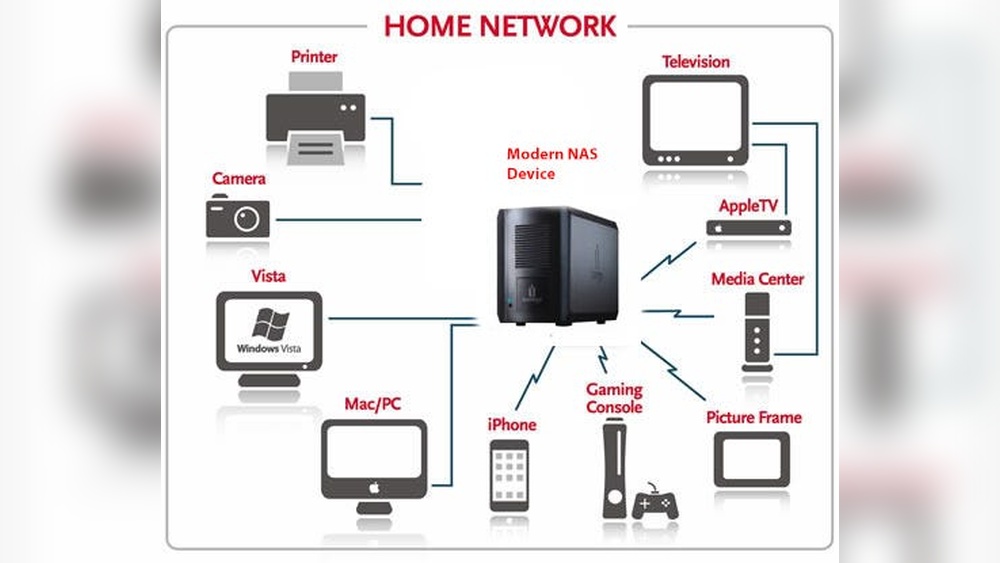

Imagine having all your important files, photos, and videos stored safely in one place—right at home—and being able to access them anytime, from any device. That’s exactly what home network data storage solutions offer you.
No more juggling external drives or worrying about losing precious memories. Whether you want to stream movies smoothly, back up your work, or share files effortlessly with family, the right setup can transform your digital life. Ready to discover how to secure your data, save space, and boost convenience?
Keep reading to find the perfect home network storage options tailored just for you.
Types Of Home Network Storage
Choosing the right home network storage depends on your needs and setup. Various types of storage offer different benefits. Understanding these options helps in picking the best fit for your home.
Network Attached Storage (nas)
NAS is a dedicated device connected to your home network. It allows multiple users to store and access files from any device. NAS often includes features like automatic backups and media streaming. It works well for sharing files across laptops, phones, and smart TVs.
NAS devices usually have multiple hard drives for data protection. They are easy to expand as your storage needs grow. Many NAS systems support apps to enhance functionality.
Direct Attached Storage (das)
DAS connects directly to one computer, usually via USB or Thunderbolt. It provides fast access to data but limits sharing to one device at a time. This option suits users who need extra storage for a single computer.
DAS drives are simple to use and often more affordable. They are great for quick backups or working with large files locally.
Cloud Storage Integration
Cloud storage allows you to save files on internet servers. It offers access from anywhere with an internet connection. Many home network storage solutions now support syncing with cloud services.
This integration ensures your files stay safe even if local hardware fails. It also helps in sharing files securely with others outside your home network.
Credit: contabo.com
Choosing The Right Storage Device
Choosing the right storage device for a home network is key to keeping data safe and accessible. The right device fits your needs now and grows with you. It balances space, speed, and device compatibility. Picking the best option helps avoid frustration and lost files.
Capacity And Scalability
Storage capacity means how much data the device can hold. Think about your current files and future needs. Choose a device that offers room to grow. Scalable storage lets you add more space without replacing the device. This saves money and time in the long run.
Performance And Speed
Performance affects how fast data moves on your network. Speed matters when streaming videos or backing up files. Devices with faster read and write speeds improve user experience. Consider devices with SSDs or hybrid drives for better performance. A slow device can cause delays and frustration.
Compatibility With Devices
Check if the storage device works with your computers, phones, and smart TVs. Some devices support multiple platforms like Windows, Mac, and Linux. Network-attached storage (NAS) often offers wide compatibility. Ensure your device supports common protocols like SMB or DLNA. Compatibility avoids connection issues and lost data access.
Setting Up Your Network Storage
Setting up your network storage is the first step to secure and easy data access. A well-configured storage system keeps your files safe. It also helps share data across devices in your home. Follow simple steps to connect, configure, and enable access.
Connecting To Your Home Network
Start by connecting your storage device to your router. Use an Ethernet cable for fast and stable connection. Power on the device and wait for it to boot. Check your router’s settings to find the device’s IP address. This address allows your devices to find the storage easily.
Configuring User Access
Create user accounts to control who can see your files. Assign different permission levels for each user. Use strong passwords to protect your data. Limit access to sensitive folders if needed. Regularly update user settings to maintain security.
Enabling Remote Access
Remote access lets you reach your files from anywhere. Enable this feature in the storage device’s settings. Use a secure connection method like VPN or encrypted links. Set up two-factor authentication for added safety. Test remote access to ensure it works smoothly.
Data Backup Strategies
Data backup strategies are essential for protecting your home network data. They ensure your files stay safe from loss, damage, or theft. A good backup plan keeps your important documents, photos, and videos secure and easy to restore.
Using effective backup methods reduces stress and saves time during emergencies. It also helps maintain the smooth running of your home network storage system. Let’s explore key strategies that make data backup reliable and simple.
Automated Backup Scheduling
Automated backup scheduling lets you set backups to run on a regular basis. This removes the need to remember manual backups. You can choose daily, weekly, or monthly schedules.
This method ensures your data is always up-to-date. It lowers the risk of losing recent files. Many home network storage devices offer built-in tools for automation.
Redundancy And Raid Options
Redundancy means storing copies of your data in multiple places. It prevents data loss if one storage device fails. RAID (Redundant Array of Independent Disks) is a popular way to add redundancy.
RAID combines several hard drives into one system. Some RAID levels mirror data on two drives, others spread data across drives with parity checks. This protects your data and improves storage speed.
Versioning And File Recovery
Versioning saves multiple copies of the same file at different times. This helps recover earlier versions if a file becomes corrupted or deleted. It acts like a timeline for your files.
File recovery tools work with versioning to restore lost or damaged data quickly. They are essential for accidental deletion or ransomware attacks. Most home storage solutions support both features.
Security Measures For Safe Storage
Keeping data safe in a home network storage system is essential. Security measures protect your files from theft, loss, or damage. These steps help maintain privacy and ensure only authorized users access the data. Implementing strong protections makes your storage reliable and secure.
Encryption Methods
Encryption scrambles data to keep it unreadable to outsiders. It protects files during storage and transmission. Common methods include AES (Advanced Encryption Standard) which is fast and secure. Encrypting sensitive files prevents hackers from stealing information. Many home storage devices offer built-in encryption options. Always enable encryption for the highest security.
Firewall And Network Protection
A firewall acts as a barrier between your network and the internet. It blocks unauthorized access and harmful traffic. Use a router with a strong firewall to protect your storage system. Regularly update your router firmware for improved defense. Network protection stops hackers from reaching your data. Turn on security features on all devices connected to your network.
User Authentication And Permissions
User authentication confirms the identity of anyone accessing the storage. Set strong passwords and change them often. Use multi-factor authentication for extra safety. Assign permissions to control who can view or edit files. Limit access to important data to only trusted users. Proper authentication and permissions reduce the risk of data breaches.
Credit: buffaloamericas.com
Popular Storage Solutions And Brands
Choosing the right home network data storage solution can be confusing. Many brands offer different devices and services. Popular storage solutions include network-attached storage (NAS), cloud backup, and hybrid options. Each has unique features suited for various needs and budgets. Understanding top brands helps make a better choice.
Top Nas Brands
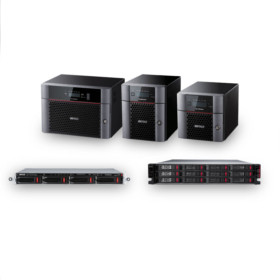
NAS devices provide local storage accessible from any device on the network. Synology is a leading brand known for user-friendly interfaces and powerful features. QNAP offers versatile NAS units with advanced performance for home and small offices. Western Digital (WD) provides reliable NAS solutions that suit beginners and experts alike.
Affordable Cloud Backup Services
Cloud backup services store data on remote servers, ensuring safety from local failures. Google Drive offers easy integration with many devices and apps. Dropbox is popular for simple file sharing and automatic backups. Backblaze provides budget-friendly unlimited backup space with strong security.
Hybrid Storage Options
Hybrid storage combines local NAS and cloud backup to protect data efficiently. This setup keeps files accessible on the network while syncing important data to the cloud. Brands like Synology and QNAP support hybrid systems, allowing flexible storage management. Hybrid solutions balance speed, security, and cost for many users.
Troubleshooting Common Issues
Troubleshooting common issues in home network data storage is essential. Small problems can stop your access to important files. Being ready helps fix issues fast. This keeps your data safe and your system running smooth.
Many issues happen due to network or hardware faults. Knowing how to identify these helps avoid data loss. It also improves storage speed and reliability. Below are key areas to check and fix.
Connectivity Problems
Check all cables and connections first. Loose or damaged cables cause most network failures. Restart your router and storage device to refresh connections. Verify your device is on the same network. Make sure firewall settings allow access to storage. Use ping tests to check if the storage device responds. Update firmware and drivers for better compatibility.
Data Corruption And Recovery
Data corruption can happen from power loss or improper shutdowns. Regularly back up important files to separate devices. Use built-in tools to scan and repair storage errors. Avoid sudden disconnections during file transfers. If corruption happens, restore from the latest backup. Use recovery software only if backups are unavailable. Keep your storage device clean and cool to prevent hardware failure.
Performance Optimization
Slow data access may come from network congestion or outdated hardware. Limit the number of devices using the network at once. Use wired connections for faster and stable speeds. Check for software updates on your storage device. Clear unused files to free up space. Defragment drives if supported to improve speed. Consider upgrading to faster storage like SSDs for better performance.

Credit: www.amazon.com
Future Trends In Home Data Storage
Home data storage is evolving rapidly. The future will bring smarter, faster, and safer ways to keep data at home. These new trends will shape how people store and access their information.
Expect more advanced technology, better device connections, and stronger security. These changes will make home data storage more reliable and user-friendly.
Advancements In Storage Technology
Storage devices will grow faster and hold more data. New materials and designs will improve durability and speed. Solid-state drives (SSDs) will become more common and affordable. Cloud storage will blend with local storage for better access. Users will enjoy seamless data transfer and backup options.
Integration With Smart Home Devices
Data storage will connect closely with smart home gadgets. Cameras, voice assistants, and sensors will store data locally. This reduces reliance on internet connections. Home networks will manage data automatically and securely. Users will control storage through simple apps or voice commands.
Growing Importance Of Cybersecurity
Data protection will become a top priority. Storage systems will include stronger encryption and access controls. Regular updates will defend against new threats. Multi-factor authentication will be standard. Families will have tools to monitor and manage data safety easily.
Frequently Asked Questions
What Is Home Network Data Storage?
Home network data storage allows multiple devices to save and share files securely. It centralizes data access using devices like NAS or cloud storage. This setup enhances convenience, backup reliability, and media streaming within your home network.
How Does Nas Improve Home Data Storage?
NAS (Network Attached Storage) offers dedicated storage accessible over your home network. It provides large capacity, data redundancy, and easy file sharing. NAS devices often support remote access, making them ideal for safe and efficient home data storage solutions.
Which Storage Solutions Suit Home Networks Best?
Popular home network storage solutions include NAS devices, external hard drives, and cloud storage. NAS is ideal for multi-user access; external drives suit single users; cloud storage offers off-site backups. Choose based on budget, capacity needs, and accessibility preferences.
Is Home Network Storage Safe From Data Loss?
Yes, home network storage can be safe with proper backup and redundancy. Using RAID configurations, regular backups, and strong network security minimizes data loss risks. Combining local NAS with cloud backup enhances data protection significantly.
Conclusion
Choosing the right home network data storage keeps your files safe and accessible. Simple setups fit small homes, while advanced options serve larger needs. Consider ease of use, capacity, and budget before buying. Regular backups prevent data loss and keep your system running smoothly.
A good storage solution supports streaming, sharing, and remote access. Stay organized and enjoy fast, reliable access to your important files anytime. Investing time in setup pays off with peace of mind and convenience.