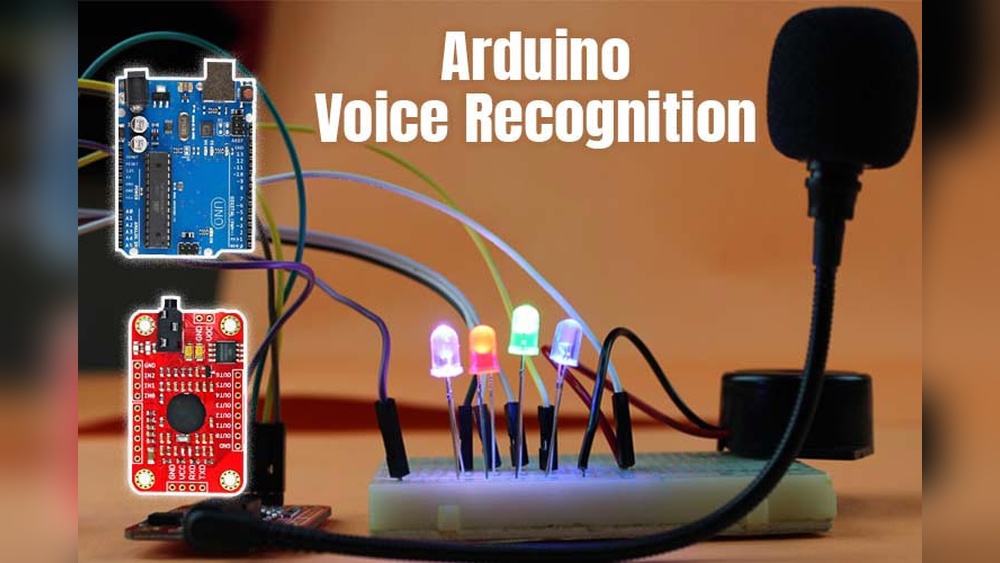

Imagine controlling your devices just by speaking to them—no buttons, no remote, no hassle. With voice recognition technology, you can turn this convenience into your everyday reality.
Whether it’s adjusting the lights, playing your favorite music, or managing your smart home gadgets, voice control puts the power literally at your fingertips—or rather, your voice. If you want to make your life simpler, more efficient, and impressively futuristic, keep reading.
You’re about to discover how easy it is to take command with just your words.

Credit: community.home-assistant.io
Voice Recognition Basics
Voice recognition technology allows devices to understand and respond to human speech. It changes how people interact with gadgets. Instead of pressing buttons, users can speak commands to control devices. This makes technology easier and faster to use.
Voice recognition is now common in smart homes, phones, and cars. It helps with tasks like playing music, setting alarms, or turning on lights. Understanding how voice recognition works helps users appreciate its benefits and limitations.
How Voice Recognition Works
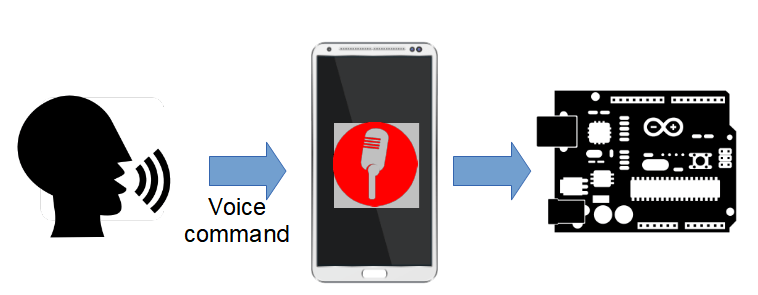
Voice recognition starts by capturing sound waves from your speech. The device converts these waves into digital data. Then, it breaks down the data into small sounds called phonemes.
The system compares these phonemes to known patterns in its database. It tries to match them to words and sentences. Once recognized, the device performs the requested action or responds with information.
Some systems learn from user speech to improve accuracy. They adapt to accents and speech styles over time.
Key Technologies Behind Voice Control
Voice control relies on several main technologies. Speech recognition software processes the audio input. It converts spoken words into text.
Natural Language Processing (NLP) helps understand the meaning behind words. It allows devices to follow complex commands. Machine learning algorithms improve recognition by learning from data.
Microphones and audio sensors capture clear voice signals. Noise cancellation technology removes background noise. This ensures accurate voice detection in noisy environments.
Top Voice Assistants
Voice recognition technology has transformed how people interact with devices. Voice assistants now help control smart homes, manage tasks, and provide information swiftly. Choosing the right voice assistant depends on features, compatibility, and ease of use. Here is a look at some top voice assistants available today.
Amazon Alexa Features
Amazon Alexa controls many smart devices with simple voice commands. It supports thousands of skills for music, news, and smart home control. Alexa can set timers, answer questions, and create shopping lists. It works well with Amazon products like Echo speakers and Fire TV. Alexa also supports routines, automating multiple tasks with one command.
Google Assistant Capabilities
Google Assistant offers fast, accurate answers using Google’s search engine. It understands natural language and context for better conversations. It controls smart home devices, sends messages, and manages your schedule. Google Assistant works on Android phones, Google Nest devices, and more. It integrates with many apps and services for seamless control.
Apple Siri Integration
Siri works best within the Apple ecosystem, including iPhones, iPads, and HomePods. It controls Apple HomeKit devices and handles calls, messages, and reminders. Siri uses voice recognition to understand commands quickly. It offers privacy by processing many requests on the device. Siri also supports shortcuts to automate daily tasks.
Emerging Alternatives
New voice assistants are entering the market with unique features. Samsung’s Bixby offers deep integration with Samsung devices. Microsoft’s Cortana focuses on productivity and works with Windows systems. Other niche assistants target specific smart home brands or provide localized support. These alternatives give users more choices for voice control.
Smart Home Devices Compatible With Voice
Voice recognition technology powers many smart home devices today. These devices respond to spoken commands, making daily tasks easier. Voice-controlled gadgets help you manage your home with simple words. They add convenience and improve accessibility for everyone.
Smart home devices that work with voice assistants offer seamless control. They connect to platforms like Amazon Alexa, Google Assistant, or Apple Siri. This compatibility lets you use voice commands to operate various devices in your home.
Smart Speakers And Displays
Smart speakers are the heart of voice-controlled homes. Devices like Amazon Echo or Google Nest play music, answer questions, and control other smart gadgets. Smart displays add a screen to show weather, recipes, or video calls. They respond quickly to voice commands for hands-free use.
Voice-controlled Lighting
Voice-controlled lighting lets you adjust brightness and color without touching switches. You can turn lights on or off, dim them, or change colors with simple commands. Smart bulbs from brands like Philips Hue or LIFX work well with voice assistants. This feature saves energy and creates the right mood easily.
Smart Thermostats And Fans
Voice-operated thermostats and fans keep your home comfortable. You can set the temperature or turn fans on and off by speaking. Devices like Nest Thermostat or Ecobee listen to your voice for quick adjustments. These smart devices help save energy by optimizing heating and cooling.
Entertainment Systems
Voice control enhances your entertainment experience. Control your TV, soundbar, or streaming devices using voice commands. Products like Fire TV, Roku, or Apple TV support voice assistants for easy navigation. You can play, pause, or change channels without using a remote.
Credit: www.javacodegeeks.com
Setting Up Voice Control
Setting up voice control makes using smart devices easier and more fun. It lets you manage your devices by speaking simple commands. The setup process is straightforward and helps your system understand your voice clearly.
Good setup improves accuracy and speeds up response time. It also allows you to create personalized commands for your needs. Follow a few steps to get your voice control ready and working smoothly.
Choosing The Right Assistant
Select a voice assistant that matches your devices and lifestyle. Popular options include Amazon Alexa, Google Assistant, and Apple Siri. Each assistant has unique features and works best with certain devices.
Consider compatibility with your smart home products. Also, think about the languages and accents the assistant supports. Pick one that feels natural and easy for you to use daily.
Device Configuration Tips
Place your voice control device in a central, quiet location. Avoid areas with loud background noise or direct sunlight. Connect your device to a strong Wi-Fi network for better performance.
Follow the setup wizard on the app carefully. Update the device’s software to the latest version. This ensures new features and improved security for your voice assistant.
Customizing Voice Commands
Create custom commands for common tasks to save time. Use simple phrases you will remember easily. Most assistants allow you to link these commands to multiple actions.
Test your commands and adjust them if needed. Personalizing voice control makes your smart home more responsive and fun to use. It also helps avoid confusion and errors during commands.
Hands-free Home Navigation
Hands-free home navigation lets you control devices using voice alone. This technology removes the need to touch screens or buttons. It makes moving through your home’s smart systems easier and faster. Voice recognition understands spoken commands and acts on them instantly. It supports daily life with simple, natural communication.
Controlling Screens And Interfaces
Voice commands allow users to operate screens without hands. You can say “scroll down” or “go back” to move through menus. Selecting items is easy by saying “click” followed by the option name. This control works on TVs, smartphones, and smart home hubs. It creates a smooth and efficient way to interact with devices.
Voice Commands For Daily Tasks
Daily chores become simpler with voice control. Commands like “turn on lights” or “set thermostat to 72 degrees” adjust home settings quickly. You can ask your system to play music, check the weather, or add items to a shopping list. This reduces effort and saves time on routine activities.
Accessibility Benefits
Voice recognition technology improves home accessibility. People with mobility challenges find it easier to control devices. It offers independence by removing physical barriers. This technology helps seniors and those with disabilities live more comfortably. Voice navigation creates an inclusive smart home experience for everyone.
Local Vs Cloud-based Voice Control
Voice recognition technology lets users control devices by speaking commands. This control comes in two main types: local and cloud-based. Local voice control processes commands directly on the device. Cloud-based voice control sends voice data to servers online for processing. Each type affects privacy, speed, and reliability differently. Understanding these differences helps choose the best option for your needs.
Privacy Considerations
Local voice control keeps your data on the device. It does not send audio recordings to the internet. This reduces the risk of data breaches. Users have more control over their personal information. Cloud-based systems send voice data to remote servers. Companies may store and analyze these recordings. This raises privacy concerns for sensitive information. Choosing local control can increase privacy and security.
Performance Differences
Local voice control offers faster response times. It does not depend on internet speed or connectivity. Commands are processed instantly on your device. Cloud-based voice control requires a stable internet connection. Processing happens on powerful servers, enabling complex tasks. However, slow or lost connections delay responses. Some cloud systems improve accuracy by learning from many users. Local systems focus on quick and private processing.
Popular Local Voice Solutions
Several devices use local voice control successfully. Apple’s Siri can operate offline for basic commands. Google Assistant offers some local processing features. Mycroft is an open-source voice assistant running on local hardware. Home Assistant Voice Preview Edition works locally for smart homes. These options provide privacy and speed without relying on the cloud. They suit users who want control and data security.
Troubleshooting Common Issues
Voice control is changing fast. New trends will make devices smarter and easier to use. Voice recognition will move beyond simple commands. It will understand context and emotions better. Devices will listen and react more naturally. This future will shape how people interact with technology daily.
Advancements In Ai Voice Assistants
AI voice assistants are learning to understand speech more clearly. They will handle complex questions and tasks with ease. Improvements in natural language processing help assistants follow conversations better. They will predict user needs and offer helpful suggestions. Voice assistants will sound more human and less robotic. This will make interactions more comfortable and natural.
Integration With Iot Devices
Voice control will connect more deeply with Internet of Things (IoT) devices. Smart homes will respond to voice commands instantly. Lights, thermostats, and security cameras will work together smoothly. Users will control multiple devices with a single voice command. This integration will bring more convenience and efficiency. It will simplify daily routines and save time.
Voice Biometrics And Security
Voice biometrics will improve device security significantly. Devices will recognize individual voices to allow access. This technology helps protect personal data and privacy. It reduces the need for passwords or PINs. Voice authentication will become common in banking and smart homes. Security will be stronger while keeping user experience easy.

Credit: www.researchgate.net
Frequently Asked Questions
How Can I Control My Device With My Voice?
Control your device by enabling its voice assistant, then say commands like “go back,” “scroll down,” or “click [text]. ” Use apps like Google Home or Alexa for smart devices. Ensure your microphone is active for accurate voice recognition and hands-free operation.
What Are The Voice Controlled Home Devices?
Voice-controlled home devices include smart speakers like Amazon Alexa, Google Nest, Apple HomePod, and smart displays. They manage lights, fans, TVs, and more using voice commands. These devices connect to apps for easy control and automation, enhancing convenience and hands-free operation in your home.
How Do Voice-controlled Devices Work?
Voice-controlled devices convert spoken words into digital signals using microphones and voice recognition software. They analyze speech patterns, interpret commands, and execute tasks instantly. This technology enables hands-free control of smart home gadgets, apps, and services through natural language processing and real-time response.
Can A Home Assistant Be Controlled By Voice?
Yes, a home assistant can be controlled by voice using built-in or connected voice recognition technologies. Simply speak commands to manage smart devices.
Conclusion
Voice recognition makes device control simple and hands-free. Speak commands clearly and your devices respond quickly. This technology saves time and adds convenience to daily life. It suits all ages and skill levels well. Voice control grows smarter as it learns your preferences.
Start small and expand as you get comfortable. Enjoy the ease of managing your home or gadgets with just your voice. The future of device control is here and easy to use.