

Imagine having a kitchen helper that not only guides you through recipes step-by-step but also manages your smart appliances with just your voice. That’s exactly what KitchenAid’s Smart Display brings to your home.
Whether you’re an experienced chef or just getting started, this smart device is designed to make cooking easier, more fun, and impressively efficient. Ready to discover how the KitchenAid Smart Display can transform your kitchen routine and boost your culinary creativity?
Keep reading to find out everything you need to know.
Credit: www.cnet.com
Features Of Kitchenaid Smart Display
The KitchenAid Smart Display offers a variety of features designed to make your kitchen smarter and your cooking easier. It combines technology with convenience to help you stay organized and efficient. This device acts as a helpful assistant for everyday kitchen tasks.
Explore the key features that make the KitchenAid Smart Display a useful addition to any home.
Hands-free Google Assistant
Speak to the KitchenAid Smart Display without touching it. The built-in Google Assistant responds to your voice commands. Ask for weather updates, set timers, or control music while cooking. This hands-free feature keeps your hands free and clean.
Step-by-step Recipes
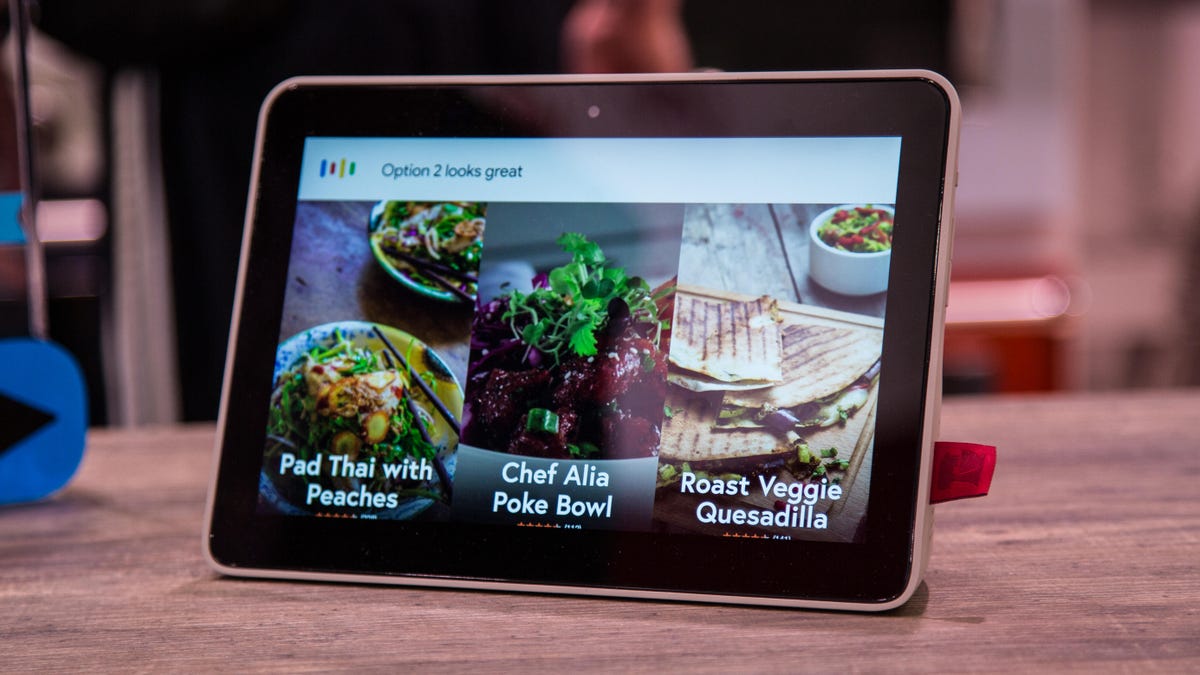
Follow recipes easily with clear, step-by-step instructions shown on the screen. The display guides you through each step at your own pace. It helps reduce mistakes and saves time in the kitchen. Try new dishes with confidence and support.
Shopping List Integration
Create and manage shopping lists directly on the Smart Display. Add items by voice or touch as you notice what you need. The list syncs with your phone, making grocery trips simpler. Never forget an ingredient again.
Smart Home Control
Use the KitchenAid Smart Display to control other smart devices in your home. Adjust lights, thermostats, or security cameras with simple voice commands. This feature brings extra comfort and control to your kitchen space.

Credit: www.kitchenaid.com
Design And Build Quality
The design and build quality of KitchenAid’s Smart Display reflect its role as a helpful kitchen assistant. It combines durability with a sleek look. The device fits well into modern kitchens, offering both style and function. KitchenAid focuses on materials and features that support daily kitchen use.
Splash-resistant Construction
The Smart Display has splash-resistant construction. This feature protects it from spills and splashes common in kitchens. You can wipe it clean easily without worry. The build uses materials that resist moisture and stains. This helps the device last longer even in busy cooking areas.
Display And Audio Features
The display is bright and clear, making it easy to read recipes. It uses a high-resolution screen that shows colors vividly. The size is perfect for viewing from different angles. Audio features include speakers that offer clear sound. Voice commands work well even with kitchen noise. This makes interaction smooth and hands-free.
User Interface And Controls
The user interface is simple and intuitive. Touch controls respond quickly to taps and swipes. The layout organizes apps and functions clearly. Users can access recipes, timers, and smart home controls easily. Voice control with Google Assistant adds convenience. This design supports a smooth and efficient kitchen experience.
Connectivity And App Integration
The KitchenAid Smart Display offers seamless connectivity that simplifies kitchen tasks. Its app integration allows easy control and monitoring from anywhere. This feature turns your kitchen device into a smart hub that fits modern lifestyles.
By connecting to Wi-Fi, the Smart Display enhances convenience and efficiency. Users can access recipes, control settings, and manage kitchen activities without standing near the appliance. This integration makes cooking and kitchen management more enjoyable.
Wi-fi Enabled Functions
The Smart Display connects to your home Wi-Fi network for real-time updates. It streams recipe videos and step-by-step guides directly on the screen. This connection also supports voice commands through Google Assistant, hands-free and simple.
Automatic software updates improve performance and add new features. The device syncs with other smart kitchen tools to streamline cooking processes. Alerts notify users about cooking times or appliance status instantly.
Kitchenaid App Compatibility
The KitchenAid app works smoothly with the Smart Display. It allows users to browse recipes, create shopping lists, and control appliances remotely. The app supports both iOS and Android devices for wide accessibility.
Users receive personalized recipe suggestions based on preferences and past cooking history. The app also offers tips and maintenance reminders to keep appliances running well. This integration brings the kitchen experience to the palm of your hand.
Remote Appliance Control
Control KitchenAid appliances from any location using the app or Smart Display. Start or stop ovens, adjust temperatures, and monitor cooking progress remotely. This flexibility saves time and prevents overcooking or burning food.
Receive notifications if an appliance needs attention or finishes a task. The Smart Display acts as a command center for all connected devices in the kitchen. Remote control adds ease and confidence to daily cooking routines.
Cooking And Kitchen Benefits
The KitchenAid Smart Display brings many benefits to cooking and kitchen tasks. It helps make meal preparation easier and more fun. This smart device works well in busy kitchens. It guides users with clear steps and useful features. Its design fits well in any kitchen style, adding convenience and efficiency.
Using the Smart Display can improve how you cook and manage your kitchen. It saves time and inspires new recipe ideas. This makes cooking less stressful and more enjoyable for everyone.
Simplifying Meal Preparation
The KitchenAid Smart Display shows step-by-step recipe instructions. It guides you through each cooking stage clearly. You can follow recipes without holding a book or phone. The hands-free voice control lets you ask questions and get help easily. It also displays timers and measurements to keep you on track. This reduces mistakes and boosts confidence in cooking.
Time-saving Features
With the Smart Display, you can set multiple timers quickly. It also helps manage your shopping list by adding items with voice commands. The device connects with other smart kitchen tools to control them remotely. This means you save time on tasks like preheating ovens or checking appliance status. The quick access to information speeds up your cooking process significantly.
Enhancing Culinary Creativity
The Smart Display offers access to many recipes and cooking ideas. It suggests dishes based on ingredients you have at home. You can explore new cuisines and cooking techniques with ease. The device encourages trying new flavors and styles. This helps improve your cooking skills and keeps meals exciting for your family.
Comparison With Other Smart Displays
The KitchenAid Smart Display stands out in a crowded market of smart home devices. It offers features designed specifically for kitchen use. Comparing it with other smart displays helps highlight its strengths and weaknesses. This comparison focuses on unique KitchenAid advantages, Google Assistant performance, and price versus value.
Unique Kitchenaid Advantages
KitchenAid Smart Display has a splash-resistant design. This feature suits busy kitchens and protects against spills. It offers hands-free step-by-step recipe guidance. The screen is bright and easy to read, even in a well-lit kitchen. The device integrates well with other KitchenAid smart appliances. This helps create a connected cooking environment. Few competitors focus on kitchen-specific features like these.
Google Assistant Performance
The KitchenAid Smart Display uses Google Assistant for voice commands. It responds quickly and accurately to questions. It controls smart home devices with ease. Users can ask for timers, weather, or play music. The Assistant also manages shopping lists efficiently. Performance matches other Google-powered smart displays. Some devices may have more third-party app support, but KitchenAid covers essential functions well.
Price And Value
KitchenAid Smart Display is priced higher than many generic smart displays. The cost reflects its durable build and kitchen-focused features. It offers good value for those who cook often. Users gain convenience and durability not found in cheaper models. For casual users, a less expensive device might suffice. The Smart Display is an investment for serious home cooks.
Troubleshooting Common Issues
Troubleshooting common issues with the KitchenAid Smart Display helps keep your kitchen running smoothly. This device combines smart technology with user-friendly features. Sometimes, small problems can stop it from working right. This guide covers key issues and simple fixes. It aims to save your time and reduce frustration.
Display Malfunctions
The screen might freeze or not respond to touch. A quick restart often solves this problem. Press and hold the power button until the device turns off. Then, turn it back on. Check for any dirt or moisture on the screen. Clean it gently with a soft cloth. If the display stays blank, plug the device into another power outlet. This can rule out power supply issues.
Connectivity Problems
Wi-Fi connection issues are common with smart devices. Ensure your Wi-Fi network is stable and within range. Restart your router to clear network bugs. The Smart Display should be close to the router for best signal strength. Forget the Wi-Fi network on the device and reconnect. This resets the connection settings. Avoid using public Wi-Fi networks as they may block device functions.
Software Updates And Support
Keep your Smart Display updated to avoid bugs and add new features. Check for updates in the device settings regularly. Updates install automatically if the device is connected to Wi-Fi and charging. If an update fails, restart the device and try again. Visit the official KitchenAid support page for help. Customer service can guide you through complex issues and repairs.
User Experience And Reviews
The KitchenAid Smart Display offers a unique blend of technology and kitchen convenience. Users find it helpful for following recipes, managing grocery lists, and controlling smart devices. The feedback reveals how this device fits into daily cooking routines and home management.
Customer Feedback Highlights
Many users praise the clear screen and easy voice commands. The Google Assistant integration helps hands-free control. Users like the splash-resistant design for kitchen use. Some mention occasional connectivity issues with Wi-Fi. Overall, the device receives positive remarks for its practical functions.
Real-world Usage Scenarios
People use the Smart Display to read recipes step-by-step. It helps timers and reminders during cooking. Users control lights and other smart home devices from the kitchen. Some use it to play music or watch videos while cooking. It works well as a central kitchen assistant.
Pros And Cons
Pros: Easy to use, clear display, good voice recognition, smart home integration, splash-resistant design.
Cons: Occasional Wi-Fi connection problems, limited app ecosystem, some users want a larger screen.

Credit: www.pcmag.com
Future Of Smart Kitchens
The future of smart kitchens centers on technology that simplifies cooking and daily tasks. KitchenAid’s Smart Display plays a key role in this transformation. It offers more than just recipes; it connects your kitchen to a smarter lifestyle. As kitchens evolve, smart devices will become essential tools for every home.
Role Of Smart Displays
Smart displays act as the command center in modern kitchens. They show recipe steps clearly and provide voice control. Users can watch cooking videos while their hands stay free. These devices also answer questions and set timers, making cooking easier and safer. They bring convenience right to the countertop.
Integration With Other Appliances
Smart displays connect with other kitchen gadgets and appliances. They can control ovens, refrigerators, and dishwashers from one screen. This integration saves time and reduces errors during cooking. KitchenAid’s Smart Display works well with other smart devices for a seamless experience. It helps manage your kitchen efficiently without moving around.
Innovations From Kitchenaid
KitchenAid focuses on creating smart products that fit everyday life. Their Smart Display features splash resistance, ideal for busy kitchens. It includes Google Assistant for easy voice commands. KitchenAid adds unique features like customized cooking guides and smart shopping lists. These innovations aim to make cooking simpler and more enjoyable for users.
Frequently Asked Questions
What Is The Most Common Problem With The Kitchenaid Dishwasher?
The most common KitchenAid dishwasher problem is poor cleaning performance. Causes include clogged spray arms, dirty filters, or faulty detergent dispensers.
Do Kitchenaid Appliances Have Wi-fi?
Yes, select KitchenAid appliances like the Smart Oven+ and Smart Display feature Wi-Fi connectivity for remote control and smart functions.
Why Is The Display Not Working On My Kitchenaid Refrigerator?
The display may not work due to a faulty electronic control board, bad LED assembly, or a malfunctioning user interface. Check power connections and reset the refrigerator to fix the issue.
Is Kitchenaid Considered High End?
KitchenAid is a mid-range brand known for durable, stylish appliances with advanced features. It offers excellent value but is not luxury.
Conclusion
KitchenAid’s Smart Display offers easy, hands-free kitchen help. It guides you through recipes step-by-step. The device also controls smart home appliances smoothly. Its splash-resistant design suits busy kitchens well. Connecting with Google Assistant makes tasks simpler. This smart display fits well in many homes.
It helps save time and reduces stress. A useful tool for anyone who loves cooking. Consider it for a connected, modern kitchen experience.