
Are you wondering how long the battery lasts on your Ring Video Doorbell 2? Knowing this can save you from unexpected power outages and keep your home secure without interruptions.
You’ll discover exactly how long the battery charge can last, what affects its life, and simple tips to make sure your doorbell stays powered longer. Keep reading to get the most out of your Ring Video Doorbell 2 and never miss a visitor again.
Credit: smarthomesolver.com
Ring Video Doorbell 2 Battery Basics
The Ring Video Doorbell 2 uses a rechargeable battery to stay powered. Understanding its battery basics helps users manage their device better. Battery life depends on use and settings. Knowing the battery type and charging methods can extend its operation time.
Battery Type And Capacity
The Ring Video Doorbell 2 has a removable rechargeable battery. It uses a lithium-ion battery, which holds charge well. The battery capacity is about 6,000 mAh. This size allows for several weeks of use before recharging. Battery life varies with motion alerts and live view usage.
Charging Methods
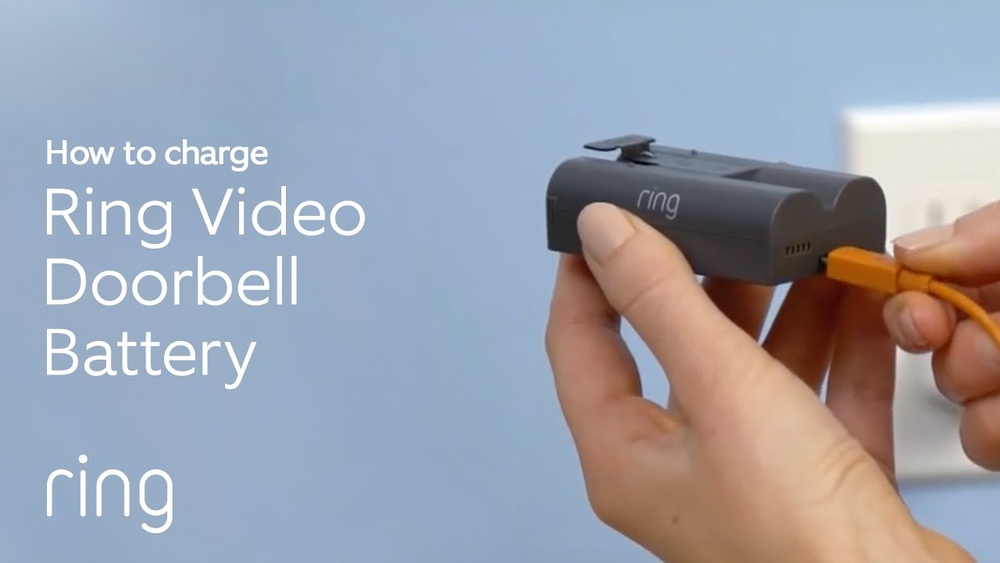
Charging the Ring Video Doorbell 2 is simple. Remove the battery and use the included USB charger. It takes about 5 to 10 hours to fully charge. The doorbell can also connect to existing doorbell wiring for continuous power. Wired charging reduces the need for frequent battery recharges.

Credit: www.amazon.com
Factors Affecting Battery Life
The battery life of the Ring Video Doorbell 2 depends on several factors. Understanding these can help you get the most out of your device. Battery performance changes based on how you use the doorbell and the environment around it.
Each factor plays a role in how long the battery lasts before needing a recharge. Let’s explore the main influences on battery life.
Usage Frequency
How often you use your doorbell affects battery life. More rings and video views drain the battery faster. Frequent visitors or deliveries cause more activity. Each time the camera records, it uses power. High usage means charging will be needed sooner.
Wi-fi Signal Strength
Strong Wi-Fi helps the doorbell work efficiently. If the signal is weak, the device uses more power to stay connected. This extra effort reduces battery life. Place the router close or use a Wi-Fi extender. A steady connection saves battery and improves performance.
Motion Detection Settings
Motion alerts use battery power. Sensitive motion settings cause the camera to record more often. This drains the battery quickly. Adjusting the sensitivity or activity zones can lower power use. Less frequent alerts mean longer battery life.
Weather Conditions
Cold or hot weather impacts battery performance. Batteries lose power faster in extreme temperatures. Cold weather slows down battery chemistry, reducing charge capacity. Hot weather can also damage the battery over time. Keep the doorbell in a shaded spot if possible.
Expected Battery Life On A Full Charge
The Ring Video Doorbell 2 runs on a rechargeable battery. Knowing how long it lasts on a full charge helps you plan recharging times. Battery life varies based on usage and settings. Understanding the expected battery life can prevent unexpected power loss. Below are details about how long you can expect the battery to last.
Average Duration In Typical Use
Under normal conditions, the battery lasts about six to twelve months. This range depends on how often the doorbell is used. Typical use means occasional motion alerts and video recordings. In most homes, charging once or twice a year is enough. Lower activity and fewer alerts extend the battery life.
Battery Life In High Activity Areas
In busy areas, the battery drains faster. Frequent motion detection and video streaming use more power. In such cases, expect the battery to last about two to four months. High traffic near the doorbell means more alerts and recordings. Charging might be needed every few months to keep it working well.
How To Check Battery Level
Checking the battery level on your Ring Video Doorbell 2 is simple. Knowing the battery status helps you keep the doorbell working without interruption. You can check the battery level in two main ways. One uses the Ring app on your phone. The other uses the battery indicator lights on the device itself.
Using The Ring App
Open the Ring app on your smartphone. Select your Ring Video Doorbell 2 from the list of devices. The battery level shows on the device’s dashboard. It appears as a percentage. This number tells you how much charge remains. The app also sends alerts when the battery gets low. Checking the app regularly keeps you informed.
Battery Indicator Lights
The Ring Video Doorbell 2 has small lights for battery status. Press the button on the doorbell. The lights blink to show the battery level. Green means the battery is good. Yellow means it is getting low. Red means the battery needs charging soon. This quick check helps if you do not have the app handy.
Tips To Extend Battery Life
Extending the battery life of your Ring Video Doorbell 2 helps keep it running longer between charges. Simple changes can save energy and improve performance. These easy steps help you get the most from your device.
Adjusting Motion Settings
Lower the motion sensitivity to reduce alerts. Set motion zones to focus only on key areas. This cuts down on unnecessary recordings. Fewer alerts mean less battery use.
Optimizing Wi-fi Connection
Place the doorbell close to your router. Strong Wi-Fi reduces the power the device needs. Avoid walls and metal objects between router and doorbell. A stable connection keeps battery use low.
Scheduling Video Recording
Use the app to schedule recording times. Turn off video during low-activity hours. This stops constant recording and saves energy. Set times when you expect visitors or activity.
Using Solar Chargers
Attach a solar charger to your doorbell. It uses sunlight to keep the battery full. This reduces the need for manual recharging. Solar power helps maintain longer battery life.

Credit: ring.com
Charging Time And Best Practices
Charging your Ring Video Doorbell 2 battery properly helps keep it working well. Knowing the charging time and best practices ensures your doorbell stays ready. This section explains how long charging takes and how to do it safely.
Typical Charging Duration
The Ring Video Doorbell 2 battery usually takes 5 to 10 hours to fully charge. Charging time depends on the charger and battery level. Using the original USB charger gives the best results. If the battery is very low, expect closer to 10 hours. A partially drained battery may charge faster. Avoid using slow or weak chargers to save time.
Safe Charging Tips
Charge your battery in a cool, dry place. Avoid direct sunlight or very hot areas. Use only the charger that comes with the doorbell or a similar USB charger. Do not leave the battery plugged in after it reaches 100%. Unplugging prevents overheating and extends battery life. Check the cable and charger for damage before use. Keep the battery away from water or moisture during charging.
Battery Replacement And Maintenance
Battery replacement and maintenance are key to keeping your Ring Video Doorbell 2 working well. A healthy battery means your doorbell stays active and records every visitor without interruption. Knowing when to change the battery and how to care for it helps avoid sudden power loss.
Regular checks and simple care steps can extend the battery life. This saves time and ensures your doorbell always stays ready. Let’s explore when to replace the battery and how to maintain it properly.
When To Replace The Battery
Replace the battery if it no longer holds a full charge. You may notice the doorbell runs out of power faster than before. The Ring app will also alert you about low battery levels. If charging takes much longer, the battery might be worn out. Changing the battery every 6 to 12 months keeps your doorbell reliable. Use only official Ring batteries for the best fit and safety.
Maintaining Battery Health
Keep the battery healthy by charging it regularly. Avoid letting it drain completely before recharging. Extreme temperatures can reduce battery life, so protect your doorbell from very hot or cold weather. Remove the battery during winter if the doorbell is not in use. Clean the battery contacts gently to maintain a good connection. Proper care helps the battery last longer and keeps your doorbell working smoothly.
Frequently Asked Questions
How Long Does Ring Video Doorbell 2 Battery Last?
The Ring Video Doorbell 2 battery typically lasts 6 to 12 months. Usage frequency and motion detection affect battery life. Regular charging ensures optimal performance.
How To Check Ring Doorbell 2 Battery Level?
You can check the battery level via the Ring app. Open the device settings and view the battery status. This helps plan timely recharges.
How To Extend Ring Doorbell 2 Battery Life?
Reduce motion sensitivity and limit alerts to extend battery life. Use a strong Wi-Fi signal for efficient operation. Charge the battery when below 20%.
How Long To Fully Charge Ring Doorbell 2 Battery?
It takes about 5 to 10 hours to fully charge the battery. Use the provided USB charger for best results. Avoid overcharging to maintain battery health.
Conclusion
The Ring Video Doorbell 2 battery lasts about six to twelve months. This depends on how often you use the doorbell and the settings you choose. Regular charging keeps the doorbell working well. Keep an eye on the battery level in the app.
Charging is quick and simple, so downtime is short. Knowing battery life helps you plan charging times. This way, your doorbell stays ready to protect your home. Battery care ensures your device works smoothly all year. Easy to manage and reliable for daily use.