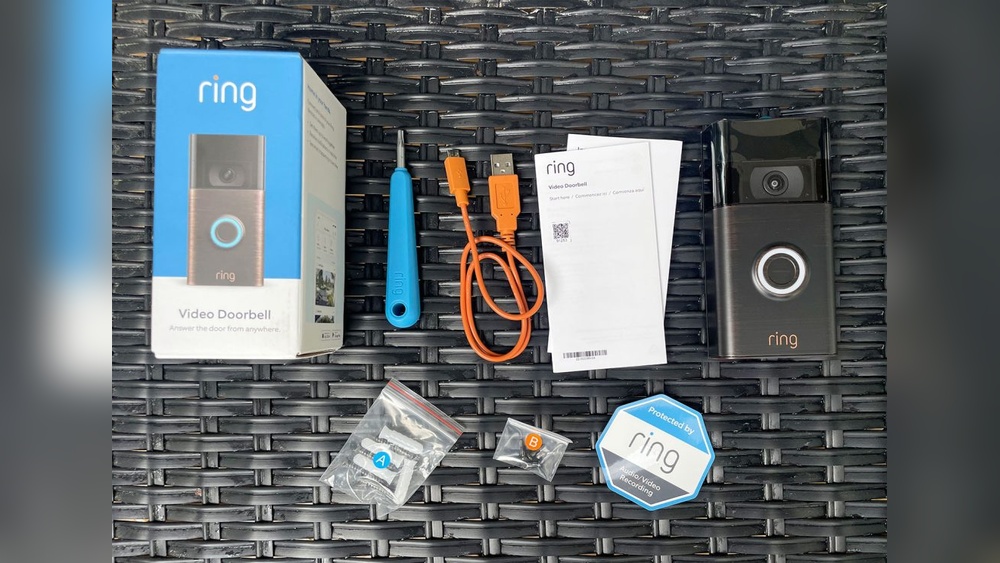

Setting up your Ring Video Doorbell with a battery might seem tricky at first, but it’s easier than you think. Imagine having the power to see who’s at your door anytime, right from your phone.
With just a few simple steps, you can secure your home and never miss a visitor again. In this guide, you’ll learn exactly how to install and connect your battery-powered Ring Doorbell quickly and hassle-free. Ready to make your home smarter and safer?
Let’s get started!
Prepare Your Ring Video Doorbell
Preparing your Ring Video Doorbell is the first step for a smooth setup. This process ensures your device works well and lasts longer. It includes charging the battery, gathering tools, and checking compatibility.
Each part of preparation helps avoid problems during installation. Following these steps makes your experience easier and faster.
Charge The Battery Fully
Start by removing the battery from your Ring doorbell. Use the included USB cable to connect it to a power source. Charge the battery until the indicator shows it is full. A full battery helps the doorbell work without interruptions.
Charging usually takes a few hours. Avoid using the doorbell while charging the battery. This keeps the battery healthy and ready for use.
Gather Necessary Tools
Collect all tools needed before starting the setup. Most Ring doorbells require a screwdriver and the mounting screws that come in the box. You might also need a drill for some surfaces.
Having the right tools nearby saves time. It prevents stops in the middle of installation. Check the instruction manual for any special tools required.
Check Compatibility
Verify your doorbell works with your home Wi-Fi network. Ring doorbells need a 2.4 GHz or 5 GHz Wi-Fi connection. Make sure your router supports these frequencies.
Also, confirm your doorbell fits your door frame or wall. Some models need specific sizes or shapes for mounting. Check your home setup to avoid issues.
Install The Ring App
Installing the Ring app is the first step to set up your Ring Video Doorbell with battery. The app lets you connect your doorbell to your phone. It also helps you control and view the doorbell’s live video. Follow the steps below to get the app ready.
Download From App Store Or Google Play
Open the App Store on iPhone or Google Play on Android. Type “Ring” in the search bar. Find the Ring app and tap the download button. Wait for the app to install on your device. This process usually takes a few seconds.
Create Or Log Into Your Account
Open the Ring app after installation. Tap “Create Account” if you are new to Ring. Fill in your name, email, and password. If you already have an account, choose “Log In” and enter your details. This step connects your phone to your Ring devices.
Enable Necessary Permissions
The Ring app needs permissions to work properly. Allow access to your camera and microphone. Grant permission for notifications to get alerts. Enable location access for better device performance. These permissions help the app run smoothly and keep you updated.
Power On And Connect The Doorbell
Powering on and connecting your Ring Video Doorbell with a battery is simple. This step starts the process of making your doorbell work. Follow the steps below carefully. You will have your doorbell ready in no time.
Insert The Battery
Begin by opening the back of your Ring doorbell. Take the battery out of its package. Place the battery inside the doorbell slot. Make sure it fits snugly and the contacts touch properly. Close the back cover firmly. This supplies power to the device.
Power Up The Device
Press the small button on the side of the doorbell. Hold it for a few seconds until you see a light. This light shows the device is powering on. Wait for the light to become steady. It means the doorbell is ready for the next step.
Initiate Setup Mode
Press and hold the setup button until the light blinks. Blinking light tells you the doorbell is in setup mode. Open the Ring app on your smartphone. Follow the app instructions to connect the doorbell to Wi-Fi. Your doorbell is now ready to use.

Credit: www.youtube.com
Connect To Wi-fi Network
Connecting your Ring Video Doorbell to a Wi-Fi network is a key step for live video and alerts. A stable connection ensures smooth video streaming and quick notifications. Follow these simple steps to connect your device to your home Wi-Fi.
Select Your Network
Open the Ring app on your phone or tablet. It will show a list of available Wi-Fi networks. Pick the network you want to connect your doorbell to. Choose the one with a strong and stable signal for best performance.
Enter Password Correctly
Type in the password for your chosen Wi-Fi network carefully. Passwords are case-sensitive, so check uppercase and lowercase letters. Avoid spaces or extra characters. Double-check before submitting to avoid connection errors.
Confirm Connection
After entering the password, the app will try to connect your doorbell to Wi-Fi. Wait a few moments for confirmation. You will see a message once the connection is successful. Test the live video feed to ensure the device works properly.
Mount The Doorbell
Mounting your Ring Video Doorbell with battery is a simple step. It ensures your device works well and stays safe. Follow these steps to place and fix your doorbell correctly.
Choose Installation Location
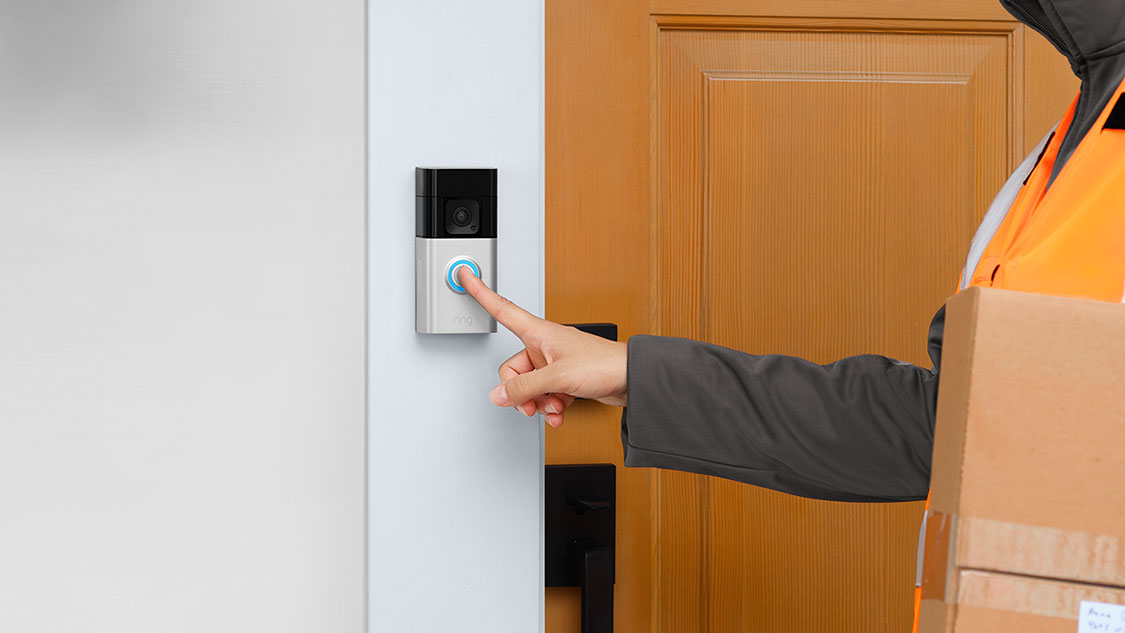
Select a spot near your front door. The place should have a clear view of visitors. Avoid spots with direct sunlight or heavy rain. Make sure the doorbell is within Wi-Fi range for good connection.
Attach Mounting Bracket
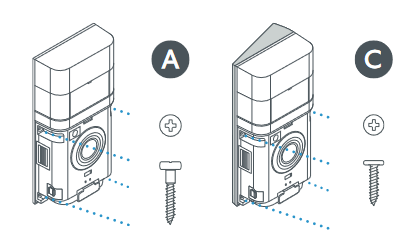
Use the included screws and anchors. Hold the mounting bracket against the wall. Mark the holes to drill. Drill carefully and insert wall anchors if needed. Screw the bracket tightly to the wall.
Secure The Doorbell
Align the doorbell with the mounting bracket. Slide it down until it clicks in place. Check if it fits firmly and does not move. Lock it using the provided security screw for safety.
Customize Settings
Customizing your Ring Video Doorbell settings helps you get the best experience. It lets you control how the doorbell works for you and your home. You can change motion detection, notifications, and test video and audio easily.
Adjust Motion Detection
Open the Ring app and go to Device Settings. Choose Motion Settings to see options. You can set motion zones to focus on important areas. This stops false alerts from cars or trees. Adjust the sensitivity to catch the right movements. Save your settings when done.
Set Notification Preferences
Tap on Notification Settings in the app. Pick how you want to be alerted. Choose between push notifications, email, or both. You can also set quiet hours to avoid alerts at night. Make sure notifications match your daily routine. This keeps you updated without distractions.
Test Video And Audio
Use the Live View option in the Ring app to check video quality. Speak into the app to test two-way audio. Listen to the sound coming from the doorbell speaker. Adjust volume settings if needed. Testing ensures your Ring doorbell works perfectly before use.
Maintain Your Ring Doorbell
Maintaining your Ring Video Doorbell ensures it works well every day. Simple care keeps the battery healthy and the video clear. It also helps your device stay updated with new features and fixes.
Regularly Charge The Battery
Charge the battery before it runs out. Take the doorbell off the mount and use the provided charger. A full battery keeps your doorbell active and ready to record.
Clean The Camera Lens
Wipe the lens gently with a soft, dry cloth. Dirt and dust can blur the video. Clean the lens often to get clear images of visitors.
Update Firmware
Check for firmware updates in the Ring app. Updates improve security and add new functions. Install updates quickly to keep your doorbell running smoothly.
Credit: ring.com
Credit: ring.com
Frequently Asked Questions
How Do I Install My Ring Video Doorbell Battery?
To install, open the doorbell’s back panel and insert the battery firmly. Ensure it clicks into place for proper connection. Then, close the panel securely before powering on the device. This setup ensures your Ring Video Doorbell functions correctly without wired power.
How Can I Charge The Ring Video Doorbell Battery?
Remove the battery from the doorbell and connect it to the included USB charger. Charge until the indicator shows full power, usually a few hours. Avoid overcharging to maintain battery health. This method keeps your Ring doorbell ready without uninstalling it.
What App Setup Is Needed For Ring Video Doorbell?
Download the Ring app from your device’s app store. Create an account or log in, then follow on-screen instructions to connect your doorbell. The app helps you customize settings, receive alerts, and monitor your doorbell’s status easily.
How Do I Connect Ring Doorbell To Wi-fi?
In the Ring app, select your device and choose Wi-Fi settings. Connect to your home network by entering the password. Ensure your Wi-Fi signal is strong near the doorbell for optimal performance. This step is crucial for real-time video and notifications.
Conclusion
Setting up your Ring Video Doorbell with a battery is simple and quick. Follow each step carefully to avoid mistakes. Make sure the battery is fully charged before starting. Connect the doorbell to your Wi-Fi for smooth operation. Test the device to check if it works well.
Regularly charge the battery to keep the doorbell active. Enjoy the added security and convenience at your doorstep. This small effort brings peace of mind every day. Easy setup means you can protect your home without stress.