
Are you thinking about upgrading your home security with a video doorbell but worried it won’t work with your existing chime? You’re not alone.
Many people want the convenience of seeing who’s at their door without the hassle of rewiring or buying new equipment. The good news is, there are video doorbells designed to connect seamlessly with your current chime system. You’ll discover which options fit perfectly with what you already have, saving you time, money, and frustration.
Keep reading to find the best video doorbell that works with your existing chime—and make your home smarter and safer today.
How Video Doorbells Connect To Chimes
Video doorbells alert you when someone is at your door. They often connect to your existing chime. This connection lets the doorbell ring inside your home. Understanding how video doorbells link to chimes helps you choose the right model.
Wired Vs Wireless Connections
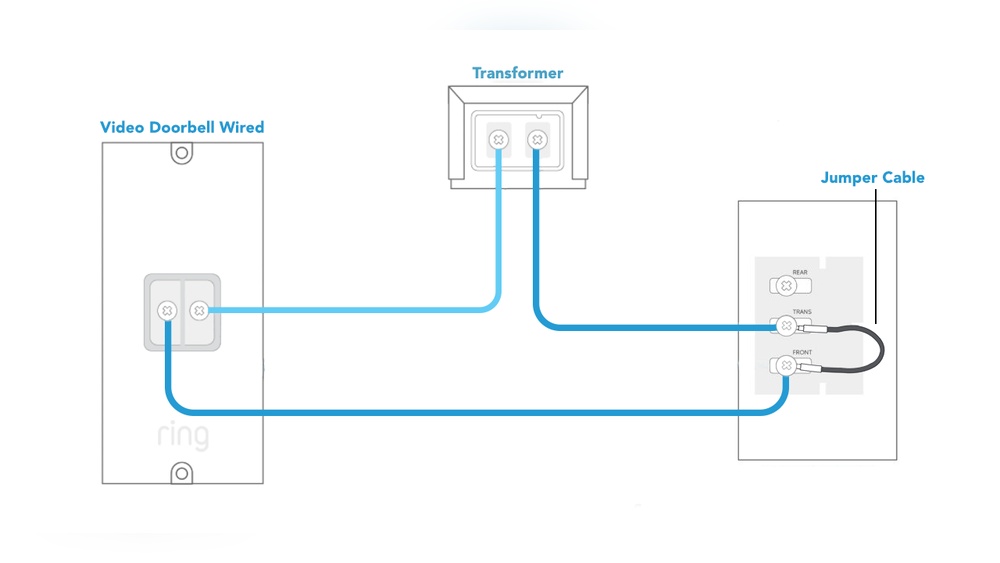
Wired video doorbells connect to your home’s existing doorbell wires. These wires link the doorbell to the chime inside. The connection uses electricity from the wires to power the doorbell.
Wireless video doorbells do not need doorbell wires. They use batteries and connect to the chime through Wi-Fi or a separate wireless signal. Wireless models are easier to install but may need battery changes.
Chime Compatibility Basics
Not all video doorbells work with every chime. Some chimes only work with wired doorbells. Others support wireless signals from certain brands.
Check your chime type before buying a video doorbell. The doorbell’s product info usually lists compatible chimes. This ensures your doorbell rings correctly inside your home.
Power Requirements
Most wired video doorbells need low voltage power from your home wiring. This power keeps the doorbell and chime working. A transformer often reduces your home’s voltage to a safe level for the doorbell.
Wireless doorbells run on batteries. Battery life varies by model and usage. Some models offer rechargeable batteries for convenience.

Credit: www.esseg.eu
Key Features To Consider
Choosing a video doorbell that works with your existing chime means checking key features. These features affect how well the doorbell fits your needs. Focus on video quality, sound options, and smart home use. These help you pick the right model easily.
Video Quality And Field Of View
Clear video helps you see visitors well. Look for at least 1080p resolution. This shows faces and details clearly. A wide field of view covers more area at your door. It reduces blind spots and shows visitors from head to toe.
Two-way Audio And Motion Alerts
Two-way audio lets you talk to visitors from anywhere. This adds safety and convenience. Motion alerts notify you when someone is near your door. Choose doorbells with adjustable motion zones. This reduces false alerts from passing cars or animals.
Smart Home Integration
Smart home compatibility makes your doorbell easier to use. It works with devices like Alexa or Google Home. You can control it by voice or phone app. Check if the doorbell supports your smart home system. This helps keep all devices connected smoothly.
Top Video Doorbells For Existing Chimes
Choosing a video doorbell that works with your existing chime saves time and money. Not all video doorbells support traditional chimes. Some need special adapters or new chime units. This guide highlights top video doorbells compatible with most existing chimes. Each option fits different budgets and feature needs.
Best Overall Compatibility
The Ring Video Doorbell 3 stands out for wide chime compatibility. It works with most wired doorbell chimes. Installation is simple and does not require extra equipment. The device offers clear video and two-way talk. Its reliable connection suits many home setups.
Budget-friendly Options
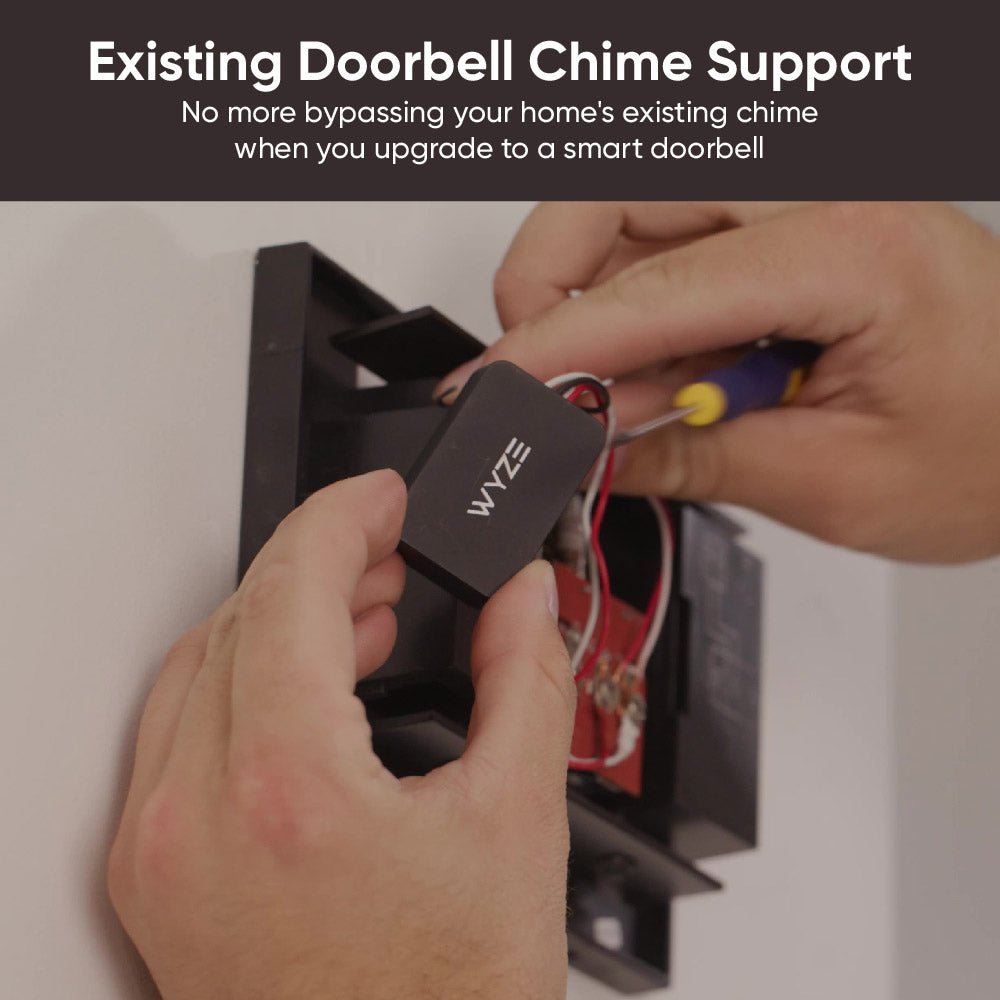
The Wyze Video Doorbell offers solid chime compatibility at a low price. It connects easily to existing wired chimes without extra parts. The video quality is good for the price. It includes motion detection and app alerts. A great choice for basic needs and small budgets.
Premium Features And Performance
The Nest Hello excels in advanced features and chime support. It integrates with many wired chimes and smart home systems. Video clarity is high with HDR and night vision. It provides continuous video streaming and facial recognition. Ideal for users wanting top performance and smart features.
Installation Tips And Tricks
Installing a video doorbell that works with your existing chime can save time and effort. Follow these simple tips and tricks to ensure a smooth setup. Proper installation avoids common problems and keeps your system working well.
Preparing Your Existing Chime
Turn off power to your doorbell at the breaker. This protects you from electric shock. Remove the cover of your existing chime to check the wiring. Note the wires connected to the terminals. Clean any dust or dirt inside the chime box. Make sure the chime is compatible with your video doorbell model.
Step-by-step Installation Guide
Start by attaching the mounting bracket to the wall. Use a level to keep the doorbell straight. Connect the wires from your existing chime to the doorbell terminals. Secure the video doorbell onto the bracket. Turn the power back on and test the doorbell. Follow the manufacturer’s instructions to connect to Wi-Fi and complete setup.
Troubleshooting Common Issues
Check if the doorbell chime does not ring. Confirm all wires are tight and correctly placed. Reset your video doorbell by following the manual. Ensure the Wi-Fi signal is strong near the doorbell. Replace the chime transformer if power is low. Contact support if the problem continues.
Maintaining Your Video Doorbell
Maintaining your video doorbell ensures it works well with your existing chime. Regular care helps avoid common problems and keeps your device reliable. Simple steps can extend the life of your doorbell and improve its performance.
Firmware Updates And Security
Keep your video doorbell’s firmware up to date. Updates fix bugs and improve security. They protect against hacking and privacy issues. Set your device to update automatically or check regularly. This keeps your system safe and running smoothly.
Battery And Power Maintenance
Check the battery level often if your doorbell uses batteries. Charge or replace batteries as needed to avoid downtime. For wired doorbells, inspect wiring connections for wear or damage. Proper power supply ensures your doorbell stays active without interruptions.
Optimizing Performance Over Time
Clean the camera lens and sensors to keep the image clear. Remove dirt, dust, or spider webs gently. Test the chime sound to confirm it rings correctly. Adjust settings to match your home’s environment. Small efforts improve video quality and alert reliability.
Credit: www.wyze.com

Credit: www.reddit.com
Frequently Asked Questions
Which Video Doorbells Work With Existing Chimes?
Many video doorbells like Ring Video Doorbell 3 and Nest Hello work with existing chimes. They connect to your current wiring and chime system seamlessly, allowing you to keep your traditional doorbell sound while upgrading to smart features.
How To Check If My Chime Supports A Video Doorbell?
Check your chime’s voltage and wiring compatibility. Most video doorbells require 16-24V AC. Refer to the doorbell’s installation guide to ensure your chime system supports the power and wiring needed for the video doorbell.
Can I Use A Video Doorbell Without Rewiring Chimes?
Yes, some video doorbells, such as Ring Video Doorbell Wired, allow use without rewiring. They use plug-in adapters or battery power, making installation easier while still connecting to your existing chime for traditional sound alerts.
Do All Video Doorbells Make Existing Chimes Ring?
No, not all video doorbells trigger existing chimes. Some models need a separate chime connector or adapter to ring your current chime. Check product specifications to ensure compatibility with your existing doorbell sound system.
Conclusion
Choosing a video doorbell that works with your existing chime saves time and money. Many models fit well without extra tools or changes. Check the doorbell’s compatibility with your current system before buying. This helps avoid installation problems and extra costs.
A working chime keeps your home secure and alerts you easily. Pick a doorbell that matches your needs and setup. Simple, smart choices make your home safer and more convenient.