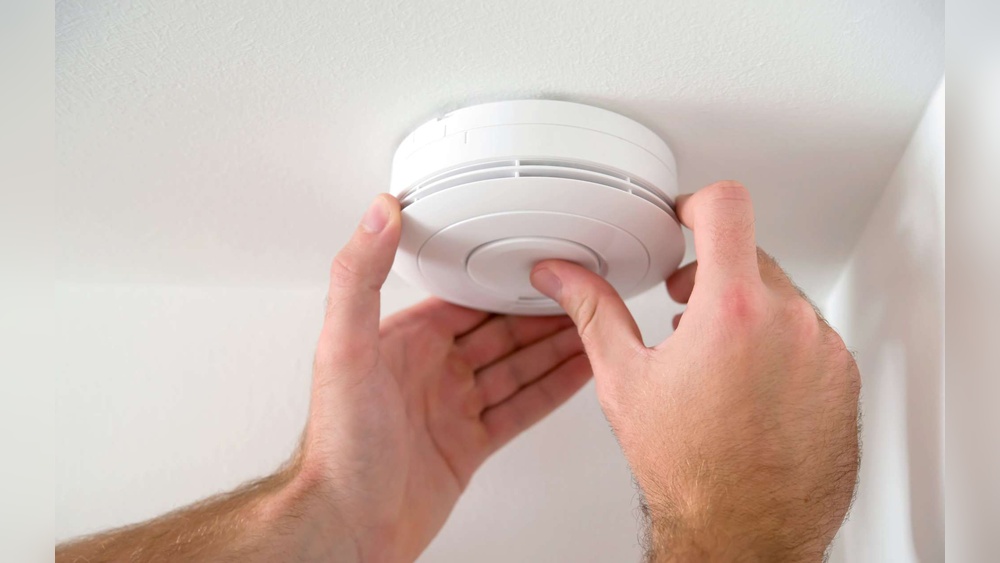

Is your smoke detector beeping non-stop, driving you crazy? That constant noise can be frustrating and make it hard to focus or relax.
You might wonder why it won’t stop and what you can do about it quickly. The good news is, you don’t have to deal with that annoying beep forever. You’ll discover simple, effective steps to silence your smoke detector and keep it working properly.
Keep reading to find out how to take control and bring peace back to your home.
Common Reasons For Beeping
Smoke detectors beep to alert you about potential problems. These beeps help keep your home safe. Knowing why your smoke detector beeps can help you stop the noise quickly. Common reasons include battery issues, dust build-up, the device reaching its life limit, or electrical problems.
Low Battery Alerts
Low batteries cause frequent beeping sounds. The smoke detector signals you to replace the battery. Use fresh, high-quality batteries for best results. Check batteries every six months to avoid surprises.
Dust And Debris
Dust and dirt can block the sensor inside the smoke detector. This blockage causes false alarms or beeping. Clean your smoke detector regularly with a soft brush or vacuum. Keep the area around the detector free of dust.
End Of Life Warning
Smoke detectors have a limited lifespan. Most last about 8 to 10 years. After this, they beep to warn you to replace the unit. Check the manufacturing date on your device to know its age. Replace old detectors promptly for safety.
Electrical Issues
Hardwired smoke detectors depend on your home’s electrical system. Power surges or wiring problems may cause beeping. If the detector is hardwired and beeps, check your circuit breaker. Call an electrician if you suspect wiring problems.

Credit: waynealarm.com
Quick Battery Replacement
Smoke detectors often beep to warn about low battery power. Quick battery replacement stops the annoying sound fast. This simple fix keeps your home safe and your mind calm.
Choosing The Right Battery
Select the battery type your smoke detector needs. Most use 9-volt or AA batteries. Check the label inside the detector for the correct size. Use fresh batteries from a reliable brand. Avoid old or damaged batteries to prevent beeping.
Step-by-step Replacement Guide
First, remove the smoke detector from its base carefully. Open the battery compartment by sliding or lifting the cover. Take out the old battery and dispose of it properly. Insert the new battery, matching the positive and negative ends. Close the battery compartment securely. Reattach the smoke detector to its base until it clicks.
Testing After Replacement
Press the test button on your smoke detector. Hold it for a few seconds until you hear a loud beep. This confirms the new battery works well. If no sound comes, check the battery placement again. Replace the battery if the beeping continues. Testing ensures your smoke detector is ready to protect.
Cleaning Your Smoke Detector
Cleaning your smoke detector is a simple step to stop it from beeping unnecessarily. Dust and dirt can block the sensor inside. This makes the alarm think there is smoke. Regular cleaning keeps the detector working well. It also helps avoid false alarms and annoying beeps.
Tools Needed
You need a few items before starting. A soft brush or a small paintbrush works well. Use a vacuum cleaner with a soft brush attachment. A clean, dry cloth is helpful too. Avoid using water or cleaning sprays. These can damage the smoke detector.
Safe Cleaning Techniques
Turn off the power to the smoke detector first. Remove the detector from the ceiling or wall. Use the brush or vacuum to remove dust gently. Clean all around the vents and sensor areas. Wipe the outside with a dry cloth. Let the detector dry fully before reinstalling it. Restore the power and test the alarm to ensure it works.
Preventing Future Dust Build-up
Keep the area around the detector clean. Dust and vacuum the room regularly. Avoid placing detectors near windows or vents. These areas collect more dust and debris. Consider cleaning your smoke detector every six months. This routine helps keep it clear and beep-free.

Credit: www.angi.com
Resetting The Smoke Detector
Resetting the smoke detector can stop the annoying beeping. It clears errors and restarts the device. This helps the detector work properly again. Many times, a simple reset fixes the problem fast.
Resetting is a basic step to try before replacing batteries or the whole unit. It resets the internal memory of the smoke detector. This process removes false alarms and alerts.
Manual Reset Methods
Start by pressing and holding the reset button on the detector. Hold it for about 15 to 20 seconds. The button is usually on the front or side of the unit.
If your model has no reset button, remove the batteries. Wait for one minute, then put the batteries back in. This action acts like a reset for some smoke detectors.
For hardwired smoke detectors, turn off the power at the circuit breaker first. Then press the reset button or remove the backup battery. Restore power and check if the beeping stops.
When To Perform A Reset
Reset the smoke detector after changing the battery. This ensures the device starts fresh with new power. Also reset if the alarm beeps without smoke or fire.
Perform a reset if the detector sounds false alarms often. It may have dust or minor faults causing false signals. Resetting can clear these errors.
Use reset as a first step before calling a technician. It solves most common beeping issues quickly. If beeping continues after reset, further checks are needed.
Handling Electrical Smoke Detectors
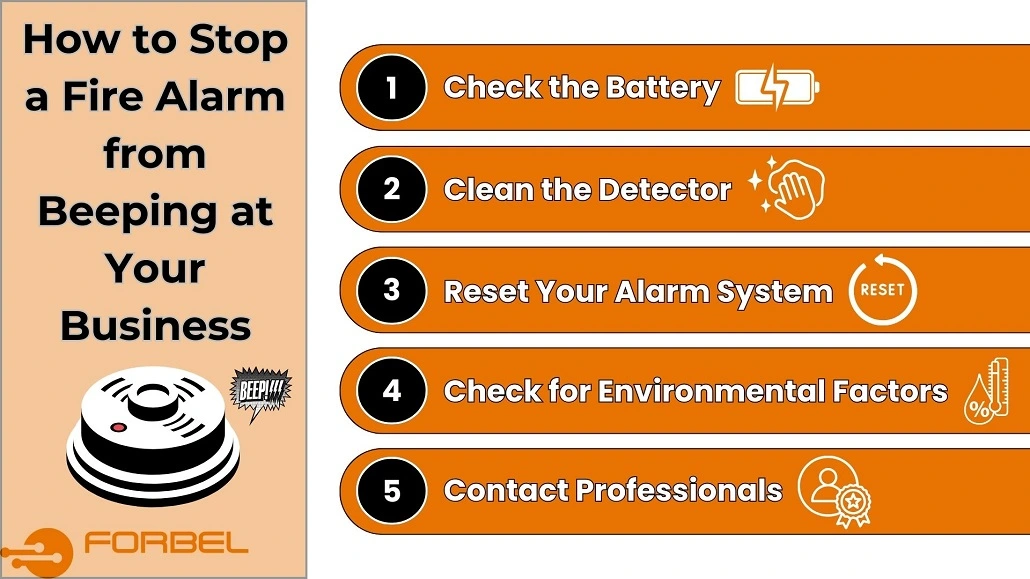
Handling electrical smoke detectors requires careful attention. These devices connect directly to your home’s power. They need a steady power supply to work well. A weak or interrupted power source can cause beeping sounds. Understanding how to check and maintain their power can stop annoying alarms.
Electrical smoke detectors also have backup batteries. These batteries help during power outages. Low battery levels often trigger beeping. Checking both power and batteries is key to fixing problems.
Checking Power Supply
Start by turning off the power to the smoke detector at the circuit breaker. Remove the detector from its mounting bracket. Look for loose or disconnected wires. Make sure all wire connections are tight and secure. Use a voltage tester to confirm power is reaching the detector. Replace any damaged wires or parts. Reattach the detector and restore power. Observe if the beeping stops. Regular checks prevent future power issues.
Professional Help Tips
Electrical smoke detectors involve wiring and circuits. Incorrect handling can cause damage or injury. Hire a licensed electrician for repairs beyond basic checks. Professionals can test the entire system safely. They can replace faulty units or fix wiring problems. Call an expert if beeping continues after your checks. Early professional help ensures your safety and device reliability.
Credit: forbel.com
Replacing An Old Smoke Detector
Old smoke detectors can cause constant beeping. This happens when the device is past its lifespan or faulty. Replacing an old smoke detector ensures safety and stops annoying sounds. New detectors work better and keep your home safe from fire risks. Follow these simple steps to replace your smoke detector.
Signs It’s Time To Replace
Smoke detectors usually last about 10 years. If your detector beeps even after changing the battery, it might be old. Yellowing or physical damage also shows it needs replacement. Frequent false alarms can mean the sensor is failing. Check the manufacture date on the back to confirm its age.
Choosing A New Detector
Select a smoke detector with a long battery life. Look for models with sealed lithium batteries that last 10 years. Consider detectors with both smoke and carbon monoxide sensors. Choose units that have clear test buttons and loud alarms. Pick a model certified by safety standards for trust.
Installation Basics
Turn off power to the old detector if it is hardwired. Remove the old detector by twisting or unclipping it. Attach the mounting bracket of the new detector to the ceiling or wall. Connect wires if needed, or insert the battery in battery-powered models. Test the new detector by pressing the test button after installation.
Frequently Asked Questions
Why Does My Smoke Detector Keep Beeping?
Your smoke detector beeps due to low batteries, dust, or a malfunction. Check and replace batteries first. Clean the detector to remove dust. If beeping continues, consider replacing the unit or consulting a professional.
How Do I Stop A Smoke Detector From False Alarming?
False alarms often happen from steam, cooking fumes, or dust. Move the detector away from kitchens or bathrooms. Regularly clean the device and ensure proper ventilation. Replace old detectors to reduce false alarms.
Can A Dead Battery Cause Smoke Detector Beeping?
Yes, a dead or low battery triggers the smoke detector to beep. Replace batteries regularly, at least once a year. Use high-quality batteries to ensure consistent performance and avoid false alerts.
How Often Should I Replace My Smoke Detector?
Replace smoke detectors every 10 years. Over time, sensors degrade and become less reliable. Check the manufacturing date on the device. Regular replacement ensures optimal safety and reduces false beeping.
Conclusion
Stopping your smoke detector from beeping is simple with the right steps. Check the battery first; a low battery often causes beeping. Clean the detector to remove dust or insects. Make sure it is properly installed and not too close to cooking areas.
Regular checks keep your home safe and peaceful. A quiet smoke detector means better rest and safety for everyone. Keep these tips handy to stop unwanted beeps quickly. Safety and peace of mind go hand in hand.