
Is your smoke detector beeping nonstop, driving you crazy? That annoying sound can be hard to ignore, especially when it keeps going day and night.
But don’t worry—you don’t have to live with the constant beep. You’ll learn simple, effective ways to stop the beeping fast. Whether it’s a low battery or another common issue, we’ll guide you step-by-step so your home feels peaceful again.
Keep reading, and say goodbye to that frustrating noise for good.
Common Reasons For Beeping
Smoke detectors beep to warn you about issues needing attention. Understanding these common reasons helps stop the beeping quickly. This prevents false alarms and keeps your home safe.
Low Battery Alerts
One of the main causes of beeping is a low battery. Smoke detectors use batteries to work, and these run out over time. When the battery is low, the alarm beeps at intervals. Changing the battery stops the noise and keeps the detector working well.
Dust And Debris Issues
Dust or dirt inside the detector can cause false beeping. Small particles block the sensor and confuse the alarm. Cleaning the smoke detector with a soft brush or vacuum can fix this. Regular cleaning helps avoid unnecessary beeps and false alarms.
End Of Life Warning
Smoke detectors have a lifespan of about 8 to 10 years. After this, they beep to tell you they need replacing. This warning helps keep your home safe with a working alarm. Check the date on your detector and replace it if it is old.
Electrical Problems
Hardwired smoke detectors may beep due to electrical faults. Loose wires or power surges can cause this issue. Make sure all connections are tight and stable. If problems continue, calling an electrician is the safest step.

Credit: www.angi.com
Quick Battery Replacement Tips
Beeping smoke detectors often signal low batteries. Replacing the battery quickly stops the noise and keeps your home safe. Follow these simple steps to change the battery correctly.
Choosing The Right Battery
Use the battery type recommended by the smoke detector manufacturer. Most models use 9-volt or AA batteries. Check the old battery for its type and brand. Avoid cheap batteries to ensure longer life. Always keep spare batteries at home for emergencies.
Safe Battery Removal
Turn off the smoke detector before removing the battery. Use a small screwdriver if needed to open the battery compartment. Handle the battery gently to avoid damage. Dispose of the old battery according to local rules. Never throw batteries in regular trash.
Proper Battery Installation
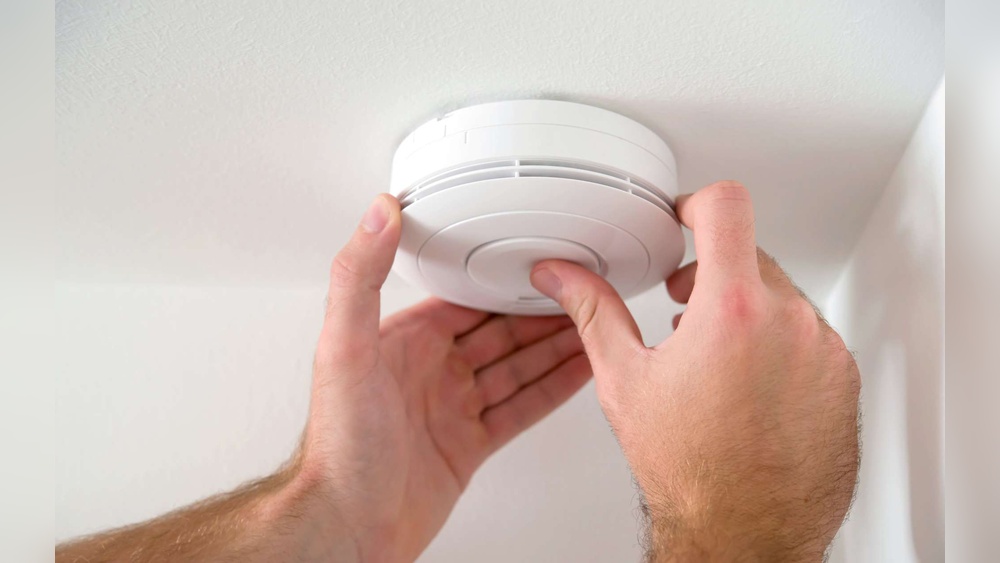
Match the battery terminals to the smoke detector’s connectors. Insert the battery firmly but carefully. Close the battery compartment securely. Test the smoke detector by pressing the test button. The beeping should stop, confirming the battery works well.
Cleaning Your Smoke Detector
Cleaning your smoke detector is a simple way to stop annoying beeping. Dust and dirt can block sensors, causing false alarms or constant beeps. Regular cleaning keeps your smoke detector working well and protects your home.
Tools Needed
- Soft brush or small paintbrush
- Vacuum cleaner with brush attachment
- Microfiber cloth
- Compressed air can (optional)
- Step stool or ladder (if needed)
Step-by-step Cleaning Process
- Turn off the power to the smoke detector to avoid accidents.
- Remove the smoke detector from its mounting bracket carefully.
- Use the soft brush or paintbrush to gently clean vents and openings.
- Vacuum the detector using the brush attachment to remove loose dust.
- Blow compressed air into the sensor area to clear stubborn dirt.
- Wipe the outside with a dry microfiber cloth for a final clean.
- Reattach the smoke detector and turn the power back on.
- Test the smoke detector to ensure it works properly.
Preventing Future Dust Build-up
Clean your smoke detector every six months to reduce dust build-up. Avoid placing it near vents, fans, or kitchens where dust and grease gather. Use air filters in your home to lower airborne dust. Regular home cleaning also helps keep smoke detectors dust-free.

Credit: www.youtube.com
Resetting The Smoke Detector
Resetting the smoke detector is a simple way to stop the annoying beeping sound. This method clears any errors and restores normal function. It can help when the smoke detector beeps due to minor issues.
Resetting does not fix all problems but often stops false alarms. It is a quick step before replacing batteries or the whole unit. Knowing how to reset your smoke detector saves time and worry.
Reset Button Location
The reset button is easy to find on most smoke detectors. It is usually small and round. Look on the front or side of the device. Some models hide it under a cover or near the battery compartment.
Check your smoke detector’s manual for exact location. Knowing this spot helps you reset the device fast. The button might say “reset” or have a symbol like a circle.
Resetting Procedures
Press and hold the reset button for 15-20 seconds. The beeping will stop or change. Release the button and wait for the detector to reboot.
Some detectors need the battery removed before resetting. Wait a minute, then put the battery back and press reset again. The light on the detector may blink as it restarts.
When To Reset
Reset your smoke detector after changing batteries. This makes sure the device works well. Reset if the alarm beeps without smoke or fire.
A reset helps after a power outage or electrical issue. Do not reset if you smell smoke or see fire. Always check safety first before resetting.
When To Replace Your Smoke Detector
Smoke detectors do not last forever. Knowing when to replace yours can keep your home safe. Over time, detectors lose sensitivity and may beep frequently. Old detectors might not alert you properly during a fire. Replacing your smoke detector at the right time is important for safety.
Signs Of Aging
Smoke detectors usually last about 10 years. Look for yellowing plastic or cracked casing. Frequent beeping or false alarms can signal aging. Dust buildup inside can affect performance. If cleaning does not stop the beeping, it may be time to replace.
Choosing A New Detector
Select a smoke detector with a long battery life. Opt for models with a silence button to stop false alarms. Consider detectors with both smoke and carbon monoxide sensors. Make sure the new detector meets safety standards. Easy installation is a bonus for quick setup.
Proper Disposal
Do not throw old smoke detectors in the trash. Many contain small amounts of radioactive material. Check local rules for hazardous waste disposal. Some stores offer recycling or take-back programs. Proper disposal helps protect the environment and community.
Additional Tips To Stop Beeping
Beeping smoke detectors can be annoying and stressful. Sometimes, the simple fixes do not stop the sound. Use these extra tips to find and fix the cause of beeping.
Checking Wiring Connections
Check the wiring if your smoke detector is hardwired. Loose or damaged wires cause beeping. Turn off power before inspecting. Look for disconnected or frayed wires. Secure any loose connections with wire nuts. Replace damaged wires to stop false alarms. If unsure, call a professional electrician for help.
Avoiding False Alarms
False alarms can cause frequent beeping. Smoke from cooking or steam can trigger sensors. Place detectors away from kitchens and bathrooms. Clean the detector’s sensor regularly to remove dust. Use a fan to clear smoke or steam quickly. Avoid spraying cleaning sprays near detectors. These steps reduce false alarms and stop beeping.
Regular Maintenance Schedule
Maintain smoke detectors to keep them working well. Test alarms once a month by pressing the test button. Replace batteries every six months or as needed. Clean detectors with a soft brush or vacuum yearly. Replace smoke detectors every 10 years. Regular care helps avoid beeping and keeps your home safe.

Credit: waynealarm.com
Frequently Asked Questions
Why Does My Smoke Detector Keep Beeping?
Your smoke detector beeps due to low batteries, dust buildup, or sensor issues. Regular cleaning and battery replacement can stop beeping. If persistent, consider replacing the unit for safety.
How Can I Silence A Smoke Detector Beep Temporarily?
Press the hush or silence button on your detector to stop beeping temporarily. This usually mutes the alarm for 8-10 minutes while addressing the cause.
How Often Should I Replace Smoke Detector Batteries?
Replace batteries at least once a year or when the detector beeps low battery alerts. Use high-quality batteries for reliable performance and safety.
What Causes False Alarms And Beeping In Smoke Detectors?
False alarms and beeping can be caused by steam, dust, insects, or low batteries. Keep detectors clean and install them away from kitchens and bathrooms.
Conclusion
A beeping smoke detector can be very annoying. Fixing it quickly keeps your home safe. Check the battery first and replace it if needed. Clean the detector to remove dust and dirt. Reset the alarm to stop false beeps. Regular checks help avoid future problems.
Stay calm and follow these easy steps. Your smoke detector will work properly again. Safety matters, so don’t ignore the beeps. Small actions make a big difference in your home’s safety.