
Is your hardwired smoke detector beeping nonstop and driving you crazy? That constant sound can be more than just annoying—it can disrupt your focus, sleep, and peace of mind.
But don’t worry, you’re not alone, and you don’t have to live with that noise. You’ll discover simple, effective steps to stop your smoke detector from beeping for good. Keep reading, and you’ll learn exactly what to do to bring quiet back to your home.
Common Causes Of Beeping
Hardwired smoke detectors can beep for several reasons. This sound alerts you to a potential problem. Knowing the common causes helps you stop the beeping quickly. Here are the main reasons why your smoke detector might beep.
Low Battery Issues
Even hardwired smoke detectors have backup batteries. These batteries keep the alarm working during power outages. When the battery runs low, the detector beeps to warn you. Replace the battery regularly to avoid this issue.
Power Supply Problems
Smoke detectors need a steady power supply to work properly. A loose wire or power outage can cause beeping. Check your circuit breaker and wiring for any faults. Fixing power issues stops the alarm from beeping.
Dust And Debris
Dust can block the smoke detector’s sensors. This makes the detector think there is smoke and beep. Clean the detector regularly with a soft brush or vacuum. Keeping it clean prevents false alarms and beeping.
End Of Device Life
Smoke detectors do not last forever. Most need replacement every 8 to 10 years. Older detectors beep to signal it is time for a new unit. Check the manufacturing date on your detector to see if it’s time to replace it.

Credit: www.angi.com
Safety First
Stopping a hardwired smoke detector from beeping needs care. Safety comes first. Smoke detectors protect your home and family. Before you try to stop the noise, take steps to stay safe.
Electricity and sensitive parts inside the detector can cause harm. Avoid rushing. Follow simple safety rules to prevent accidents.
Turn Off Power
Cut power to the smoke detector before you start. Find your home’s circuit breaker panel. Switch off the breaker that controls the detector. This stops electricity from flowing. It keeps you safe from shocks.
Test the detector by pressing the test button. If no beep sounds, the power is off. Only then, proceed with your work.
Use Proper Tools
Use the right tools for the job. A sturdy ladder helps you reach the detector. Use a screwdriver that fits the screws. This avoids damage to the device.
Wear gloves to protect your hands. Handle the detector gently. Proper tools and care prevent injuries and damage.
Quick Battery Replacement
A hardwired smoke detector may beep to warn about a low battery. Quick battery replacement stops the beeping fast. This is a simple fix anyone can do. No special tools or skills needed. Follow easy steps to find and change the battery. Let’s get started.
Locate The Battery Compartment
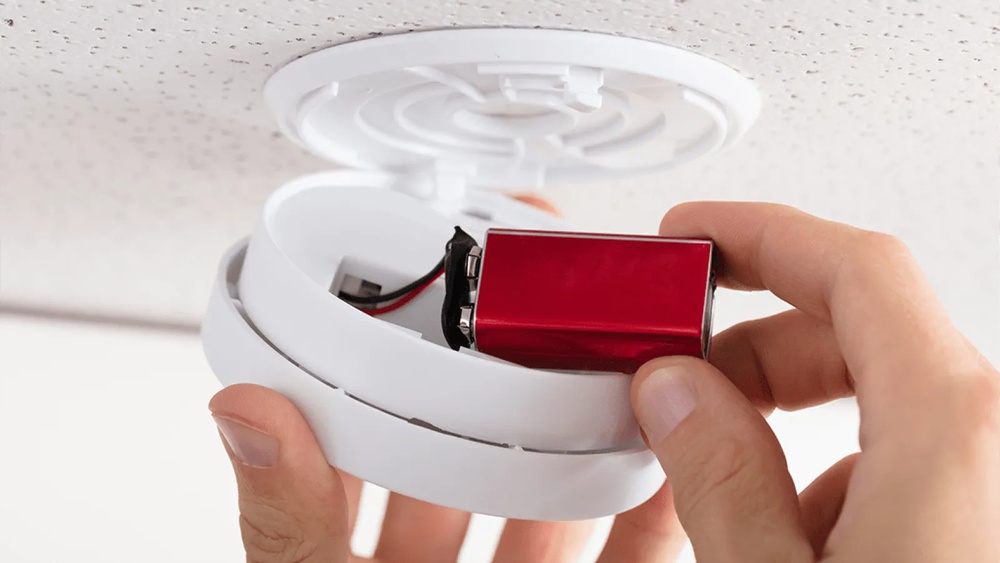
First, find the smoke detector on your ceiling or wall. Most have a small cover that holds the battery. Look for a latch or a twist-off cover. Gently open the cover. Inside, you will see the battery compartment. Some models hide the battery behind the detector’s main body. Carefully pull or twist to access it. Keep the cover safe for later.
Remove And Replace Batteries
Take out the old battery carefully. Note the battery type and how it fits. Usually, it is a 9-volt or AA battery. Insert the new battery in the same position. Press it gently but firmly into place. Close the battery compartment cover securely. The beeping should stop right away. Test the smoke detector by pressing the test button. It should beep once, then stay silent.
Resetting The Smoke Detector
Resetting a hardwired smoke detector often stops the annoying beeping sound. This step can fix small glitches or errors in the device. Resetting clears the smoke detector’s memory and lets it start fresh. Follow these simple methods to reset your smoke detector safely and easily.
Power Cycle Method
First, turn off the power to the smoke detector at the circuit breaker. This cuts the electricity to the device and helps reset its system. Wait for about 30 seconds to one minute. This pause lets the internal components fully discharge. Then, turn the power back on at the circuit breaker. The smoke detector should stop beeping after it powers up again. If it keeps beeping, try the reset button method next.
Using The Reset Button
Locate the reset button on your smoke detector. It is usually small and easy to press. Press and hold the reset button for 15 to 20 seconds. This action clears any error signals causing the beep. Release the button and wait for the detector to stabilize. The beeping should stop if the reset worked. If the device still beeps, check the battery or wiring for issues.
Cleaning And Maintenance
Cleaning and maintenance play a big role in keeping your hardwired smoke detector working well. Dirt and insects can block sensors and cause beeping. Regular care helps the detector stay reliable and quiet.
Remove Dust And Insects
Dust buildup can cause false alarms or constant beeping. Use a soft brush or vacuum cleaner to gently remove dust from the detector’s vents. Check inside the detector for small insects that may have entered. Clear them out carefully to avoid damage.
Check Sensor Condition
The sensor inside the smoke detector must stay clean and intact. Look for signs of wear or damage on the sensor area. Wipe it gently with a dry cloth if it looks dirty. Do not use water or cleaning chemicals, as they can harm the sensor.
Inspecting Wiring And Connections
Hardwired smoke detectors beep for several reasons. One common cause is wiring issues. Checking the wiring and connections can solve the beeping problem. It ensures the detector gets steady power and works right. This section explains how to inspect the wiring safely and clearly.
Check For Loose Wires
Turn off the power at the circuit breaker before starting. Remove the smoke detector from its base carefully. Look inside for any wires that are loose or disconnected. Loose wires can cause the detector to beep or fail. Gently push any loose wires back into place. Make sure the wires fit snugly in their terminals. Avoid pulling or damaging the wires during inspection.
Secure Connections
Use a screwdriver to tighten any loose wire screws. Secure connections stop power interruptions that cause beeping. Check that all wires are connected to the correct terminals. Confirm the neutral and hot wires are in the right spots. A loose or wrong connection can trigger false alarms. After securing, place the detector back and restore power. Test the detector to see if the beeping stops.
When To Replace The Detector
Knowing when to replace your hardwired smoke detector is important. A beeping alarm can mean the device is failing. Old or faulty detectors may not protect you properly. Replacing them ensures safety in your home. Here are key points to help you decide.
Signs Of Device Failure
Frequent beeping even after battery changes is a red flag. Smoke detectors over 10 years old often stop working well. Physical damage like cracks or corrosion also means replacement is needed. Unresponsive test buttons show the device may be broken. Continuous false alarms can signal sensor problems. These signs suggest your detector cannot be trusted.
Choosing A New Detector
Pick a smoke detector with a clear label from a trusted brand. Look for models with battery backup for power outages. Choose detectors that meet safety standards like UL certification. Consider combination units with carbon monoxide detection for extra safety. Easy installation and maintenance features save time and effort. A good detector protects your home and family reliably.

Credit: localperthelectrician.com.au

Credit: waynealarm.com
Frequently Asked Questions
Why Is My Hardwired Smoke Detector Beeping?
Your hardwired smoke detector beeps due to low battery, wiring issues, or dust buildup. It signals a need for maintenance or battery replacement to ensure safety.
How Do I Silence A Hardwired Smoke Detector Beep?
Press and hold the reset button for 15-20 seconds. If beeping persists, replace the backup battery or clean the detector.
Can A Dirty Smoke Detector Cause Beeping Sounds?
Yes, dust and debris can trigger false alarms and beeping. Regularly clean your smoke detector with a vacuum or soft brush.
How Often Should I Replace Smoke Detector Batteries?
Replace backup batteries at least once a year. Test detectors monthly to ensure they function properly and prevent unexpected beeps.
Conclusion
Stopping a hardwired smoke detector from beeping takes patience. Check the battery and wiring carefully. Clean dust and debris from the unit. Reset the detector by turning off power briefly. Test it to ensure the beeping stops. Regular maintenance helps avoid future problems.
Stay safe by addressing alerts quickly. A quiet smoke detector means peace of mind. Keep your home safe and your mind calm. Simple steps make a big difference.