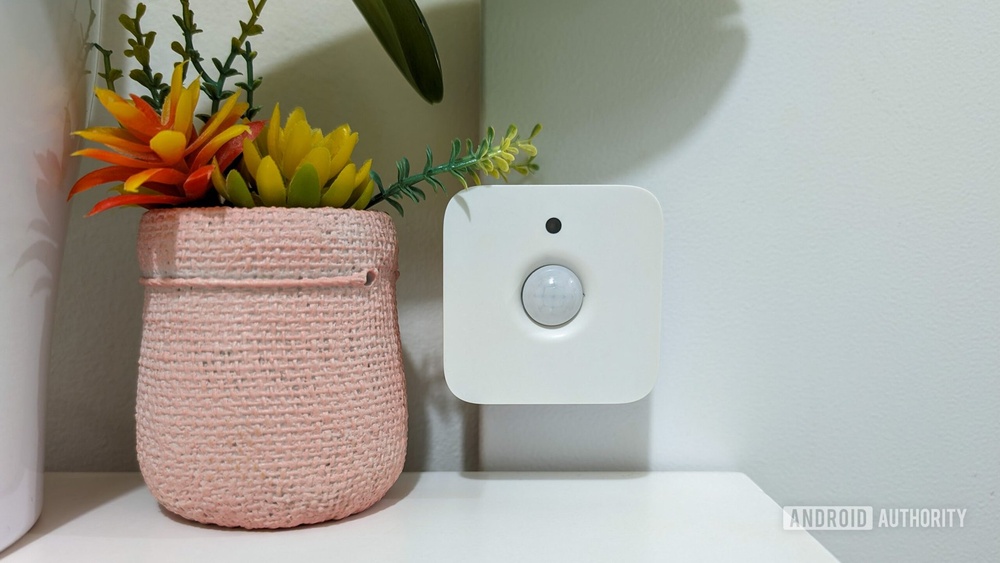

Imagine walking through your hallway at night without fumbling for the light switch. What if the lights turned on automatically the moment you step in?
Setting up motion sensors in your smart home hallways can make this a reality. Not only does this add convenience, but it also boosts your home’s safety and energy efficiency. In this guide, you’ll discover simple steps to install motion sensors that transform your hallway into a smarter, more responsive space.
Ready to make your home more intuitive? Keep reading to learn how you can do it yourself with ease.
Choosing The Right Motion Sensors
Choosing the right motion sensors is key to a smart home hallway setup. The right sensor improves security and saves energy. It also makes your smart home more responsive and reliable. Understanding sensor types, compatibility, and power sources helps you pick the best option for your needs.
Types Of Motion Sensors
Motion sensors detect movement using different technologies. Passive Infrared (PIR) sensors sense body heat. They are common and affordable. Ultrasonic sensors send sound waves and detect changes. Microwave sensors use radio waves to spot motion. Each type suits different hallway sizes and lighting conditions. PIR sensors work well in most homes.
Sensor Compatibility With Smart Systems
Check if the sensor works with your smart home system. Popular systems include Alexa, Google Home, and Apple HomeKit. Sensors may use Zigbee, Z-Wave, or Wi-Fi to connect. Choose sensors that match your hub’s protocol. Compatibility ensures smooth integration and easy control. It also allows automation with other smart devices.
Battery Vs. Wired Sensors
Battery-powered sensors offer easy installation and placement. They need regular battery changes or recharging. Wired sensors require professional installation but offer constant power. Wired sensors are more reliable for long-term use. Choose based on your preference for convenience or stability. Battery sensors suit renters, while wired suits permanent homes.
Planning Sensor Placement
Planning sensor placement is key for smart home hallway motion sensors. Proper placement ensures sensors detect movement accurately. It also prevents false alarms and maximizes sensor coverage. Careful planning saves time and avoids frustration later.
Ideal Locations In Hallways
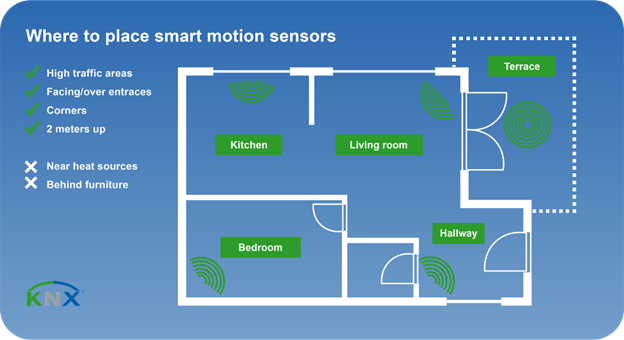
Place sensors near entrances and exits of hallways. Corners work well to cover long spaces. Mount sensors at a height between 6 to 8 feet. This height captures movement without being too sensitive to pets. Avoid placing sensors behind doors or furniture that block view.
Avoiding False Triggers
Avoid placing sensors near windows with direct sunlight. Sunlight can cause false alarms. Keep sensors away from heating vents or air conditioners. Moving air can trigger sensors mistakenly. Choose spots where pets or curtains cannot easily activate the sensor.
Considering Sensor Range And Angle
Check the sensor’s range before installation. Most sensors cover 20 to 30 feet. Adjust the angle to cover the entire hallway width. Point sensors slightly downward to catch foot movement. Test the sensor’s detection area before final mounting.
Tools And Materials Needed
Setting up motion sensors in smart home hallways requires specific tools and materials. Having the right items makes installation easier and faster. It also ensures the sensors work correctly and safely. Prepare your tools and accessories before starting the project. This saves time and avoids interruptions.
Essential Installation Tools
- Screwdriver: Needed to open sensor covers and mount devices.
- Drill: Useful for making holes in walls for screws or anchors.
- Measuring tape: Helps position sensors at the correct height and distance.
- Level: Ensures sensors are mounted straight for accurate detection.
- Pencil: Marks placement spots on walls before drilling.
- Wire stripper: Needed if wiring sensors to your home’s electrical system.
- Voltage tester: Checks electrical power is off before handling wires.
Additional Accessories
- Wall anchors: Support screws in drywall or plaster for secure mounting.
- Double-sided tape: Useful for temporary sensor placement or lighter models.
- Batteries: Required for battery-operated motion sensors.
- Extension wires: Help connect sensors placed far from power sources.
- Cable clips: Keep wires organized and prevent tripping hazards.
- Smart home hub: Connects sensors to your smart home system.

Credit: bona-store.com
Step-by-step Installation Process
Installing motion sensors in your hallway is a simple way to boost home security and save energy. This step-by-step guide helps you set up sensors quickly and correctly. Follow each step carefully to ensure your sensors work perfectly.
Preparing The Hallway
Clear the hallway of any objects that block the sensor’s view. Clean the walls where you plan to mount the sensors. Check the hallway lighting to avoid false triggers. Choose a spot where the sensor can cover the whole hallway. Measure the height for proper sensor placement, usually around 6 to 8 feet.
Mounting The Sensors
Mark the spots on the wall using a pencil. Use screws or adhesive tape, depending on the sensor model. Attach the sensor firmly to avoid movement. Ensure the sensor faces the main traffic area in the hallway. Double-check that the sensor is stable and correctly aligned.
Connecting To Power Or Batteries
Identify if your sensor uses batteries or direct power. Insert fresh batteries if battery-powered, following the polarity marks. For wired sensors, connect the wires to your home’s electrical system. Turn off power at the breaker before wiring to stay safe. Test the sensor to confirm it powers on properly.
Integrating Sensors With Smart Home Systems
Integrating motion sensors with smart home systems makes your hallway smarter and safer. These sensors work with hubs and apps to control lights and alerts. They bring convenience by automating tasks based on movement. Connecting sensors properly is key to a smooth smart home experience.
Connecting To Hubs And Apps
Start by linking the motion sensors to your smart home hub. Most hubs support popular sensor brands. Use the hub’s app to add new devices. Follow the app instructions to complete pairing. This connection lets you control sensors from your phone. It also helps sensors communicate with other smart devices.
Setting Automation Rules
Create simple rules that trigger actions when motion is detected. For example, turn on hallway lights at night. Set rules for different times or people. You can schedule sensors to work only during certain hours. This saves energy and improves security. Use the app’s automation section to build and edit these rules.
Testing Sensor Responses
After setup, test the sensors to ensure proper function. Walk through the hallway and check if lights respond quickly. Test different distances and angles. Adjust sensor sensitivity if needed. Make sure automation rules trigger as expected. Regular testing keeps your system reliable and efficient.
Credit: www.knx.org
Optimizing Sensor Performance
Optimizing sensor performance is key to a smart hallway that works smoothly. Proper setup ensures the sensors detect motion accurately. It also helps avoid false alarms and saves energy. Regular checks and adjustments keep your system reliable. Small changes can make a big difference in sensor response.
Adjusting Sensitivity Settings
Sensitivity controls how easily the sensor detects movement. Set it too high, and it may trigger by pets or small movements. Too low, and it might miss people walking by. Start with a medium setting. Test the sensor by walking past it. Adjust the sensitivity up or down based on your tests. Check the manufacturer’s instructions for specific steps.
Regular Maintenance Tips
Keep sensors clean to avoid dust or dirt blocking detection. Wipe the sensor lens gently with a soft cloth. Check batteries regularly and replace them as needed. Inspect wiring for damage or loose connections. Test the sensors monthly to ensure they work properly. Keep the area around sensors free from objects that might block motion.
Troubleshooting Common Issues
Sensors not detecting motion? Check if sensitivity is too low. False alarms may mean sensitivity is too high or something is moving nearby. Loose wiring can cause sensors to fail. Reset the sensor by turning it off and on again. If problems continue, consult the user manual or contact support. Simple fixes often restore sensor function quickly.
Enhancing Security And Convenience
Setting up motion sensors in your hallway improves both security and convenience. These sensors detect movement and trigger actions to keep your home safe. They also make daily life easier by automating lighting and alerts. Smart hallways become more responsive and energy-efficient with motion sensors.
Linking With Lighting Controls
Connect motion sensors to your hallway lights to save energy. Lights turn on only when someone enters the hallway. They switch off automatically after no movement is detected. This setup prevents wasted electricity and brightens dark areas instantly. It also helps guests navigate without searching for switches.
Using Sensors For Alerts And Notifications
Motion sensors can send alerts to your smartphone or device. Receive notifications if unusual movement happens at night. This feature helps spot intruders or unexpected visitors quickly. Alerts give peace of mind, especially when you are away from home. You can customize notifications for specific times or zones.
Combining With Other Smart Devices
Pair motion sensors with cameras for real-time video recording. Integrate sensors with smart locks to trigger automatic door locking. Use them alongside smart speakers for voice alerts or announcements. Combining devices creates a smarter, safer hallway environment. The system adapts to your lifestyle and security needs.

Credit: www.amazon.com
Frequently Asked Questions
How Do Motion Sensors Improve Hallway Safety?
Motion sensors detect movement and automatically turn on lights. This reduces tripping hazards in dark hallways and enhances overall safety at home.
Where Should I Place Motion Sensors In Hallways?
Place sensors near entrances and corners for optimal coverage. Avoid direct sunlight or heat sources to prevent false triggers and ensure reliable detection.
Can Motion Sensors Save Energy In Smart Homes?
Yes, motion sensors reduce energy use by lighting hallways only when needed. This lowers electricity bills and supports eco-friendly living by minimizing wasted power.
Are Motion Sensors Compatible With All Smart Home Systems?
Most sensors work with popular platforms like Alexa, Google Home, and Apple HomeKit. Check compatibility before purchase to ensure seamless integration with your smart home setup.
Conclusion
Setting up motion sensors in your hallway boosts safety and convenience. You can save energy by lighting only when needed. Sensors help you move easily in the dark. Installation is simple and suits most homes. Choose the right spots for best results.
Test the sensors to ensure they work well. Enjoy a smarter, more comfortable home environment today.