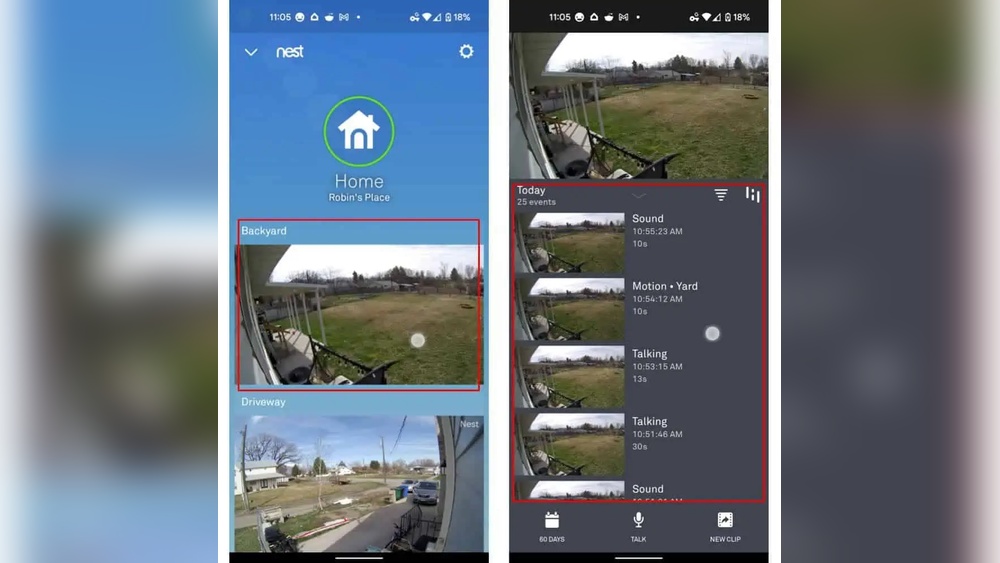

Have you ever wanted to keep a crucial moment caught on your Nest Doorbell video but didn’t know how to save it? Whether it’s a package delivery, a visitor, or something unexpected, knowing how to quickly and easily save your Nest Doorbell videos can give you peace of mind.
In this guide, you’ll discover simple steps to save your footage without any hassle. Keep reading to make sure you never miss out on capturing important moments right at your doorstep.
Nest Doorbell Video Basics
Understanding the basics of Nest Doorbell video helps you save and review footage easily. This device captures important moments at your doorstep. Knowing how it records and stores videos is key to managing your security better.
How Nest Doorbell Records Video
The Nest Doorbell records video when it detects motion or someone presses the button. It uses a built-in camera with night vision to capture clear footage day and night. Videos start recording automatically to catch every detail.
The doorbell streams live video to your phone or tablet. You can watch in real-time or check past clips saved in the cloud. The system also sends alerts when activity is detected, keeping you informed instantly.
Video Storage Options
Nest Doorbell videos save either locally or in the cloud. Local storage means videos stay on the device or a linked storage unit. Cloud storage keeps videos on Google’s servers, accessible anytime online.
Cloud storage requires a Nest Aware subscription for full video history. This plan offers 30 days or more of saved videos. Without it, only recent events or snapshots remain available.
Choosing the right storage option depends on your needs. Cloud storage offers easy access and extra features. Local storage keeps footage private but may limit video length and access.
Using Nest Aware Subscription
Using a Nest Aware subscription helps you save and view your Nest Doorbell videos easily. This service records your video footage and stores it securely in the cloud. You can watch past events anytime, which adds extra security and peace of mind.
Benefits Of Nest Aware
Nest Aware keeps your videos safe for days or weeks. It offers continuous video recording, not just clips triggered by motion. You get smart alerts for people, animals, or packages. The subscription also lets you create activity zones to focus on important areas.
Setting Up Video History
Set up video history through the Nest app. Choose how many days of footage you want to save. The app will automatically upload videos to the cloud. This way, your recordings stay safe even if your doorbell is offline or stolen.
Accessing Saved Footage
Open the Nest app to view saved videos anytime. Use the timeline to find specific events quickly. You can download or share videos from the app. This makes it easy to keep evidence or show footage to others.
Saving Videos Without Subscription
Saving video clips from your Nest Doorbell without a subscription can be done with simple steps. While Nest Aware offers cloud storage, you can still keep important videos manually. This guide explains how to save your Nest Doorbell videos without extra costs.
Manual Video Download
To save a video manually, open the live feed on your phone or computer. Pause the video at the desired moment. Look for the download option, usually shown as a download icon or three dots menu. Click it to save the clip to your device. This way, you keep a copy without needing a subscription.
Using Google Home App
The Google Home app lets you view and save Nest Doorbell footage. Open the app and select your Nest Doorbell device. Tap on the event you want to save. Use the download or share button to store the video on your phone. This process helps you keep videos directly from the app.
Limitations To Consider
Without a subscription, video history is limited. You can only save clips when you catch them live or soon after. No cloud storage means videos may not stay available for long. Manual saving requires quick action to avoid losing footage. Keep this in mind when using your Nest Doorbell without a subscription.

Credit: www.youtube.com
Alternative Storage Methods
Saving Nest Doorbell videos is important to keep your footage safe. The default storage might not meet your needs. Alternative storage methods give you more control and space. These options help you access and save videos easily.
Using Third-party Cloud Services
Third-party cloud services offer extra space for your videos. Services like Google Drive or Dropbox store files online. You can upload videos automatically or manually. This method keeps videos safe even if your device breaks. Access your footage from any device with internet.
Local Storage Options
Local storage means saving videos on your own devices. Use external hard drives or USB flash drives. This method does not need internet to access videos. It is faster to copy and view files. Local storage keeps your data private and secure.
Automated Backup Solutions
Automated backup tools save your videos without you doing anything. These tools connect your Nest Doorbell to cloud or local storage. They run backups at set times or when new videos arrive. This keeps your footage updated and safe. No need to remember manual saves.
Troubleshooting Video Saving Issues
Saving videos from your Nest Doorbell is important for security and review. Sometimes, videos do not save properly due to various issues. These problems can frustrate users and reduce the device’s usefulness. Troubleshooting helps identify the cause and fix the problem quickly.
Common Problems And Fixes
Videos may not save because of storage limits or account issues. Check your Nest subscription status to ensure video history is active. Clear the app cache or restart your device to fix temporary glitches. Verify that your phone or computer has enough space to download videos. Reset the Nest Doorbell if problems persist to restore default settings.
Ensuring Reliable Internet Connection
Video saving depends heavily on internet quality. A weak Wi-Fi signal can interrupt video uploads and cause failures. Place your Nest Doorbell near the router or use a Wi-Fi extender. Test your internet speed using online tools to confirm it is stable. Avoid network congestion by limiting multiple device use during video recording times.
Updating Firmware And Apps
Outdated software can lead to video saving errors. Regularly update your Nest app to get the latest features and fixes. Check for firmware updates on your Nest Doorbell through the app settings. Updates improve device performance and fix known bugs. Enable automatic updates to ensure continuous smooth operation.
Credit: www.centromedicoloira.com
Tips For Protecting Your Saved Videos
Saving videos from your Nest Doorbell is useful for security and review. Protecting these videos is very important. Without protection, others might see or misuse them. Follow simple steps to keep your saved videos safe and private. These tips help stop unwanted access and keep your data secure.
Focus on securing your Google account, choosing strong passwords, and controlling sharing options. These actions create layers of security around your videos. Let’s explore how to do this easily and effectively.
Securing Your Google Account
Your Nest Doorbell videos link to your Google account. Protect this account well. Turn on two-factor authentication for extra safety. It asks for a code after your password. Check your account activity often. Sign out from devices you do not use. This lowers risk of unauthorized access.
Setting Strong Passwords
Use a unique password for your Google account. Avoid easy words or common phrases. Combine letters, numbers, and symbols. Change your password regularly. Do not share it with others. Strong passwords make it hard for hackers to break in.
Managing Sharing Permissions
Be careful with who can see your saved videos. Only share with trusted people. Use Google’s sharing settings to control access. Remove permissions when no longer needed. Avoid public sharing links. This keeps your videos private and under your control.

Credit: kdfoundation.org
Frequently Asked Questions
How Can I Save Nest Doorbell Video Locally?
To save Nest Doorbell videos locally, use the Google Home app. Download desired clips directly to your phone or computer for offline access. This method ensures you keep important footage without relying solely on cloud storage.
Does Nest Offer Cloud Storage For Video Recordings?
Yes, Nest provides cloud storage through Nest Aware subscription plans. These plans allow continuous video recording and access to saved clips anytime. Subscriptions vary in price and storage duration to suit different user needs.
Can I Share Saved Nest Doorbell Videos Easily?
Yes, you can share saved Nest Doorbell videos via the Google Home app. Simply select the clip and use sharing options like email or messaging apps. This makes it easy to send footage to family or authorities if needed.
What Is The Best Way To Back Up Nest Doorbell Videos?
The best backup method is combining cloud storage and local downloads. Use Nest Aware for cloud backup and download important videos periodically. This dual approach protects your footage from loss or accidental deletion.
Conclusion
Saving Nest Doorbell videos helps keep your home safer. You can store important moments on your phone or cloud. Make sure to check your settings to save videos automatically. Regularly download and back up videos to avoid losing them. This way, you always have proof if you need it.
Simple steps protect your home and give peace of mind. Start saving your videos today for easy access later. It’s quick, easy, and important.